
Neowin first reported the public rollout on August 12, and the update follows features Microsoft previewed to Alpha Skip-Ahead Xbox Insiders in late June through Xbox Wire. The release turns that earlier test into a broader console update, while adding several items that were not part of the original Insider announcement: cloud-save rollback, Windows Phone achievement history, subscription badges in installation management, and the stated 1,000-item wishlist ceiling.
For Xbox Series X|S and Xbox One owners, this is mostly a dashboard and account-management release. It does not announce additional backward-compatible Xbox 360 titles, nor does it change which older discs or digital licenses will run on current hardware. Instead, Microsoft is making the compatible Xbox 360 catalogue easier to inspect, track, and preserve within the current Xbox interface.
 Xbox 360 games get modern game-card treatment
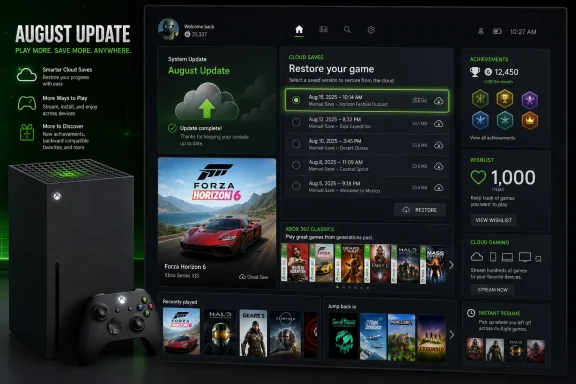
Installed backward-compatible Xbox 360 games now receive game hubs within their Xbox game cards. Opening the card can show achievement progress, captures, and other activity details that sit closer to the experience modern Xbox games already receive.
Microsoft also says it has improved the symbols used for cloud-save synchronization status in these hubs. That sounds minor, but it addresses a recurring problem in cross-generation libraries: a player may have a save associated with an Xbox 360 title without an obvious indication of whether the current console has finished syncing it. More visible sync state will not repair a corrupted save or create a backup, but it should make it easier to recognize when the console is still waiting on cloud data before launching a game.
The update also adds detailed popups for Xbox 360 achievements when viewed from a player’s profile. Previously, older achievements could feel like a separate layer of the Xbox account, preserved in history but less integrated with the newer dashboard. The change gives players a more direct route from a profile achievement list to its description and progress context.
Windows Phone games will now appear in achievement history as well. That is an account-history change, not an indication that Microsoft has restored Windows Phone game support or made those titles runnable on Xbox consoles. Players with old mobile-era Xbox achievements should treat the addition as better visibility for an existing record, rather than a revival of the defunct platform.
Xbox Wire’s June Insider post described the Xbox 360 game hubs and achievement popups before their public availability. The key point for collectors and long-time Xbox users is that Microsoft is improving the presentation of the backward-compatible catalogue, not expanding the catalogue itself. If a game was never made compatible with Xbox One or Xbox Series consoles, this dashboard update does not make it playable.
Cloud-save restoration is useful, but only one game supports it today
The August release introduces the most consequential new control: the ability to browse earlier synchronized cloud-save versions and restore one directly from the console. In supported games, players can reach it through Manage game & add-ons > Saved data > Restore saved data.
Microsoft’s current support is deliberately narrow. The feature is available first for Forza Horizon 6, with additional games promised in future updates but no public list, timetable, or eligibility criteria. That omission matters. A player should not assume a missing save in another Xbox game can now be recovered by visiting the same menu, or that every cloud-enabled title keeps a selectable history of restore points.
The distinction between a normal cloud sync and a restore workflow is important. Xbox cloud saves normally move the latest synchronized state between consoles and supported devices. A version-restoration interface potentially gives players a way to recover from a bad overwrite, an accidental deletion, or a synchronization problem without relying on an opaque conflict prompt. But it also means players need to understand what they are selecting: restoring an earlier save can discard newer progress if the game’s own save logic treats the selected version as authoritative.
Microsoft has not said how many save versions Forza Horizon 6 retains, how long they are kept, whether the interface is available across all game modes, or how it behaves when a local save and cloud version differ. Until those details are documented, the cautious approach is to read the date and state of each available save carefully before restoring anything. The feature is a recovery path, not a substitute for confirming that a game has finished syncing before shutting down or moving to another console.
The update’s improved sync-status symbols in Xbox 360 game hubs and its newer restore control are related in spirit: both give players more visibility and control over data that has historically been managed mostly in the background. But they should not be conflated. Microsoft has only named Forza Horizon 6 for restoration support, and it has not said that Xbox 360 titles receive the same rollback capability.
Cloud gaming can bypass a download wait — with conditions
Another feature moved from the Insider program into the broader update lets a player start a game through Xbox Cloud Gaming while its local update is queued or installing. The console can also offer a cloud launch from a game card when a title is installing or updating.
This is a convenience feature, not a universal fallback for every update. It requires an applicable Game Pass membership and depends on the specific game being available for cloud streaming. A purchased game that is not in the cloud catalogue, a player without the necessary membership, or a game unavailable in a region’s cloud service will still require the conventional download-and-install wait.
For households with slow broadband or limited time on a shared console, the option can be meaningful: a large patch no longer necessarily blocks the evening’s play session. But it also shifts the player to a streamed session, with the latency, bandwidth requirements, and image-quality tradeoffs that entails. Local installation remains the better choice for games where responsiveness matters most, particularly competitive multiplayer titles.
The broader significance is that Microsoft is continuing to make cloud streaming an escape hatch inside the console interface rather than a separate destination. The update presents streaming at the point a player encounters the friction — the game card — rather than requiring them to manually seek out the cloud catalogue.
A 1,000-game wishlist solves capacity, not discovery
Xbox users can now add up to 1,000 games to a wishlist, a substantial increase for players who track years of releases, sales, DLC, and future purchases. The update also allows released and upcoming games to be added directly from their game cards.
The direct game-card option was previewed by Xbox Wire in June, so the public release is not the first appearance of that workflow. The 1,000-title cap is the meaningful expansion in the August build. For players who previously treated wishlists as a short queue rather than a long-term library of buying intentions, the higher ceiling removes a hard constraint.
It does not, however, fix every store-discovery problem. A much larger wishlist can become harder to search and maintain if it lacks good filtering, price-history tools, duplicate detection, or clearer separation between games, editions, add-ons, and preorders. Microsoft’s announcement does not describe new organization controls alongside the expanded limit.
The update does add a smaller but welcome signal in Manage game & add-ons: badges can now indicate that a base game or add-on is granted through a subscription. That should help explain why content is presently installable, particularly in libraries where ownership, Game Pass access, free-play periods, and shared entitlements can overlap.
Microsoft also fixed a crash that could occur while scrolling pages in My games & apps, corrected an issue that could display Chinese characters in the on-screen keyboard for the Canadian French locale, and included unspecified stability and performance fixes.
Players can check whether build 10.0.26100.9426 has arrived under Settings > System > Updates. The biggest immediate benefit is for Forza Horizon 6 players who need a first-party way to select an earlier cloud save; for everyone else, the update is a quieter but useful refinement of the Xbox library, storefront, and backward-compatibility experience.