
The event also bundled together several launches and rollouts: Smart Document Capture, automated bank reconciliation, a revamped Xero Partner Hub, U.S. payroll powered by Gusto, and the future XeroForce custom-agent builder. But the headline Microsoft integration was not first announced in Denver. Xero published its Microsoft 365 integration details on July 1, and Microsoft followed with its own description of JAX as a financial agent inside Microsoft 365 Copilot. Denver is the company’s U.S. showcase for features that were already entering the market, not a clean-slate launch.
That distinction matters for IT departments and accounting firms deciding whether this is ready for production workflows. Xero remains the system of record, and the available public material still leaves important questions unanswered about tenant controls, licensing, data boundaries, availability by region, and which advertised actions can actually be executed from each Microsoft 365 surface.
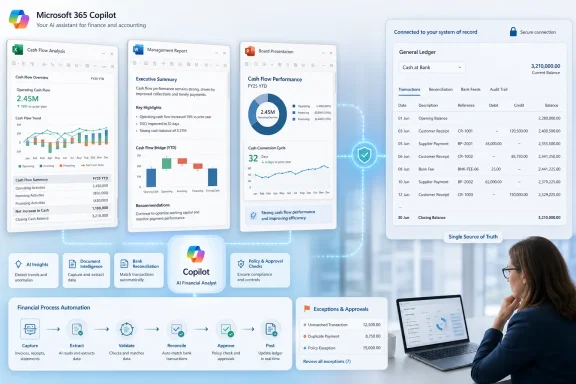 Microsoft 365 Copilot becomes a front end for Xero data
According to Xero’s July product announcement, the Microsoft 365 integration lets JAX answer finance questions in Copilot Chat, return structured live Xero data in Excel, generate financial summaries in Word, and help create PowerPoint material using current accounting figures. Microsoft’s Community Hub describes the same model: Copilot can surface insight from Xero, but users are directed back to Xero for deeper work and for the underlying financial record.
For a small business, the immediate benefit is reducing the copy-and-paste cycle between bookkeeping software and the documents used to run the business. An owner building a quarterly review in PowerPoint, for example, could retrieve current cash-flow information rather than exporting a report, cleaning it up in Excel, and then manually placing a chart or total into a slide.
For accountants, the more consequential scenario is Excel. Xero says live data can arrive as structured tables, which should be more useful than a static CSV export for forecast models, overdue-invoice reviews, and management reporting. The appeal is not that Copilot can calculate a profit-and-loss statement—Excel could already do that—but that an approved user could start with data grounded in the live accounting file rather than an aging export saved to a shared drive.
There is a boundary that readers should keep in view. Copilot can summarize and present financial information, but it does not remove the normal accounting controls around transaction coding, source-document review, reconciliations, permissions, or approval. A polished Word narrative based on live figures can still be wrong if the ledger has unmatched transactions, duplicate bills, incorrect tax treatment, or an incomplete bank feed.
Xero’s own description says JAX can return answers and action confirmations, with links back to the Xero service to carry out work such as payment reminders. That architecture is significant: it limits the chance that a Microsoft 365 document becomes an uncontrolled transaction-entry point, but it also means organizations should not assume the integration turns Copilot into a complete accounting workstation.
JAX automation still requires a review process
At Denver, Xero highlighted Smart Document Capture and automatic bank reconciliation as the machinery feeding JAX. Smart Document Capture reads bills, receipts, and other source documents, extracts relevant information, prepopulates records, and can suggest matches against bank transactions. Automated reconciliation is intended to match and categorize bank-feed items in real time, leaving exceptions for review.
Xero says its automatic reconciliation feature can save accountants and bookkeepers around half the time normally spent on monthly reconciliation. That is a vendor productivity estimate, not an independently audited result, and the saving will depend heavily on the quality of bank-feed descriptions, the regularity of suppliers, existing bank rules, volume, and how often a company handles split transactions or unusual payments.
Xero has published stronger operational caveats than the polished event wording conveys. Its product material identifies automated bank reconciliation as a beta feature in at least some plans and regions, and its community updates have described the capability as being rolled out gradually. Smart Document Capture also has regional rollout limits. Those details should matter more to a firm than a generic claim that AI “automates bookkeeping.”
In bookkeeping, false-positive automation is generally more expensive than a missed suggestion. A bank transaction matched to the wrong invoice, supplier, account, or tax code can flow into cash reporting, VAT or sales-tax calculations, accounts payable, and management forecasts. JAX may reduce routine matching work, but an accounting practice should define a review threshold before it lets staff rely on automated recommendations at scale.
The best early use case is a constrained one: repetitive supplier invoices, stable bank feeds, documented approval rules, and a clear exception queue. Firms should compare the count of auto-matched items with the count of corrections, reversals, and duplicate detections over at least one close cycle before treating the claimed time savings as a realized operating gain.
Partner Hub shifts attention to portfolio-level exceptions
Xero’s updated Partner Hub is intended for accounting and bookkeeping practices rather than individual small-business owners. The hub brings together client “book health,” work status, month-end readiness, and JAX-generated flags for issues such as unreconciled transactions, duplicate entries, anomalies, and missing paperwork.
The important development is the document-chasing workflow. Xero says JAX can identify missing documents, contact the client, send reminders, answer certain follow-up questions, and match received files to the relevant transactions. If implemented with suitable controls, that could reduce the highly manual email traffic that often delays month-end close.
But it also expands the automation surface from internal ledger work to client communications. A practice needs to decide whether an AI-generated request is permitted to go out automatically, who owns its wording and frequency, and how it handles a client reply that includes sensitive documents or information that should not be attached to a transaction. The submission says customer approval remains part of this process, but Xero has not published enough detail to establish precisely which steps require approval in each workflow.
The accountancy risk is reputational as much as technical. A poorly timed or incorrect document reminder may be a minor software defect to Xero, but it can look like a client-service failure from the perspective of a business owner who has already supplied the requested file. Firms adopting the feature should start with a limited client group, review outbound requests, and retain a clear audit trail of the requests, responses, attachments, matching decisions, and human overrides.
The Partner Hub may prove more valuable than the Microsoft 365 connection for larger practices because it focuses on the bottleneck that creates stale books: the gap between a transaction occurring and an adviser receiving enough evidence to close it properly. Copilot can make the finished report easier to produce. It cannot fix a ledger that is missing documents.
XeroForce is a promise, not a deployed control plane
XeroForce, Xero’s natural-language tool for building custom AI agents, is the most ambitious item in the announcement and the least mature. Xero introduced it at Xerocon London in July as a builder on its Xero OS platform, and subsequent company material has described it as early access or preview, with broader availability still to come.
The pitch is straightforward: a practice could describe a workflow in natural language—such as checking for missing compliance documents, escalating an outlier, or preparing a recurring client task—and let XeroForce construct a specialized agent. The actual challenge is not describing a workflow. It is proving that the resulting agent has the right data access, predictable behavior, approval gates, and a durable audit log.
For Microsoft administrators, that should sound familiar. A new agent is another identity, another set of connected data sources, another potential route for sensitive information, and another object that needs lifecycle management. Organizations should demand answers on whether XeroForce agents can be restricted by role and client, how prompts and outputs are retained, whether actions can be disabled centrally, and what logging reaches administrators and auditors.
Xero’s public material emphasizes “Accountable Intelligence” and says JAX uses controls intended to ground AI tasks in relevant data. Those are useful design goals, but they are not substitutes for customer-configurable security controls and independently verifiable operational evidence. Until XeroForce reaches general availability with detailed administration documentation, it belongs in a controlled pilot rather than a production compliance workflow.
U.S. payroll is live, but built for simpler employers
Xero also used the Denver event to spotlight Xero Payroll, powered by Gusto. Gusto and Xero announced the deeper embedded payroll relationship in late 2024, and Xero’s current U.S. support information confirms that the payroll product is available, subject to account review.
The initial target remains small U.S. businesses with comparatively straightforward payroll requirements. Xero’s beta documentation had described businesses with one to 20 employees, standard pay cycles, and no time tracking or contractor payments as the intended early cohort. Businesses with multi-state complexity, contractors, complex benefits, unusual pay policies, or advanced timekeeping requirements should verify current eligibility and functionality rather than infer enterprise payroll coverage from the event-stage messaging.
This is strategically relevant to the JAX pitch because payroll, payments, bills, and bank reconciliation all affect cash-flow reporting. Bringing them closer to the Xero ledger could give Copilot and JAX a more timely view of the business. It also concentrates more operational and personally sensitive data in the Xero environment, making access reviews and offboarding processes more important.
The near-term reality is more prosaic than “agentic accounting”: Xero is connecting live finance data to the workspaces where people write reports, build spreadsheets, and present results. The useful next step for Microsoft 365 and Xero administrators is to pilot that connection with read-oriented reporting first, validate the data path and permissions, and keep payment, payroll, reconciliation, and client-contact actions behind explicit human review until the controls are documented and tested.