
But the important practical detail is buried beneath the launch language: WiFi Motion is an awareness feature, not an alarm system. It can tell that something disturbed radio signals along a path between an Xfinity Gateway or extender and a chosen connected device. It cannot tell the customer who moved, precisely where that person is, or whether the event was an intruder, a child, a pet, or a misplaced robot vacuum.
Comcast presented WiFi Motion as part of its new Xfinity Shield platform, alongside network-level CyberSecure protections and family-management controls. Independent coverage from BleepingComputer, TechSpot, Tom’s Hardware, and others confirms the core arrangement: customers with compatible Xfinity gateway hardware can enable it in the Xfinity app and set Home Watch, Away Watch, or Dark Watch notification modes.
The launch is meaningful for people who use Xfinity-supplied networking hardware, particularly households already full of Windows PCs, smart TVs, speakers, printers, and home-automation devices. Those devices can double as fixed endpoints in a Wi‑Fi sensing setup—provided they stay where they are.
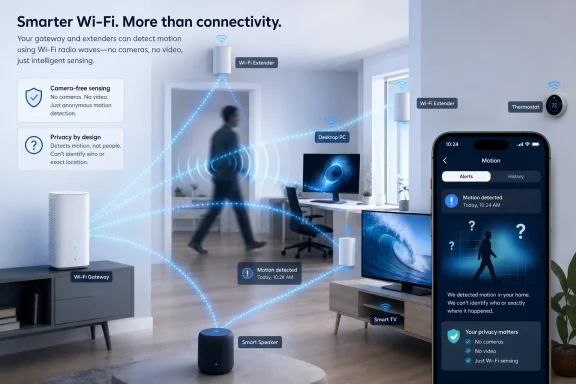 WiFi sensing watches signal changes, not people
WiFi Motion relies on a phenomenon that networking engineers have known about for years: radio signals do not travel through a home in a clean, fixed line. They reflect from walls, furniture, appliances, and people. A person crossing an active wireless path alters the radio environment, and software can detect that change.
Xfinity says WiFi Motion compares the radio-frequency signal traveling between its gateway or Wi‑Fi extenders and selected Wi‑Fi-connected devices. The customer chooses devices intended to cover certain parts of the house, then configures alert sensitivity and watches motion events in the app.
The resulting notification is therefore tied to a device path, not a room map. Xfinity’s support material says WiFi Motion may work across rooms and floors, but it does not provide an exact location. If an alert says a smart TV or speaker detected activity, that does not mean motion happened directly beside that device. It means the motion disturbed the wireless conditions between the gateway or extender and that endpoint.
That makes stationary equipment essential. A desktop PC, smart television, speaker, thermostat, or plugged-in printer can be a useful sensing endpoint if it remains in one place. A laptop that gets carried between rooms, a phone that regularly leaves the house, or a portable game console is a poor choice because its changing position alters the signal conditions that the feature is trying to measure.
For Windows users, the practical implication is simple: do not select every device on the network. Use a few always-on, fixed devices in locations where an alert would be useful, such as a living-room PC, a bedroom smart display, or a wired-in entertainment setup that remains connected over Wi‑Fi.
“Launched” is more accurately a nationwide product push
Comcast’s announcement describes Xfinity Shield as available nationwide beginning August 18, 2026, and says WiFi Shield is included for Xfinity Internet customers using Advanced Xfinity Gateways. Yet WiFi Motion itself appears to have existed before this week’s product launch.
BleepingComputer identified a 2024 Xfinity customer email describing the same basic function: detecting disturbances between a gateway and Wi‑Fi devices and sending app notifications. The outlet also pointed to earlier reporting that Comcast had been marketing the capability before the Xfinity Shield name appeared. Xfinity’s own support documentation, meanwhile, has referred to WiFi Motion as an available feature before this week’s announcement.
That is more than a semantic quibble. Customers should read August 18 as the date Comcast made WiFi Motion a prominent component of a broader security and family-safety package—not necessarily the moment motion sensing first reached all supported gateways.
The actual compatibility line is also narrower than “Xfinity routers.” Comcast says customers need an Advanced Xfinity Gateway for access to all features, while TechSpot reports that WiFi Motion works on XB7 gateways and newer models. Comcast’s public announcement does not spell out a complete model-by-model eligibility table, and customers using their own modem and router should not assume they can participate. The feature depends on Comcast-controlled gateway software and the Xfinity app.
That equipment requirement is a trade-off. Xfinity can deploy the service broadly because it controls the gateway firmware, app, and support workflow. But customers who prefer their own router for privacy, performance, or network administration are outside the feature’s likely target group.
The limits are physical, not merely legal disclaimers
A camera can show whether a person entered through a door. A conventional alarm sensor can be attached to the door itself. WiFi Motion does neither. It detects changes in a radio environment, which makes layout and signal quality central to whether it is useful.
Xfinity warns that a home’s size, walls, construction materials, device placement, and Wi‑Fi strength can limit detection. The feature only works where there is a strong signal traveling between Xfinity hardware and the selected connected device. In a large home with a weak dead zone, the same poor coverage that frustrates a Teams call or a Windows update download will also create a blind area for WiFi Motion.
The company also acknowledges that the system can react to pets. Its settings include sensitivity controls intended to reduce alerts from smaller animals, but WiFi Motion has no visual evidence with which to distinguish a child from a larger pet or a person. An alert is an alert about movement, not a reliable classification.
Shared-wall housing deserves particular caution. In apartments, condos, duplexes, and townhomes, radio signals may extend through or around common walls. Xfinity advises lowering sensitivity if movement outside the intended sensing area produces unwanted notifications. That advice reveals the core limitation: the system senses disruption in a signal path, not a legally or physically precise security perimeter.
A useful initial configuration would be modest rather than ambitious:
- Select only fixed Wi‑Fi devices that are located near areas where motion alerts would be meaningful.
- Start with a lower sensitivity setting and test alerts while household members and pets follow normal routines.
- Use Away Watch for times when no one should be home instead of treating every ordinary movement as a possible security incident.
- Re-test coverage after moving a gateway, extender, smart TV, desktop PC, or other selected endpoint.
The final point matters because a Wi‑Fi layout is not static. Replacing a PC, moving a mesh node, rearranging furniture, or changing an endpoint from Wi‑Fi to Ethernet can change the behavior of a sensing path.
No video does not mean no sensitive data
Comcast is correct that WiFi Motion does not record video, capture images, record sound, or identify individuals. That is a substantial privacy difference from indoor cameras, especially in bedrooms, home offices, and living spaces where users may not want persistent visual or audio recording.
However, the service still generates data about activity inside a residence. Xfinity says customers can view seven days of motion events in the app. Its terms also say Comcast may disclose information generated by WiFi Motion to third parties without further notice in connection with a law-enforcement investigation or proceeding, a dispute involving Comcast, or a court order or subpoena.
BleepingComputer noted a key omission in that documentation: Comcast does not explain what motion information it retains beyond the customer-visible history, how long it keeps it, or the specific form of data it could disclose in response to a legal demand. The company separately says it does not monitor the motion or notifications generated by WiFi Motion, but that is different from a statement that no motion-derived data is stored or available to the company.
For privacy-conscious households, the decision should therefore be framed plainly. Enabling the feature trades some in-home activity information for camera-free alerts. It does not create footage, but it does create a record of motion events under Comcast’s service terms.
The $15 upgrade explains what the free tier cannot do
Comcast’s paid Shield Select option costs $15 per month and includes an indoor camera, door/window sensor, cloud video storage, and 24/7 urgent-response functionality. That product split makes the company’s own view of WiFi Motion clear: the free feature is a low-friction alert layer, while the paid tier supplies the hardware and response tools needed for a more conventional security offering.
Xfinity’s support documentation is explicit that Home and Away modes are not a professionally monitored security service. Comcast does not watch WiFi Motion alerts and does not call customers when motion is detected. Even where urgent response is available through the broader smart-home service, the customer must initiate the request in the app.
That means WiFi Motion is most useful for a narrow set of cases: confirming unexpected activity while a household is away, receiving an overnight alert in a hallway or common area, or getting a basic heads-up without installing a camera. It is a poor substitute for evidence collection, emergency dispatch, access control, or reliable intrusion verification.
Comcast has successfully turned a capability of managed Wi‑Fi hardware into a consumer feature that costs customers no extra equipment. The limitation is equally clear: when Xfinity Motion reports activity, it has told the customer that the network noticed movement—not what moved, where it moved, or whether anyone needs to respond.