
The announcement, distributed through Business Wire on August 11, positions the connector as a route to ZoomInfo’s “GTM Context Graph” from Microsoft 365 Copilot, Dynamics 365, Excel, and Word. ZoomInfo’s own GTM.AI documentation describes the same deployment model: add ZoomInfo under Model Context Protocol tools in Copilot Studio, complete an OAuth sign-in, then let the selected agent call ZoomInfo tools when a prompt warrants it.
That distinction changes the operational story. Microsoft’s Copilot Studio documentation confirms that Model Context Protocol servers are tools for agents, rather than a blanket data layer automatically supplied to the entire Microsoft 365 suite. For IT teams, the work is in designing, approving, testing, publishing, and maintaining an agent—not simply enabling a marketplace add-on.
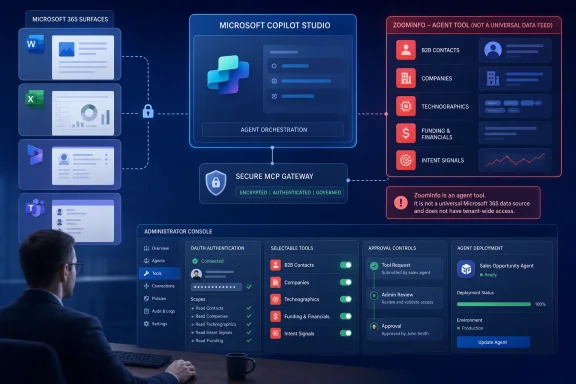 The connector is an agent tool, not a universal Copilot feed
ZoomInfo’s marketing language emphasizes a salesperson asking Copilot for a contact and receiving a direct dial or business email without leaving the working window. That may be the outcome, but it is only available in the places where the organization has deployed its configured Copilot Studio agent.
Microsoft documents two ways to attach an MCP server to a Copilot Studio agent: use its MCP onboarding wizard or create a custom connector through Power Apps. ZoomInfo says its offering appears as a native MCP connector in the Copilot Studio tools catalog, with OAuth authentication and support for ZoomInfo single sign-on. Once connected, the agent receives the tools and resources exposed by ZoomInfo’s server.
Microsoft’s public documentation makes clear that an MCP connection does not itself decide whether every tool should be used. When an MCP server is added, its tools are enabled by default. Makers can turn off the “Allow all” setting and selectively enable only the tools an agent needs; newly introduced tools remain off by default after that change. That is a meaningful control point for a connector that could expose searches across a very large external commercial-data service.
The practical deployment path therefore looks like this:
- An administrator or approved maker creates or opens a Copilot Studio agent and adds ZoomInfo as an MCP tool.
- The organization authenticates the connection to its ZoomInfo tenant and decides which ZoomInfo capabilities the agent may invoke.
- The agent is tested with the prompts employees will actually use, including ambiguous requests that could call more data than intended.
- The agent is then approved and surfaced in Microsoft 365 Copilot, Dynamics 365, Teams, or other destinations supported by the organization’s deployment.
Microsoft’s Agent Store guidance says agents built in Copilot Studio are subject to administrator review before they become available to users in Microsoft 365 Copilot. Those agents can be made available through the Agent Store across apps including Teams, Outlook, Word, Excel, and PowerPoint. The connector alone is therefore not the distribution mechanism; the organization’s agent and its publication settings are.
“Available in Word and Excel” needs a narrower reading
ZoomInfo names Word and Excel among the destinations where its data can be used. Its GTM.AI documentation says an agent built once can run where Copilot agents run, including Dynamics, Excel, Word, Teams, and other Copilot destinations. Microsoft’s own documentation supports the general architecture: the Agent Store is accessible across Word and Excel, and Microsoft 365 Copilot works alongside those applications.
But the announcement does not identify a specific native ZoomInfo pane, ribbon command, workbook add-in, or Word feature that independently injects live ZoomInfo records into documents. It also does not spell out whether the Excel workflow creates a table through a conversational agent, generates a downloadable workbook, writes directly into an existing sheet, or requires the user to copy an agent response into the file.
That omission matters to sales-operations teams that are evaluating this as an alternative to an established enrichment workflow. “Create a target list in Excel” can mean several very different things:
- A Copilot agent returns a formatted response that a user manually transfers into a worksheet.
- An agent generates a new file or structured table as an output.
- A controlled flow populates an approved workbook template.
- A workflow uses write permissions to alter an existing spreadsheet or Dynamics record.
Those models have different auditability, data-retention, approval, and error-correction properties. ZoomInfo says any workflow that writes to a CRM or initiates another business action should require explicit configuration and review or confirmation. That is appropriate, but the company has not published the specific tools exposed by this connector or a public matrix of which tools are read-only versus capable of initiating a downstream action.
For Dynamics 365 customers, the announcement’s promise of inline enrichment should likewise be treated as a designed workflow rather than an automatic bulk-data cleanup. Microsoft’s agent tooling can connect to external services and take actions, but the actual behavior depends on the agent’s enabled tools, the user’s permissions, the connector configuration, and the target environment’s governance rules.
Microsoft’s governance controls exist, but configuration carries the risk
Microsoft has spent 2026 building more explicit governance around MCP servers and agent tools. Its documentation says external MCP services need a connector pathway in Copilot Studio and are subject to Power Platform data policies. Administrators can manage tools in the Microsoft 365 admin center, monitor availability, block a tool, and control agents that users can request or install.
There is also a newer Bring Your Own MCP server route through Microsoft Agent 365. That pathway is currently a preview feature and is aimed at centralized registration, approval, and observability for remote MCP services. Microsoft says it can route registered servers through an Agent 365 Tooling Gateway and expose activity to security teams for monitoring. However, ZoomInfo is presenting its integration as a marketplace-native Copilot Studio connector, not as an organization’s privately registered server, so administrators should confirm which route their tenant actually uses before assuming the preview governance model applies.
The security boundary has two sides. Microsoft’s policies determine whether the agent and connector can operate in the tenant; ZoomInfo’s plan, entitlements, and OAuth session determine what the service returns. A user who can invoke an agent may still receive different results depending on their ZoomInfo authorization, but organizations should validate that behavior rather than infer it from the marketing description.
The central concern is not that an agent can retrieve a company profile. It is that the agent orchestrator determines when a prompt warrants a ZoomInfo tool call. Microsoft specifically advises makers to provide clear descriptions for MCP servers because the orchestrator uses that information when deciding whether to call the server. Poor tool descriptions, broad instructions, and unrestricted tools make it easier for an agent to retrieve irrelevant or excessive data in response to a vaguely phrased request.
ZoomInfo’s scale claims remain vendor claims
ZoomInfo says its data graph contains more than 500 million contacts, more than 100 million companies, and billions of signals. The company also says customers have reported 54 percent productivity gains and 11.5 hours saved per week on account research and outreach preparation.
Those figures explain the pitch, but they should not be read as independently established outcomes for this Microsoft integration. The productivity statistics are ZoomInfo’s own customer-reported metrics, and the company has not published a Microsoft-specific deployment study, methodology, sample size, or comparison group alongside this launch.
There is a more mundane limitation, too: the value of this connector rests on data accuracy at the moment the agent calls it. An MCP-based integration can reduce the lag and copy-paste errors that come from CSV exports and manual CRM entry, but it does not turn commercial contact data into a system of record. Sales organizations will still need reconciliation rules for conflicting account ownership, stale direct dials, duplicate leads, and differences between ZoomInfo’s account model and the fields required in Dynamics 365.
The real deliverable is a governed sales agent
This launch is useful for organizations that already buy both ZoomInfo and Microsoft Copilot services and have a clear sales-research workflow to automate. It can put external prospecting context closer to a seller’s CRM research, spreadsheet segmentation, and account-plan drafting work without forcing a separate ZoomInfo browser session.
It is less compelling as a casual Microsoft 365 feature enablement. The connector requires the right ZoomInfo subscription, Microsoft licensing, tenant permissions, an authenticated connection, a configured Copilot Studio agent, and a deployment surface where employees can use that agent. ZoomInfo has not disclosed pricing for the connector, which ZoomInfo plans include it, whether usage limits apply, or whether all data categories are available to every licensed customer.
The immediate task for administrators is to treat ZoomInfo as a high-value external agent tool: enable only the searches and actions a sales workflow requires, test the prompts that will trigger it, confirm the user-level authorization model, and keep CRM writes behind an explicit confirmation or approval step. The promised tab-free experience comes only after that configuration work is complete.