
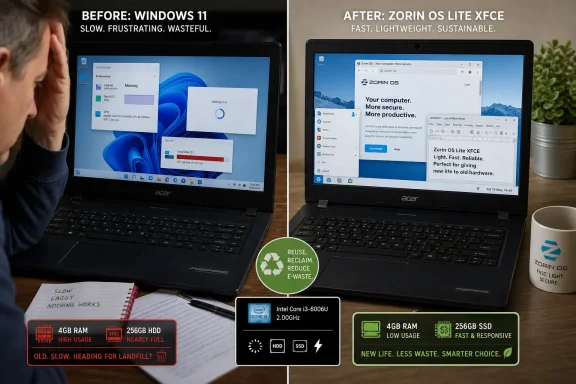
An Acer Aspire with an Intel Core i3-8145U, 4GB of RAM and a 256GB drive did not become obsolete when Windows 11 felt slow; it became a good candidate for a lighter desktop environment. XDA Developers’ account of installing Zorin OS Lite on that machine is a useful reminder for Windows users staring at an aging laptop — but its strongest lesson is more specific than “Linux revives old PCs.”
The laptop was still Windows 11-capable hardware. Intel lists the i3-8145U as an eighth-generation, two-core/four-thread mobile processor with a 2.1GHz base clock and turbo speeds up to 3.9GHz. Microsoft’s supported-processor documentation includes eighth-generation Intel Core parts, and Windows 11’s published floor remains 4GB of memory and 64GB of storage. The machine described by XDA is therefore not an example of Windows 11 being forced onto a fundamentally unsupported 2019-era PC.
It is an example of the gulf between Windows 11’s installation minimum and a configuration that remains pleasant to use in 2026.
XDA’s writer reports that Windows 11 consumed more than 50GB of the laptop’s 256GB drive and that Zorin OS Lite occupied just over 17GB after installation. They also describe slow starts, a system still struggling several minutes after boot, and a dramatic improvement in responsiveness after replacing Windows with Zorin. The experience is credible, and the practical conclusion is sound: replacing an operating system can make a frustrating machine useful again.
But the report leaves out the measurements needed to establish why the change was so dramatic. There is no Acer Aspire model number, no indication of whether its 256GB drive is a mechanical hard disk or an SSD, no SMART health data, no startup-app inventory, no memory-usage figures, and no before-and-after boot or application-launch timings. Those omissions matter. A 4GB Windows 11 system installed on a tired spinning disk can feel slow for reasons that have little to do with the age of its processor.
Microsoft still permits Windows 11 installations with 4GB of RAM, but that requirement describes whether the operating system can run — not whether it has enough headroom for modern browser workloads, Teams calls, background synchronization, endpoint tools, updates and a handful of startup applications. Even Windows 11 machines with 8GB are now routinely treated as memory-constrained by reviewers and buyers; at 4GB, the operating system is competing with every open tab and background process for the same small pool of physical memory.
When RAM runs short, Windows turns to the page file. On an SSD, that creates delays. On a conventional hard drive, it can turn ordinary desktop use into the familiar sequence of clicks followed by long pauses, audible disk activity and an unresponsive taskbar. The laptop’s i3-8145U is not a performance powerhouse, but the processor is not the most suspicious component in the configuration XDA describes. The combination of 4GB of memory and an unspecified 256GB drive is.
Zorin OS Lite attacks that problem indirectly. Its Lite edition uses XFCE rather than the GNOME-based desktop used in Zorin OS Core. Zorin’s own current technical documentation identifies XFCE as the Lite desktop and sets a 2GB RAM minimum for installation. That does not mean 2GB is ideal for contemporary web browsing, but it does show the scale of the design difference: Zorin Lite is meant to preserve resources for applications instead of spending them on a heavier desktop shell.
The result is a lower baseline memory footprint, fewer expensive background tasks by default, and a desktop that asks less of weak storage. On a laptop with only 4GB, those savings can be the difference between a machine that appears frozen and one that responds immediately enough for documents, browsing, email and light administrative work.
That is a much more defensible conclusion than the broader suggestion that software alone had “outgrown” otherwise healthy hardware. In this case, the software choice and the hardware bottleneck are inseparable.
Microsoft itself says Windows 11 requires at least 64GB of storage and warns that additional capacity may be needed over time for updates and feature support. Zorin’s published minimum for its regular Core edition is 15GB, while its Lite image is designed to run on much more modest systems. Those figures establish that Zorin starts from a leaner base; they do not prove that the 33GB difference in XDA’s installation was all operating-system overhead.
For a 256GB laptop, the usable-space gain is still meaningful. Windows installations that hover around 50GB before personal files leave little room for cumulative updates, local cloud copies, restore points and application data. Linux can give the machine more breathing room. But a Windows user considering the switch should inspect what is actually taking space first. Disk Cleanup, Storage Sense, startup-app management and uninstalling OEM utilities can recover capacity — and sometimes responsiveness — without replacing the operating system.
The larger lesson is that “Windows takes 50GB” is a troubleshooting clue, not a complete diagnosis.
The XDA account is most persuasive when it describes the laptop as “coming back from the dead,” because that captures the experience of using a lighter system after a sluggish one. It becomes less precise when it frames the machine as hardware that Windows 11 had simply aged out of service. The processor still clears Windows 11’s compatibility bar. A relatively inexpensive RAM upgrade to 8GB, if the particular Aspire model permits it, and an SSD replacement if it still has a hard disk could substantially change the Windows experience as well.
That does not weaken the case for Linux. It sharpens it.
A Linux installation is often the rational option when the owner does not want to spend money on a laptop, when memory is soldered and non-upgradeable, when a slow hard drive makes Windows intolerable, or when the machine’s job has narrowed to web access, remote administration, documents and media. In those cases, Zorin OS Lite can be a more durable answer than attempting to stretch a Windows configuration beyond its comfortable limits.
It also avoids the increasingly awkward question facing many older Windows machines: whether continued support, feature updates and a modern application stack justify investing in hardware that is no longer the user’s primary computer.
That support window matters more than the cosmetic resemblance to Windows. A revived laptop needs a supported browser, security updates and reliable hardware drivers, not merely a desktop that looks familiar. The i3-8145U’s integrated graphics and mainstream Intel wireless hardware are generally far less risky Linux targets than laptops dependent on unusual touchpads, fingerprint readers, hybrid graphics or proprietary Wi-Fi chips — though users should always test the live environment before erasing Windows.
There are real tradeoffs the XDA experience only touches lightly. Windows-only peripherals, commercial applications, niche VPN clients, proprietary enterprise management tools and some games may require workarounds or may not work acceptably. Zorin supports optional Windows application compatibility through Wine-based tooling, but compatibility layers are not a substitute for native support. For a former daily-driver gaming PC, those limits may dominate the decision. For an old secondary laptop, they may barely register.
This is why the writer’s “necessity instead of curiosity” framing rings true. A Linux migration succeeds more readily when the role of the machine is clear. A basic browsing-and-document laptop has far fewer compatibility demands than a primary Windows workstation loaded with games, specialty software and corporate tooling.
For the Acer Aspire in question, Zorin OS Lite did not make the i3-8145U newer. It made the laptop’s remaining capability accessible again — and that is enough to keep a secondary PC out of the e-waste pile for years.
It is an example of the gulf between Windows 11’s installation minimum and a configuration that remains pleasant to use in 2026.
XDA’s writer reports that Windows 11 consumed more than 50GB of the laptop’s 256GB drive and that Zorin OS Lite occupied just over 17GB after installation. They also describe slow starts, a system still struggling several minutes after boot, and a dramatic improvement in responsiveness after replacing Windows with Zorin. The experience is credible, and the practical conclusion is sound: replacing an operating system can make a frustrating machine useful again.
But the report leaves out the measurements needed to establish why the change was so dramatic. There is no Acer Aspire model number, no indication of whether its 256GB drive is a mechanical hard disk or an SSD, no SMART health data, no startup-app inventory, no memory-usage figures, and no before-and-after boot or application-launch timings. Those omissions matter. A 4GB Windows 11 system installed on a tired spinning disk can feel slow for reasons that have little to do with the age of its processor.
 The 4GB constraint is the real story
Microsoft still permits Windows 11 installations with 4GB of RAM, but that requirement describes whether the operating system can run — not whether it has enough headroom for modern browser workloads, Teams calls, background synchronization, endpoint tools, updates and a handful of startup applications. Even Windows 11 machines with 8GB are now routinely treated as memory-constrained by reviewers and buyers; at 4GB, the operating system is competing with every open tab and background process for the same small pool of physical memory.When RAM runs short, Windows turns to the page file. On an SSD, that creates delays. On a conventional hard drive, it can turn ordinary desktop use into the familiar sequence of clicks followed by long pauses, audible disk activity and an unresponsive taskbar. The laptop’s i3-8145U is not a performance powerhouse, but the processor is not the most suspicious component in the configuration XDA describes. The combination of 4GB of memory and an unspecified 256GB drive is.
Zorin OS Lite attacks that problem indirectly. Its Lite edition uses XFCE rather than the GNOME-based desktop used in Zorin OS Core. Zorin’s own current technical documentation identifies XFCE as the Lite desktop and sets a 2GB RAM minimum for installation. That does not mean 2GB is ideal for contemporary web browsing, but it does show the scale of the design difference: Zorin Lite is meant to preserve resources for applications instead of spending them on a heavier desktop shell.
The result is a lower baseline memory footprint, fewer expensive background tasks by default, and a desktop that asks less of weak storage. On a laptop with only 4GB, those savings can be the difference between a machine that appears frozen and one that responds immediately enough for documents, browsing, email and light administrative work.
That is a much more defensible conclusion than the broader suggestion that software alone had “outgrown” otherwise healthy hardware. In this case, the software choice and the hardware bottleneck are inseparable.
The disk-space comparison needs more caution
The reported storage numbers — more than 50GB for Windows 11 versus slightly more than 17GB for Zorin OS Lite — are directionally unsurprising, but they are not a clean operating-system comparison. Windows’ apparent occupied space can include the component store, update leftovers, the recovery environment, hibernation data, the page file, OEM software and user-created files. A freshly installed Linux system can also grow materially after browser caches, Flatpak runtimes, Snap packages, office software, media files and updates arrive.Microsoft itself says Windows 11 requires at least 64GB of storage and warns that additional capacity may be needed over time for updates and feature support. Zorin’s published minimum for its regular Core edition is 15GB, while its Lite image is designed to run on much more modest systems. Those figures establish that Zorin starts from a leaner base; they do not prove that the 33GB difference in XDA’s installation was all operating-system overhead.
For a 256GB laptop, the usable-space gain is still meaningful. Windows installations that hover around 50GB before personal files leave little room for cumulative updates, local cloud copies, restore points and application data. Linux can give the machine more breathing room. But a Windows user considering the switch should inspect what is actually taking space first. Disk Cleanup, Storage Sense, startup-app management and uninstalling OEM utilities can recover capacity — and sometimes responsiveness — without replacing the operating system.
The larger lesson is that “Windows takes 50GB” is a troubleshooting clue, not a complete diagnosis.
The hardware was not seven years past its useful life
The i3-8145U launched in late 2018 and powered many entry-level and midrange notebooks sold through 2019. It has two cores, four threads, Intel UHD integrated graphics and support for up to 64GB of memory. No one should confuse it with a modern productivity laptop, especially for video work, virtual machines, large spreadsheets or software development, but it is entirely adequate for basic office tasks when paired with enough memory and solid-state storage.The XDA account is most persuasive when it describes the laptop as “coming back from the dead,” because that captures the experience of using a lighter system after a sluggish one. It becomes less precise when it frames the machine as hardware that Windows 11 had simply aged out of service. The processor still clears Windows 11’s compatibility bar. A relatively inexpensive RAM upgrade to 8GB, if the particular Aspire model permits it, and an SSD replacement if it still has a hard disk could substantially change the Windows experience as well.
That does not weaken the case for Linux. It sharpens it.
A Linux installation is often the rational option when the owner does not want to spend money on a laptop, when memory is soldered and non-upgradeable, when a slow hard drive makes Windows intolerable, or when the machine’s job has narrowed to web access, remote administration, documents and media. In those cases, Zorin OS Lite can be a more durable answer than attempting to stretch a Windows configuration beyond its comfortable limits.
It also avoids the increasingly awkward question facing many older Windows machines: whether continued support, feature updates and a modern application stack justify investing in hardware that is no longer the user’s primary computer.
Zorin Lite is a practical choice, not a universal replacement
Zorin OS positions itself as a migration-friendly Linux distribution, and that strategy is apparent in Lite. It provides a familiar panel-and-menu workflow, Ubuntu-based package availability and a polished enough default setup to reduce the friction that first-time Linux users often encounter. Zorin’s current 18.1 release is based on Ubuntu 24.04 LTS and is supported with software updates and security patches through June 2029.That support window matters more than the cosmetic resemblance to Windows. A revived laptop needs a supported browser, security updates and reliable hardware drivers, not merely a desktop that looks familiar. The i3-8145U’s integrated graphics and mainstream Intel wireless hardware are generally far less risky Linux targets than laptops dependent on unusual touchpads, fingerprint readers, hybrid graphics or proprietary Wi-Fi chips — though users should always test the live environment before erasing Windows.
There are real tradeoffs the XDA experience only touches lightly. Windows-only peripherals, commercial applications, niche VPN clients, proprietary enterprise management tools and some games may require workarounds or may not work acceptably. Zorin supports optional Windows application compatibility through Wine-based tooling, but compatibility layers are not a substitute for native support. For a former daily-driver gaming PC, those limits may dominate the decision. For an old secondary laptop, they may barely register.
This is why the writer’s “necessity instead of curiosity” framing rings true. A Linux migration succeeds more readily when the role of the machine is clear. A basic browsing-and-document laptop has far fewer compatibility demands than a primary Windows workstation loaded with games, specialty software and corporate tooling.
The actionable takeaway for Windows users
Before retiring a slow Windows 11 laptop, users should separate the fixable bottlenecks from the operating-system decision.- Check whether the laptop has a mechanical hard drive, and replace it with an SSD before writing off the machine if the budget allows.
- Verify whether the RAM can be upgraded from 4GB to 8GB or more, because 4GB is a Windows 11 minimum rather than a comfortable modern working configuration.
- Measure startup impact, free disk capacity and memory pressure before and after removing unnecessary startup utilities and OEM software.
- Test Zorin OS Lite from a USB drive first, confirming Wi-Fi, audio, suspend, display brightness and external-monitor behavior before replacing Windows.
- Back up files and save BitLocker recovery information before repartitioning or installing another operating system.
For the Acer Aspire in question, Zorin OS Lite did not make the i3-8145U newer. It made the laptop’s remaining capability accessible again — and that is enough to keep a secondary PC out of the e-waste pile for years.
References
- Primary source: XDA
Published: 2026-08-06T16:30:10+00:00
Loading…
www.xda-developers.com - Related coverage: learn.microsoft.com
Windows 11 requirements | Microsoft Learn
Hardware requirements to deploy Windows 11.learn.microsoft.com - Related coverage: support.microsoft.com
Windows 11 System Requirements | Microsoft Support
Learn about Windows 11 minimum system requirements and how to assess your upgrade eligibility.support.microsoft.com - Related coverage: learn.microsoft.com
Windows processor requirements Windows 11 supported Intel processors | Microsoft Learn
This specification details the Intel processors that can be used with Windows 11 customer systems that include Windows products, including custom images.learn.microsoft.com - Related coverage: novafuture.org
Loading…
novafuture.org - Related coverage: mclibre.org
Loading…
www.mclibre.org