

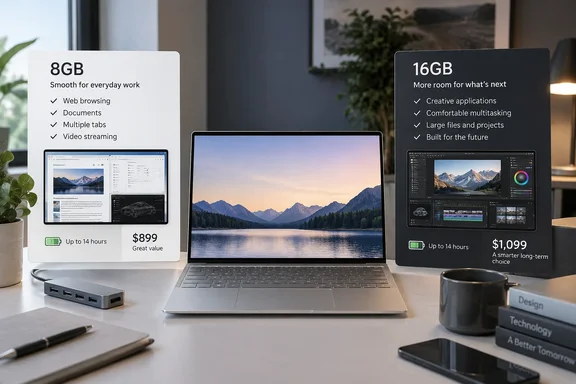
Other reviewers reach a similar purchasing recommendation, though their experiences with the base model differ. Engadget recommends spending more for 16GB and reports that the memory cannot be upgraded later; The Verge describes the 8GB version as competent but still recommends 16GB. The evidence supports choosing memory carefully, rather than declaring every 8GB Windows laptop unusable.
What the lower starting price buys
According to TechRadar, the US entry-level XPS 13 costs $699 with an Intel Core 5 320 processor, 8GB of LPDDR5X memory and a 256GB SSD. Its reported $899 step-up configuration doubles both memory and storage, to 16GB and 512GB.
That makes the $200 difference a bundled configuration upgrade, rather than a price for RAM alone. Nevertheless, someone who needs more memory must pay the full difference, even if 256GB of storage would have been sufficient.
Published prices also differ. Engadget’s August review describes a roughly $700 base model and a $200 increase for 16GB, consistent with TechRadar’s figures. The Verge’s September 14 review instead quotes $1,000 for the 16GB version. These reports do not establish whether that difference reflects configuration choices or changing prices, so $899 should be treated as a reported configuration price, not a guaranteed current offer.
Regional pricing makes the decision less straightforward still. TechRadar lists starting prices of £749 in the UK and AU$1,597.20 in Australia, with 16GB configurations starting at £1,099 and AU$1,897.50 respectively. It also reports that Australia lacks the US entry-level 256GB storage option. Those regional starting prices therefore do not describe an identical configuration everywhere.
TechRadar also quotes a $599 US student price for the base model. That is a conditional discount, distinct from the standard $699 price, and it does not change the memory limitation.
Where 8GB worked—and where testing became troublesome
TechRadar tested a UK configuration with 8GB of memory and a 512GB SSD. During ordinary work, its reviewer reported good responsiveness while browsing, writing, doing light image editing in GIMP, and running roughly half a dozen Chrome tabs alongside Spotify.
That account is more useful than a blanket claim that Windows 11 cannot function satisfactorily with 8GB. The Verge likewise reports that its 8GB review machine felt competent, while explaining that it also tested—and preferred—the 16GB version.
The more demanding results were less reassuring. TechRadar reports that:
- Eight tests in its standard benchmark suite failed to complete, mostly more demanding 3DMark graphics tests.
- Cinebench crashed several times before producing stable results, and 3DMark also crashed before testing began.
- Photoshop and Premiere Pro opened but felt sluggish, with Photoshop crashing after approximately five minutes.
- The laptop remained cool and quiet during ordinary office work, but became uncomfortable to use on the reviewer’s lap during intensive testing.
Those particular failures remain TechRadar’s observations, rather than independently reproduced findings. They show that its tested configuration was a poor fit for those workloads, but they do not establish that insufficient RAM caused every crash. The review does not provide a controlled comparison holding the processor, software and other variables constant while changing only memory capacity.
Nor does the evidence show that buying 16GB transforms the entry-level processor and integrated graphics into a powerful creative workstation. More memory addresses capacity; it does not by itself establish suitability for demanding video editing or 3D rendering.
For prospective owners, the supported distinction is straightforward: the base machine can handle a modest everyday workload, but the reviews give good reason to buy more memory for broader multitasking. Engadget is particularly cautious about recommending the 8GB version beyond basic use.
Memory is a purchase-time commitment
Engadget reports that the XPS 13’s RAM cannot be upgraded after purchase. That makes the initial configuration especially important: buying the cheapest version with an intention to add memory later is not a viable strategy.
The distinction between RAM and SSD capacity also matters here. The reviewed UK machine already had a 512GB SSD, yet still encountered the heavier-workload problems described above. More storage capacity was therefore not enough to make that 8GB configuration suitable for TechRadar’s demanding application tests.
For a tightly defined role—writing documents, browsing a manageable set of pages and playing media—the base configuration has a defensible use case. For a laptop expected to accommodate changing work over several years, choosing 16GB is the more prudent purchasing judgment. That is a recommendation based on the reported workload limits and lack of a later memory upgrade, not a prediction that the 8GB version will suddenly stop working.
The MacBook Neo comparison should not obscure this decision. Both products are being evaluated as lower-cost portable computers, but a matching entry price does not establish equivalent performance in the applications a Windows buyer needs.
Portability and battery life remain meaningful strengths
There are reasons to consider this XPS beyond its starting price. TechRadar praises its approximately 1kg aluminum chassis and 13.4-inch touch display, and reports that the display remains the same across configurations. Spending less therefore does not mean accepting a lesser screen within the range described by that review.
TechRadar measured 16 hours and 17 minutes of video playback. Its reviewer also reported completing an eight-hour workday at maximum brightness, with a Bluetooth mouse and headset connected and Windows set to Balanced power mode.
These are TechRadar’s results, not WindowsForum measurements. The video-loop figure is useful evidence of endurance under that test, but it should not be interpreted as 16 hours of heavy multitasking or creative work.
Connectivity presents another purchasing constraint. TechRadar reports two USB-C ports on the tested configuration, with one occupied when charging. The Verge independently confirms that no XPS 13 configuration includes a headphone jack.
According to TechRadar, Thunderbolt 4 is restricted to configurations with the higher-end processor. Buyers planning to use wired accessories should therefore compare the actual configuration’s connectivity as well as its memory, and include any needed hub in the total cost.
The strongest case for the 2026 XPS 13 is a portable Windows laptop for ordinary work, with a good screen and strong reported endurance. Its weakest point is the gap between the attractive entry price and the configuration reviewers are more comfortable recommending. Compare the local 16GB configuration’s total price against competing laptops before deciding that the $699 starting figure represents the machine you should buy.
Update: Windows Central reports XPS 13 base price has risen to $799 (September 25, 2026)
Windows Central now reports that Dell has increased the XPS 13’s regular consumer price by $100 since launch. According to the outlet, the laptop was previously $699 for general buyers and $599 for students; the reported increase puts the standard starting price at $799, although the article does not spell out Dell’s current student price.
This makes the earlier $699 figure historical rather than a reliable current buying benchmark. Windows Central says Dell is running a modest discount, but prospective buyers should verify the live configuration price before comparing the base 8GB model with the 16GB option.
The report also highlights features it says distinguish the XPS 13 from Apple’s MacBook Neo, including a 2.5K 120Hz display, backlit keyboard, IR facial-recognition sensor, Wi‑Fi 7 and Thunderbolt 4 connectivity. Those comparisons do not change the memory recommendation: a higher base price makes the additional cost of a 16GB configuration more consequential, particularly because the RAM is not upgradeable later.
References
- I really wanted to love the new Dell XPS 13, but Dell, we need to have a serious chat about your RAM choices TechRadar · 2026-09-21T14:54:38+00:00
- Dell XPS 13 (2026) Review: A MacBook Neo Alternative That Needs More RAM engadget.com
- The Dell XPS 13 is the first real competitor to the MacBook Neo | The Verge theverge.com