

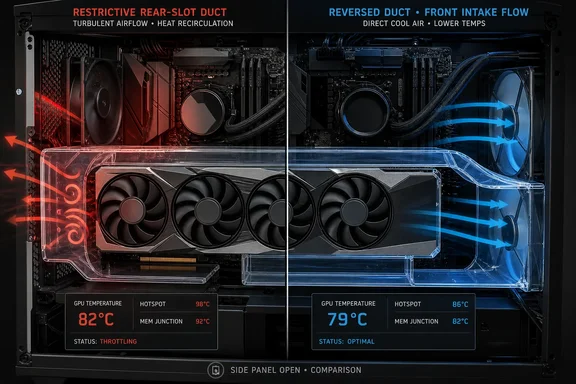
The builder reported a 30-minute FurMark control run reaching 82°C with the graphics card at default settings. Removing the side panel reduced that result to 79°C. Their first PETG duct design, intended to let the GPU draw outside air through the rear PCIe-slot area, failed almost immediately. Reversing the duct so its open side faced the case’s front intake fans produced a 79°C result after 30 minutes — a three-degree improvement over the closed-case control and equal to the side-panel-off test.
That is a modest result, but it is more meaningful than a generic claim that “more airflow” lowers temperatures. The duct did not add a fan, alter the GPU cooler, or lower room temperature. It changed where the card could obtain its intake air, and it showed why available airflow matters more than the nominal size of an opening.
The first duct ran into an intake restriction
The original design formed a U-shaped chamber around the graphics card’s intake fans and left the GPU to pull air from an opening near the case’s rear expansion slots. In theory, that would isolate the card from hot air recirculating inside the case. In practice, the rear slot grilles became a choke point.
A modern triple-fan axial GPU cooler can move substantial air, particularly when its own fan curve ramps under a FurMark load. Sending all three fans toward a limited perforated opening changes the conditions they operate under. The fans have to overcome more resistance, so airflow across the card’s heatsink can collapse even as fan speed rises. The reported result — thermal throttling in less than four minutes — is an extreme example of a duct becoming an obstruction.
This is the part builders should take seriously before printing anything. A duct’s cross-sectional area should not shrink sharply between the fan faces and its source of cool air. Sharp bends, stamped slot grilles, dense mesh, dust filters, cable bundles, and a side panel placed too close to the GPU can all create the same problem on a smaller scale.
Server vendors have used purpose-built air guides for years because their systems have known fan locations, known component placement, and validated airflow paths. Lenovo, for example, specifies air ducts for certain GPU positions in its ThinkSystem ST650 V3 server. Consumer desktop cases are less controlled: GPU thickness, fan placement, bottom clearance, front-fan alignment, radiator placement, and even cable routing vary from one build to the next. A custom duct can work, but it has to be designed around those physical constraints rather than copied as a universal mod.
The reversed duct fed the GPU instead of starving it
Turning the duct around changed its role. Rather than asking the GPU fans to draw through the rear of the case, it presented them with an air volume being replenished by the front intake fans. The final 79°C result suggests that, for this particular layout, the card benefited from a more direct supply of fresh intake air.
Tom’s Hardware has repeatedly found that case fan placement and intake restrictions can materially change GPU cooling behavior, particularly in layouts where a card lacks clear access to fresh air. Corsair has also built dedicated lower ducts into recent case designs to direct bottom-mounted fan airflow toward a GPU. Those products do not prove this homemade design is broadly repeatable, but they reinforce the basic principle demonstrated in the test: directing a low-resistance intake stream to the GPU is a legitimate thermal strategy.
The important detail is that the improvement was only three degrees against the author’s stock closed-case test. That is enough to reduce fan noise or preserve boost headroom in a card operating near its thermal target, but it does not justify treating a plastic airbox as a substitute for diagnosing basic case airflow.
The reported 79°C figure also needs careful interpretation. It matched the system’s side-panel-off result rather than beating it. That makes the duct successful as a way to recover open-case cooling without permanently operating the PC exposed to dust and accidental contact, but it does not show that the duct created an unusually efficient GPU cooling path.
FurMark results are a starting point, not a full thermal verdict
The experiment used FurMark for 30-minute comparisons, which is a reasonable way to expose a bad restriction quickly. It is also a synthetic workload that can produce a different power, fan, and thermal pattern from an actual game, a GPU compute task, or a long rendering workload.
The author included EVGA iCX monitoring because memory temperatures matter alongside the GPU core, but the published account does not provide a complete set of logged readings for GPU hotspot, VRAM, fan RPM, clock speeds, board power, CPU temperature, motherboard sensors, or room temperature. It also does not identify the graphics card model. Those omissions limit how far anyone can generalize the exact 82°C-to-79°C change.
For a DIY airflow mod, the test that matters is not simply whether the GPU core number falls. Builders should look for a consistent improvement across several sustained workloads, with the same ambient temperature and the same GPU power limit. A cooler core that comes with higher VRAM temperatures, a warmer CPU, or a large increase in fan noise may not be an improvement in practical terms.
A more complete validation routine would include:
- Record GPU core, hotspot, memory junction where available, fan RPM, power draw, clock speed, and CPU package temperature with HWiNFO or the card vendor’s monitoring tool.
- Run the same workload at least twice before and after the modification, allowing the system to return to idle between runs.
- Check both a synthetic load and a game or application the PC actually uses, since case airflow can behave differently with combined CPU and GPU loads.
- Inspect whether the duct touches fan blades, power cables, heatsink fins, or hot components, and ensure PETG parts cannot sag into a moving fan over time.
- Recheck dust accumulation after several weeks, because a new direct intake path may bypass a filtered front panel.
Fix the free airflow problems before printing plastic
The original experiment’s strongest conclusion is not that every PC needs a duct. It is that the case’s existing front intake did not line up well with the lower GPU area, leaving the card dependent on mixed air inside the chassis. A duct was one workaround for that geometry.
Before designing a custom part, owners of a warm GPU should start with less invasive changes. Confirm that front or bottom fans are actually configured as intakes, that rear and top fans are exhausting rather than fighting the intended path, and that front-panel filters are clean. Route loose PCIe power cables away from the GPU’s fan side. If the case supports bottom intake fans, they often provide the most direct route to a conventionally mounted graphics card.
There is also a trade-off around unused PCIe-slot covers. In a case with strong front intake and positive pressure, removing covers can become an easy escape route for filtered air before it reaches the GPU. In a more exhaust-biased chassis with poor front ventilation, vents close to the graphics card may instead become a useful fresh-air source. There is no universal answer; measure temperatures and noise after each change rather than relying on a pressure rule alone.
Undervolting remains the more predictable option when a card is thermally constrained. The builder noted that their usual undervolt and aggressive fan curve held the GPU near 72°C under full load, though with substantial noise. A carefully tested undervolt can cut heat at the source without changing the airflow path, and a modest custom fan curve may deliver a better temperature-noise compromise than a large, case-specific printed assembly.
A fully isolated design with separate side-panel intake and exhaust openings might reduce recirculation further, as the builder proposed, but that version would require cutting the acrylic panel and printing a far larger 332-gram part. The claimed potential gain is not tested, and it should remain a concept rather than a promised 10°C fix.
The demonstrated result is narrower and more useful: a duct can match open-case GPU temperatures when it gives the card a broad, replenished source of cool air. The failed first attempt provides the real lesson. If the duct makes three GPU fans compete for air through a restricted grille, it can turn a cooling project into a thermal-throttling project.