

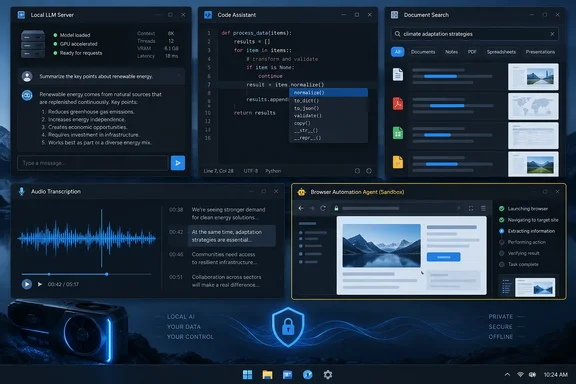
A note on the "nobody talks about" framing: none of the project pages say these tools are obscure. Some have large followings. Khoj's repository shows around 37.6k GitHub stars, and Tabby's shows about 33.9k. "Underrated" is the writer's opinion, not a measured fact. The more useful reading is that each tool does a different job.
The quick map
| Tool | Job | Windows angle |
|---|---|---|
| KoboldCpp | Run local language models (GGUF) | One-file Windows executable |
| Tabby | Self-hosted coding assistant | VS Code extension plus a server |
| Khoj | Search and chat over your own documents | Browser, Obsidian, Emacs and desktop clients |
| whisper.cpp | Local speech-to-text | Builds with MSVC or MinGW |
| AgenticSeek | Multi-step agent (browse, code, plan) | Docker Desktop and Windows scripts |
KoboldCpp: the model runner
KoboldCpp is built around llama.cpp and is the closest thing here to a general-purpose engine. Its release notes describe a one-file Windows executable, koboldcpp.exe, aimed at NVIDIA GPU users. The notes also list alternatives:
- An "oldpc" build for older CPUs and GPUs.
- A smaller no-CUDA build.
- A Vulkan option in the no-CUDA build, which the project recommends AMD users try first.
- A macOS Apple Silicon binary.
Once you load a model, you connect to it at [url]http://localhost:5001[/url], according to the release notes. The project also exposes an OpenAI-compatible API. That makes it a plausible local backend for other tools on this list.
The release page showed v1.121 dated September 15, with later 1.122 entries above it. Those entries include a bundled "KoboldCpp Agent" that you enable with --agent or from the Admin tab. The notes say it offers three approval modes for tool calls and advise caution when approving them. They also say it needs at least 28k context and recommend about 12GB of VRAM. Treat this as the release state at the time of writing.
"One file, zero install" is accurate for the application. It does not cover the model. You still need to download a compatible model, and performance depends on your hardware and model size.
Tabby: a coding assistant, not a terminal
The original piece's blurb for Tabby is wrong. It describes a terminal app for shells, SSH and Telnet, which is a different project that shares the name. The tool the article actually discusses is TabbyML's Tabby. Its VS Code extension README calls it an open-source, self-hosted AI coding assistant.
Tabby is a server plus a client. According to the extension README, you set up a Tabby server, create an account, then run the Tabby: Connect to Server... command. There you enter the server's endpoint URL and your account token. What you get:
- Real-time multi-line and full-function completions.
- A chat view, plus commands like
Tabby: Explain This. - Inline editing, with the shortcut Ctrl/Cmd+I.
"Self-hosted" is not the same as "never leaves the machine." The editor talks to a server, and that server can be on your own hardware or elsewhere in your organization. Either way, you control where inference happens.
Khoj: your documents, queryable
Khoj's repository calls it a personal AI app. It can chat with local or online models. It answers from the internet and from your documents, including PDF, Markdown, org-mode, Word and Notion files. You can reach it through a browser, Obsidian, Emacs, a desktop app, a phone or WhatsApp.
Its docs offer two routes: a hosted cloud instance, or self-hosting "on consumer hardware for privacy." Khoj supports online models like GPT, Claude and Gemini alongside local ones. Privacy therefore depends on the choices you make:
- Which backend model you connect.
- Whether you use the cloud app or your own instance.
- What you index.
The repository does say Khoj is open source and self-hostable. It does not say every configuration is private.
whisper.cpp: offline transcription
whisper.cpp is a C/C++ port of OpenAI's Whisper speech-recognition model. Its README lists Windows support through MSVC and MinGW. It also lists Apple Silicon optimizations, AVX on x86, and optional acceleration paths such as OpenVINO and AMD Ryzen AI NPU offload.
Workflow details that matter:
- You need to download a converted
ggmlmodel first. - The
whisper-cliexample currently handles only 16-bit WAV input, so you may need to convert audio with ffmpeg. - Quantized models use less memory and disk space.
- The repository also includes a
whisper-serverexample, which is an HTTP transcription server with an OpenAI-like API. It also has a microphone streaming demo.
The XDA piece says transcription quality is "good enough" and the linked Whisper blurb claims great accuracy. The project README does not benchmark accuracy. Real-world results vary with model size, language and audio quality.
AgenticSeek: the one that needs supervision
AgenticSeek is the most ambitious tool here and the most demanding. Its repository says it is run by a small group of volunteers, not a startup. The prerequisites are:
- Git.
- Python 3.10.x, which the project says to prefer because other versions may cause dependency errors.
- Docker Engine and Docker Compose for bundled services such as SearXNG.
- Chrome, since the agent uses it for web tasks.
On Windows, XDA's separate hands-on piece describes using Docker Desktop and the included start_services.cmd script. The project warns that the first run downloads Docker images, which can take up to 30 minutes. Backend startup can take around five minutes.
Hardware needs are significant. Third-party summaries of the project's FAQ table describe 7B models on 8GB VRAM as not recommended. They describe 14B on 12GB as usable for simple tasks, and 32B on 24GB as a good all-rounder. They put 70B+ on 48GB+ for power users. One README variant calls an early-prototype router unreliable at picking the right agent. Treat all of this as project guidance, not independent testing.
Two caveats matter for privacy and safety:
- The
WORK_DIRsetting defines files the agent can read and interact with. Point it at a scratch folder, not your Documents. - The "zero cloud dependency" tagline describes the local-model setup. The project also documents non-local providers, and web browsing contacts websites by design.
XDA's author says he keeps an eye on the agent's actions. That is good practice for any tool that browses and runs code.
What to take from the list
"Local" is a deployment choice, not a guarantee. Before trusting any of these with sensitive material, check four things:
- Which model endpoint is configured.
- Whether any cloud provider is enabled.
- What data is indexed or mounted.
- Whether browser or file actions are permitted.
Choose by job, not by popularity:
- For a simple local model server on a Windows gaming PC, start with KoboldCpp.
- For a private Copilot-style setup, try Tabby with a server you control.
- For searching your own notes, try Khoj.
- For offline transcripts, use whisper.cpp.
- Leave AgenticSeek for last, after you have a GPU with plenty of VRAM and a sandboxed work folder.
I haven't run these tools myself. This article draws on the XDA piece plus each project's own documentation.
References
- 5 open-source local AI tools nobody talks about, but they deserve way more attention XDA · 2026-10-04T14:30:19+00:00
- 🐾 Tabby github.com
- github.com github.com