

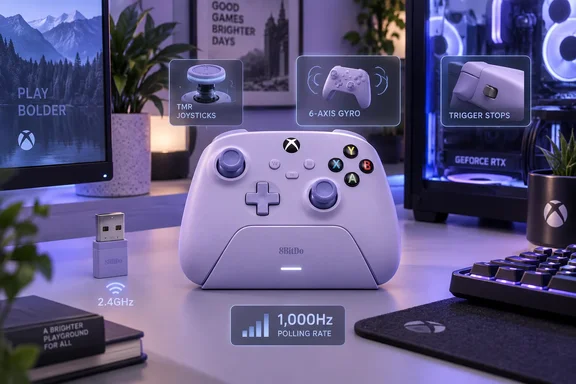
Lavender Dusk Ultimate 3 Reaches European Retail Months After Its Debut
The European news came from a Game Outlet Europe press release dated in Karlstad, Sweden. It says the 8BitDo Ultimate 3 Controller for XBOX and PC is officially shipping across European territories in an all-new, striking Lavender Dusk special edition. According to the release, the controller is available now across major European retailers and online storefronts with an MSRP of $99.99 / €89.99 / £79.99. GamingTrend and Final Weapon both carried the announcement. Both reports come from the same press release, so they are not separate confirmation of retail stock. Final Weapon adds that the controller is available now across Europe and the UK for €89.99 / £79.99, and the controller is available now in the U.S. for $99.99.
The colorway itself was announced months ago. In May, TechPowerUp reported that Lavender Dusk was currently available for pre-order from 8BitDo or Amazon for $99.99, with pre-orders shipping on August 31, 2026. The September date marks when European retail distribution began, not when the design was revealed.
8BitDo's own shipping dates don't match each other. An earlier capture of its official store listed a September 15, 2026 ship date for the Lavender Dusk model. The current store listing reads "Ships on Oct 15. 2026". That may mean 8BitDo's direct-store stock has sold out and is waiting on a restock, while regional retailers and Amazon ship from their own inventory. That reading is an inference, since 8BitDo hasn't explained the change. If you're in North America and ordering from 8BitDo directly, check the date on the store page before you pay.
8BitDo describes the colour as inspired by Rococo pastels. A natural lavender tone shaped by light and dusk. The finish is cosmetic only. The product page, tech specs and support FAQ for the Lavender Dusk model list the same hardware as the other Ultimate 3 models, and Final Weapon notes that like all other models of the Ultimate 3, the Lavender Dusk controller is officially licensed for XBOX.
TMR Joysticks and the Force Ring Anchor the Ultimate 3 Hardware
The main hardware feature is the thumbsticks. Most standard controllers use potentiometer sticks, which measure position through physical contact, and that contact wears over time. The Ultimate 3 uses tunnel magnetoresistance (TMR) sensors, which read stick position magnetically. 8BitDo says the sticks are built with TMR joysticks for higher sensitivity, greater accuracy, and long-term durability. Equipped with a 12-bit ADC sampling chip. Powered by a 216MHz high-performance processor for more precise joystick control and faster response. The press release calls the sticks "drift-free." That is shorthand for the benefit of contactless sensing, not a lifetime guarantee. None of the reporting includes independent durability testing.
The Force Ring is the Ultimate 3's own physical feature. It is a dial on the stick that changes spring tension. 8BitDo says you can fine-tune joystick tension with the integrated Force Ring. Dial in resistance to match your play style—lighter for speed, tighter for control. Because it's mechanical, the tension setting works the same on Xbox, Windows and mobile, with no software involved. Final Weapon's description links the Force Ring to the 216MHz processor, but that's a garbled reading. 8BitDo's page lists the processor and ADC chip as part of the stick-sensing electronics, not the tension dial.
The triggers use Hall-effect magnetic sensing and have physical stops. 8BitDo says users can switch between two trigger-stop levels for different game types. A short stop gives a quick, hair-trigger pull for shooters, and full travel keeps gradual control for racing games.
The Ultimate 3 also has more inputs than a standard Xbox Wireless Controller. According to TechPowerUp, it has extra L4 and R4 bumpers in the shoulder button cluster, and customizable back paddles for additional inputs. The spec sheet adds four vibration motors, a 3.5mm audio jack, and a redesigned disc-style D-pad that 8BitDo says makes diagonals easier. The controller has more inputs than a basic pad, but nothing is swappable. 8BitDo doesn't list interchangeable sticks, D-pads or paddles, the kind of parts some premium pro controllers include.
The official figures are 151 × 84 × 100.5mm, 466g, and a 1,000mAh lithium-ion battery rated at about 20 hours of play with a four-to-five-hour charge time. These are 8BitDo's numbers, not independent measurements. 8BitDo also says the controller uses an all-new mold design, with a wider grip angle for a more natural and intuitive hold.
The Ultimate 3 Charging Dock Doubles as a 2.4GHz Signal Extender
The included dock charges wirelessly and uses magnets to line the controller up. 8BitDo describes wireless charging with zero contact points, with magnetic alignment ensures precise placement. Lift the controller to auto-reconnect and jump into the action instantly. The press release adds that the controller powers down and charges when docked.
The dock also helps with the wireless connection. The 2.4GHz adapter can sit inside the dock, and 8BitDo tells users to keep the controller adapter in the dock, connect the dock to your XBOX console or Windows PC via USB to extend the wireless signal and reduce gaming latency. Final Weapon describes the dock as having an embedded 2.4G receiver chamber to keep the controller charged and connected when needed.
This setup suits a PC under a desk or a console in a TV cabinet, where a tiny USB receiver plugged into the back of the machine may have poor line of sight. With the dock on the desk and the receiver inside it, the radio sits in the open. 8BitDo's spec sheet says the adapter doesn't need to come out of the dock when you connect the dock over USB. The box includes the controller, charging dock, 2.4G adapter, USB cable and instruction manual.
Tournament Mode and Gyro Aiming Keep the Ultimate 3's Best Tricks on Windows
On a Windows PC, the controller can do more than it can on an Xbox. 8BitDo lists compatibility as Xbox Series X|S, Xbox One, Windows 10 version 1903 and later, Android 13 and later, and Apple devices. Xbox and Windows connect over 2.4GHz or wired USB, and phones and tablets use Bluetooth. Final Weapon puts it this way: when connected on PC, the controller features up to a 1000Hz polling rate and 6-axis gyro motion control as well.
The polling-rate feature is where you need to be careful. 8BitDo's tech specs mark the 1,000Hz rate as "PC only. Not supported on Xbox consoles," and the product page adds that the figure comes from ideal lab conditions. The support FAQ calls the feature Tournament Mode and warns that Tournament Mode is only supported on Windows and will disable trigger vibration. It also tells users not to turn the mode on when connected to an Xbox console.
The European press release says the controller supports up to 1,000Hz "on PC," but it doesn't mention the vibration trade-off or the Xbox warning. On Windows, there are two ways to switch Tournament Mode on or off:
- With the controller connected to a Windows PC by cable or 2.4GHz wireless, hold View + Menu for three seconds.
- Alternatively, install Ultimate Software X from the Microsoft Store, connect the controller to the PC, open the Settings section, and turn Tournament Mode on or off there.
Motion control is also limited to one setup. 8BitDo offers 6-axis motion control under 2.4G mode on PC. Customizable in 8BitDo Ultimate Software X. The spec sheet says gyro input can be mapped to the left or right stick. Gyro aiming is therefore limited to Windows over the 2.4GHz receiver. It isn't listed for Xbox consoles, and the documentation doesn't mention it for wired or Bluetooth connections.
The Share button depends on your Windows version. 8BitDo's FAQ says Share works only on Xbox consoles and Windows 11, not on Windows 10. 8BitDo says this matches how Microsoft's own Xbox Wireless Controller behaves. If you're still on Windows 10, don't expect the Share button to capture clips.
Ultimate Software X Handles Calibration and Firmware for the Ultimate 3
8BitDo's configuration software comes in two versions: Ultimate Software X for Xbox and Windows, and Ultimate Software V2 for mobile. According to the press release, they handle button remapping, trigger and stick dead zones, vibration profiles, and motion-control parameters. Firmware updates on Xbox consoles also go through Ultimate Software X from the Microsoft Store. 8BitDo's support page lists Ultimate Software X for Xbox and Windows 10 and later, and Ultimate Software V2 for Windows 10 and later, macOS 13 and later, Android 6.0 and later, and iOS 18 and later.
The support FAQ describes two ways to calibrate. To use the software, you download and launch Ultimate Software X from the Microsoft Store, then connect the controller to your Windows or XBOX device via wireless or wired connection and go to the "Settings" section and click Calibrate. To calibrate without software:
- With the controller on, press and hold the "LB+RB+View+Menu" buttons for 8 seconds to enter the calibration mode, the Status LED will start to blink.
- Push the joysticks to the edge and rotate them slowly 2-3 times.
- Slowly press the triggers to the bottom 2-3 times.
- Press the same "LB+RB+View+Menu" buttons combination again to complete the calibration.
The button-only method is handy on a console, where installing a companion app is more hassle than on a PC. The FAQ is also clear about what the controller can't do: it has no turbo or macro functions. If you need rapid-fire or input sequences, you'll need a different controller or separate software. Ultimate Software X doesn't offer either.
What this means for you
If you play mostly on a Windows 11 PC and want gyro aiming, a higher polling rate and a desk dock that improves the wireless signal, this controller has the most to offer you. If you play mostly on Xbox, you still get the magnetic sticks, the tension dial, the trigger stops and the extra inputs. You don't get the two PC-only features, and you need to leave Tournament Mode switched off. If you already own an Ultimate 3, the Lavender Dusk edition adds nothing but the colour.
- In Europe, Lavender Dusk has a suggested price of €89.99 or £79.99 and is shipping through regional retailers from September 22, 2026. The US price is $99.99.
- Check the ship date on 8BitDo's own store before ordering, because its listing has moved to October 15, 2026.
- Tournament Mode (1,000Hz) is for Windows only. It turns off trigger vibration, and 8BitDo says not to enable it on Xbox consoles.
- The 6-axis gyro works only on a PC over the 2.4GHz receiver and is set up in Ultimate Software X.
- Windows 10 users need version 1903 or later, and the Share button won't work until they move to Windows 11.
- If you need turbo or macros, look elsewhere, because the controller supports neither.
The Lavender Dusk release adds no new features, but it makes one of the better-equipped licensed Xbox controllers more widely available in Europe at a lower euro and pound price than its US dollar list price. The controller does the most on a Windows PC, and it's worth knowing which features stop at the console before you buy.