

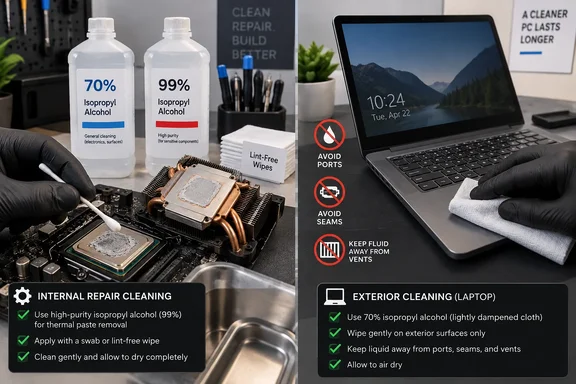
BGR’s overview of alcohol concentrations gets the broad split right: 70% IPA contains far more water than 91% or 99%, and that extra water slows evaporation. But its implication that higher purity is the general answer for computers overlooks the distinction that matters most to PC owners and technicians: internal repair cleaning and exterior device cleaning are different jobs with different materials, risks, and vendor guidance.
Microsoft’s Surface documentation, for example, allows a cloth lightly dampened with IPA solutions of 70% or less on specified external surfaces, while explicitly warning against spraying liquid directly on the device or allowing moisture into openings. Apple similarly permits 70% IPA wipes on many hard, nonporous exterior surfaces. Neither company is telling users to flood keyboards, ports, hinges, or display edges with alcohol; the instruction is to dampen the cloth, not the computer.
That is the correction worth carrying forward. A bottle of 99% IPA is a repair consumable, not an all-purpose PC disinfectant.
Thermal Paste and Circuit Boards Are the 91%–99% Job
For a desktop build, laptop teardown, or GPU repaste, 91% to 99% IPA is the sensible choice. iFixit’s thermal-compound guidance calls for 90% or higher alcohol on a swab or wipe to remove old paste from the processor package and cooler contact plate, followed by confirmation that both surfaces are clean and dry before applying fresh compound.
The reason is not that 70% alcohol immediately destroys electronics. It is that the water content and possible impurities in consumer rubbing alcohol lengthen the drying window, make residue more likely, and add uncertainty where none is needed. A small bottle of electronics-grade 99% IPA and lint-free wipes removes thermal paste, flux residue, finger oils, and light grime without turning a simple maintenance job into a drying exercise.
The method matters as much as the concentration. Power the system down, disconnect external power, and remove the laptop battery when the device design permits it. First lift away the bulk of the thermal compound with a dry lint-free wipe; then use a lightly moistened wipe or swab for the remaining film. Do not pour alcohol onto a CPU socket, graphics card, motherboard, or heatsink assembly.
High-purity IPA evaporates comparatively fast, but “fast” is not an instruction to immediately reassemble and power on. Leave the cleaned surface visibly dry, check that no liquid has travelled under nearby components or into connectors, and give the assembly time to air out in a ventilated workspace. A board contaminated by a spill, corrosion, or sugary liquid needs a more deliberate repair process than a quick swab around a CPU heat spreader.
Techspray, an electronics-cleaning supplier, lists IPA as generally compatible with materials common in circuit-board assembly, including aluminum, epoxy, phenolic materials, and several elastomers. It also recommends checking compatibility in a noncritical area rather than assuming every plastic, coating, ink, adhesive, and gasket inside a modern PC is the same.
The Outside of a Laptop Is Not a Bare Motherboard
The dangerous habit is treating a laptop lid, monitor, keyboard, trackpad, or mouse as though it were an exposed circuit board. These surfaces may include painted coatings, screen treatments, adhesives, decorative printing, soft-touch plastics, rubberized finishes, synthetic leather, fabric, and polymer blends. The electronics may survive a solvent that leaves the visible finish cloudy, brittle, streaked, or prematurely worn.
Microsoft’s Surface support guidance illustrates why a single “best percentage” answer fails. For routine care, Microsoft recommends a lint-free cloth and mild soap-and-water solution for several external surfaces. For disinfection, it permits IPA of 70% or less on supported Surface hardware, applied to the cloth. It also says not to use disinfectant wipes on Surface touchscreens and not to use chlorine, bleach, or hydrogen peroxide products.
Those instructions should be read as product-specific boundaries, not as a universal permission slip for every PC. Dell’s current cleaning guidance likewise separates the chassis and keyboard from LCD-screen cleaning and warns against direct spraying. Apple provides separate directions for nano-texture displays, where the supplied polishing cloth is the normal tool and a 70% IPA solution is reserved for occasional difficult smudges.
For an IT department, that distinction has an operational consequence. A standard workstation-cleaning procedure should identify the device class and manufacturer guidance before choosing a chemical. A generic “wipe every endpoint with alcohol” instruction may work for one fleet and shorten the life of display coatings or finishes in another.
The Real Risk Is Liquid Where It Does Not Belong
BGR warns that lower-concentration alcohol can leave water behind and potentially cause an electrical short. The useful version of that advice is more precise: do not energize equipment until it is dry, regardless of the cleaning liquid, concentration, or intended surface.
Pure IPA has low conductivity compared with ordinary water, but a cleaning event is rarely chemically pure. Water can carry dissolved minerals and contaminants. Alcohol can dissolve oils, fluxes, grime, and residue. Those materials can migrate into a keyboard switch, USB-C port, fan header, display seam, or motherboard connector. The electrical danger comes from applying power while conductive contamination or moisture remains in places it should not be.
High-purity IPA also does not “boil” near room temperature. Its standard boiling point is roughly 82°C, according to Techspray’s product data. It evaporates readily at room temperature because it has enough vapor pressure to enter the air, not because the liquid is at its boiling point. That may sound like chemistry trivia, but it explains why a fast-drying solvent can still be present in a connector or under a component after the visibly wet surface appears dry.
IPA is also flammable. Its vapors should not be introduced near an open flame, soldering iron, hot-air rework station, space heater, spark source, or powered system. Ventilation is not optional when using enough solvent to clean a heatsink, board, or chassis.
Compatibility Is the Catch BGR Understates
The claim that IPA can be “too potent” for rubber feet is directionally reasonable, but it is too vague to serve as repair advice. Damage depends on the material, the alcohol concentration, exposure time, whether the part is under stress, and what else is in the product formulation.
Techspray’s compatibility chart rates IPA poorly for polycarbonate and polystyrene, fairly for PVC, and more favorably for materials such as polypropylene, neoprene, Buna-N, and Viton. The company notes that incompatible solvents can create crazing—fine surface cracks—or soften a substrate. Seals and gaskets can swell, shrink, or become brittle after solvent exposure.
That does not mean IPA will instantly ruin every laptop foot, keyboard cap, acrylic side panel, or monitor bezel. It means the material is not reliably identified from the outside, especially on older hardware or devices with aftermarket coatings. Repeated cleaning is more likely to reveal a compatibility problem than one careful wipe.
The safe working checklist is short:
- Disconnect power and remove batteries where the device design allows it before cleaning.
- Put liquid on a lint-free cloth or swab rather than spraying or pouring it onto the PC.
- Use 91% to 99% IPA for targeted internal repair work, especially thermal-paste and flux cleanup.
- Use only the manufacturer-approved cleaner and concentration on displays, keyboards, chassis surfaces, and specialty coatings.
- Keep all liquid away from ports, vents, speakers, seams, switches, sockets, and under-keyboard gaps.
- Allow every cleaned area to dry completely before reconnecting power or testing the device.
Rice does not reverse liquid damage, and it cannot remove mineral deposits or corrosion already left behind by a spill. If water, soda, coffee, or another contaminating liquid entered a laptop or desktop, shut it down, disconnect power, and treat it as a spill-response and repair problem—not as an opportunity to pour more liquid through the hardware.
The bottle to keep beside a thermal-paste kit is 91% or 99% IPA. The bottle—or wipe—to use on a finished laptop, display, keyboard, or mouse is the one the manufacturer specifically authorizes.