

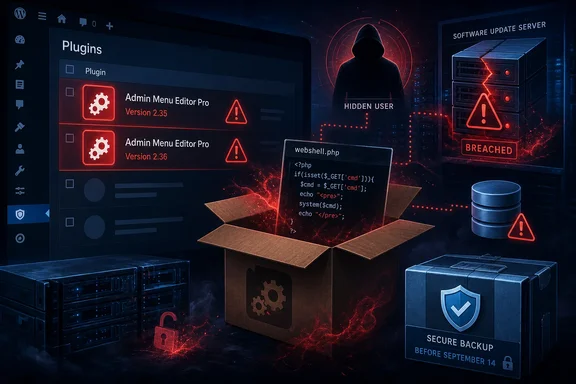
The incident is a supply-chain breach of the premium plugin’s distribution infrastructure, not a vulnerability in the free Admin Menu Editor listing on WordPress.org. That distinction is important for mixed environments: the free plugin has more than 300,000 active installations, but the available evidence confines the malicious packages to Admin Menu Editor Pro versions 2.35 and 2.36. Patchstack’s vulnerability record independently lists that exact Pro-version range as containing a backdoor.
BleepingComputer reported that the first malicious 2.35 release was available from roughly 06:00 UTC to 13:00 UTC on Monday, September 14. Elsts then issued version 2.36 at 19:00 UTC, but said the attacker still controlled the server and compromised that release as well. The vendor has taken the main site offline while investigating what it describes as likely root-level access to the hosting environment.
That timeline changes the remediation advice. Updating to 2.36 was not a fix for sites that received 2.35; it could have introduced the same compromise to a further set of customers. A site that shows 2.36 in its plugins inventory should therefore not be considered clean merely because it is running the highest available version.
The reported exposure is 1,500 sites, not 1,500 customers
Elsts told BleepingComputer that update-server logs showed approximately 230 customers installed the initial trojanized release on at least 1,500 sites. The difference is operationally significant for agencies, managed hosts, and enterprise web teams. A single customer account can control many production, staging, and client installations, so checking one WordPress dashboard is insufficient.
The reported total is also a floor, not a final victim count. Elsts said several hundred additional customers downloaded the plugin during or near the relevant time window and may have received the malicious 2.36 package. There is no confirmed comprehensive list of affected domains, and the vendor’s decision to take its infrastructure offline means it cannot presently serve as a trusted update source or a definitive cleanup oracle.
The headline figure should not be read as evidence that only 1,500 websites need review. It describes installations seen in the first wave of available update logs. Sites built from copied images, restored from recent backups, or managed under agency accounts may retain affected plugin files even if their current license status or dashboard update history is incomplete.
The backdoor survives beyond the plugin directory
The malicious code reportedly used includes/wp-user-consent.php inside the admin-menu-editor-pro directory to establish a web shell and create a concealed user account. Removing the plugin alone can therefore leave an attacker with a valid route back into WordPress or with code placed elsewhere on disk.
Elsts identified several artifacts for administrators to hunt:
- The file
wp-content/plugins/admin-menu-editor-pro/includes/wp-user-consent.phpis a compromise indicator on installations that received the affected packages. - A new
wp-content/object-cache/directory may have been created by the malicious code and should be examined before it is removed. - Database entries with names beginning
wp_ocachein the WordPress options table may be persistence data left by the payload. - A username beginning with
wp_in the WordPress users table may be an attacker-created account, even if it is not visible through the normal WordPress Users screen.
The last point is the one likely to catch teams that rely solely on the dashboard. WordPress administration screens are useful for normal maintenance, but an attacker who can write plugin PHP and database records can hide an account from that interface. Review the underlying database, ideally from a controlled administrative connection, rather than assuming that “no unexpected administrator appears in wp-admin” is a clean result.
For multisite deployments, inspect the network database and every site using the paid plugin. The free Admin Menu Editor documentation confirms that WordPress multisite can deploy its plugin network-wide or through mu-plugins; although the current incident is limited to Pro versions, those deployment patterns show why a single compromised update can touch a large number of managed sites quickly.
Restore first when a pre-September 14 backup exists
The vendor’s preferred recovery path is restoring a backup known to predate September 14, 2026. That is the sound approach because it removes both the identified artifacts and any modifications that have not yet been publicly documented. A web shell’s value to an attacker is that it allows arbitrary follow-on activity; defenders should not assume the known filename represents the entire intrusion.
Before restoring, preserve enough evidence to determine whether the site was accessed after installation. Record the affected plugin version, archive the malicious files outside the web root, retain relevant web-server and authentication logs, and note the WordPress users and options tables before changes are made. Organizations with regulatory, contractual, or incident-notification responsibilities should involve their security and legal teams before erasing evidence.
A clean restoration should be followed by credential rotation. At minimum, rotate WordPress administrator passwords, hosting-panel credentials, SSH keys or passwords, SFTP credentials, database passwords where practical, and any API keys or payment-provider secrets stored in WordPress configuration or plugin settings. Revoke active WordPress sessions and review hosting-account users, scheduled tasks, deployment credentials, and CDN or DNS access.
The important assumption is that the compromised plugin ran with the permissions granted to PHP on that site. On a poorly isolated shared-hosting account, that may include access beyond WordPress itself. On a hardened environment with per-site filesystem isolation, the likely blast radius is narrower, but it still includes the WordPress database and the application files accessible to the PHP process.
Manual cleanup is a fallback, not proof of recovery
For sites without a safe backup, Elsts recommends deleting Admin Menu Editor Pro, removing the wp-content/object-cache/ directory, and deleting the specified users and wp_ocache options. That procedure can eliminate the currently identified persistence mechanisms, but it should be treated as a recovery fallback.
Before deleting the cache directory, verify it is not being legitimately used by a caching plugin, host-managed object cache, or an application-specific deployment. The reported indicator is that a new, unexpected object-cache directory appeared with the malicious plugin update. Teams should compare it against a known-good site or backup and retain a quarantined copy for analysis rather than blindly deleting a directory that might contain legitimate infrastructure files.
Manual remediation also needs an integrity review of the rest of the site. Compare core WordPress files against official checksums; reinstall WordPress core, themes, and plugins from known-good sources; inspect wp-config.php, .htaccess, web-server configuration, uploads directories, and mu-plugins; and check cron jobs, both WordPress cron events and operating-system scheduled tasks. Review administrator accounts by querying the database directly, then verify roles and capabilities rather than checking usernames alone.
Administrators should also inspect outbound traffic and access logs beginning on September 14. Requests to unusual PHP files, administrative actions from unfamiliar IP addresses, sudden plugin or theme edits, newly created users, and changes to payment, mail, or redirect settings all merit review. On e-commerce or membership sites, assume customer data and payment workflows may have been reachable until the environment is shown to be clean.
Do not replace the affected package from mirrors
The vendor’s public site historically supplied updates for the Pro product, and third-party release trackers confirm that version 2.36 was posted on September 15. That only establishes that the version circulated; it does not establish that any copy currently found on a mirror is safe. Because 2.35 and 2.36 are the versions identified as malicious, downloading either package again for comparison or reinstallation is unnecessary risk.
Use a trusted backup or a package explicitly identified by the developer as clean after the infrastructure investigation is complete. Version 2.34 is believed to be clean according to Elsts, but that does not make it a substitute for validating the entire host after a suspected compromise. It is a useful reference point for determining exposure, not a blanket recovery guarantee.
The practical priority is simple: inventory Pro installations, flag every 2.35 and 2.36 deployment, restore from a pre-September 14 backup wherever possible, and rotate credentials after the restoration. With the vendor acknowledging possible root-level compromise of its distribution server, the only defensible posture is to regard every affected update as an attacker-supplied administrative tool until the site has been rebuilt or thoroughly investigated.
References
- Malcious Admin Menu Editor Pro plugin backdoors 1,500 WordPress sites BleepingComputer · 2026-09-15T16:34:15-04:00