

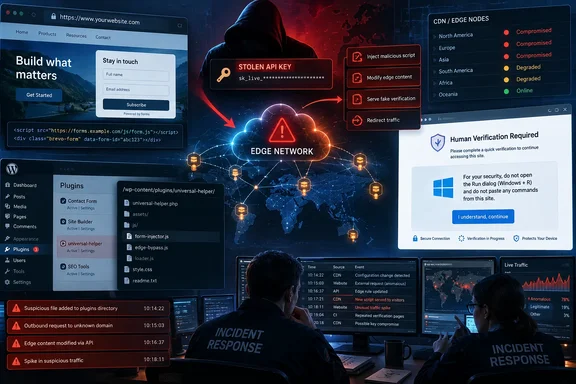
Brevo’s post-mortem says the malicious Cloudflare Worker operated from 16:07 to 20:30 UTC on September 14. Sansec, the security firm that first published technical findings, recorded the first modified Brevo SDK asset at 16:05:18 UTC and the last at 20:12:53 UTC. The mismatch is not evidence of continued malicious activity after containment; it reflects two different measurement methods. But it does mean administrators should use the broader 16:05–20:30 UTC window when querying web, proxy, DNS, endpoint, and WordPress logs.
BleepingComputer independently reported that the injected code attempted to install a malicious WordPress plugin for visitors who were already logged in as WordPress administrators. Cybernews also reported Brevo’s acknowledgement that the compromise reached customer-embedded resources. The key point is that Brevo’s origin servers and original JavaScript files were unchanged, according to the company—so a normal file-integrity check against the origin could have reported everything clean while users were receiving hostile content from the edge.
A Cloudflare credential turned trusted embeds into a distribution channel
Brevo says the attackers had a long-lived Cloudflare API key with full account permissions, hardcoded in application source code. That scope allowed creation of Cloudflare Workers, routing rules, and DNS records across Brevo zones. The Worker then rewrote responses as they were delivered, rather than modifying the stored HTML or JavaScript at Brevo itself.
That distinction explains why this incident has a larger operational footprint than a compromised marketing site. A third-party JavaScript include inherits a great deal of trust from the site that loads it. Brevo’s affected components included its forms script, Conversations widget, and SDK loader scripts—assets intended to be copied into customer websites. A compromise at that level can reach visitors who never knowingly interacted with Brevo.
Sansec estimated that more than 100,000 sites may use affected Brevo components. That is an exposure estimate, not a confirmed count of websites that served the malicious response or a count of infected machines. The actual impact depends on whether a site loaded one of the affected assets during the window, whether the visitor received the edge-altered variant, and, in the ClickFix branch, whether the visitor followed the instructions.
The incident also exposes a monitoring blind spot. Brevo says the Worker removed security headers including Content-Security-Policy. A Content Security Policy that would ordinarily block or report an unexpected external script cannot help if an attacker with control over response handling removes the policy before the browser sees it. Source-file checks, deployment logs, and origin-side hashing therefore were insufficient controls for this kind of edge-layer compromise.
For organizations running Cloudflare Workers or comparable edge logic, this is a reminder that edge configurations are production code. They need separate audit trails, least-privilege credentials, short-lived tokens where practical, alerting on Worker and route creation, and monitoring that fetches the public response a visitor actually receives—not only the artifact stored at origin.
The Windows risk begins only after the visitor runs the command
ClickFix attacks use a social-engineering trick that is deliberately awkward: the page presents a fake verification prompt and directs someone to use keyboard shortcuts such as Windows+R, paste content, and press Enter. The browser is no longer asked to download an obvious executable. Instead, the victim is induced to start a command themselves, bypassing the hesitation that often accompanies a conventional malware download warning.
Brevo says the malicious page sometimes appeared after a genuine Cloudflare checkbox, making the fraud more believable. A website can be reputable, a domain can be familiar, and the page can still be unsafe if a trusted third-party script has been compromised. That is the practical lesson for Windows users: Cloudflare does not require a visitor to open Run, PowerShell, Command Prompt, or Windows Terminal to verify they are human.
Brevo has advised anyone who executed the pasted command to regard the device as compromised, disconnect it, run a full antivirus scan, and change passwords used on the machine, beginning with the Brevo password. That response is sensible, but it should be treated as a first step rather than a final verdict. A scan that finds nothing does not establish that a device was clean, especially if a remote-access tool, infostealer, or persistence mechanism ran briefly and then removed itself.
Windows administrators should preserve what they can before indiscriminately cleaning the system: browser history, proxy records, DNS logs, Microsoft Defender detections and protection history, PowerShell operational logs if enabled, Windows event logs, and EDR telemetry. The relevant evidence is likely to be a process chain beginning with explorer.exe and the Run dialog, followed by whichever interpreter or utility the pasted command launched. Do not assume PowerShell was involved unless telemetry shows it; ClickFix operators routinely vary their command chains.
For unmanaged home PCs, the lower-friction response is to disconnect the device, run an up-to-date full scan, rotate passwords from a separate known-clean device, revoke active browser sessions where possible, and consider a Windows reset or reimage if execution is confirmed. For managed systems, isolate first, collect endpoint evidence, hunt for matching command lines and outbound connections across the fleet, then reset credentials and tokens according to the organization’s incident-response plan.
WordPress administrators face a separate server-side exposure
The injected script reportedly behaved differently for logged-in WordPress administrators. Sansec observed code that attempted to upload a plugin archive masquerading as “Web Media Optimizer.” BleepingComputer obtained and analyzed an archive associated with the campaign, reporting that it hid from the ordinary WordPress plugin list, copied itself into the mu-plugins directory for persistence, and loaded further JavaScript from attacker infrastructure.
This is the part of the incident that site owners cannot address by merely clearing a CDN cache or replacing a Brevo embed. A WordPress administrator who visited an affected site while signed in may have had a persistent backdoor placed on the server. The plugin’s apparent ability to hide itself means the WordPress dashboard alone is not a reliable inspection surface.
Administrators should compare the filesystem with the plugins displayed in WordPress, with special attention to the wp-content/mu-plugins directory and plugin installation or activation timestamps on September 14. Sansec specifically recommends looking for requests to the WordPress plugin upload endpoint and subsequent plugin activation activity. Web-server, WAF, and application logs should be searched for those events across the full 16:05–20:30 UTC period.
If suspicious plugin files or activity are found, the correct response is to treat WordPress administrator credentials and active sessions as exposed. Remove the malicious files only after capturing copies for analysis if incident-handling rules allow it; then rotate administrator passwords, regenerate WordPress authentication salts, review newly created accounts and scheduled tasks, inspect web-server write permissions, and rotate secrets stored in configuration files. Because the reported plugin included a mechanism to create an administrator session without the account password, password rotation by itself may not evict an attacker who still has the server-side implant.
Brevo’s two September incidents remain unconnected in the public record
This was Brevo’s second publicly disclosed security incident in days. On September 10, the company disclosed an SAML single sign-on flaw that it said enabled unauthorized access to customer accounts and was used to send phishing messages. Trezor subsequently said phishing emails sent through its Brevo account reached roughly 347,000 addresses, with at least 2,500 recipients interacting with the campaign.
The timing naturally raises the question of whether the SSO issue and the Cloudflare API-key compromise were part of the same intrusion. Brevo says the Cloudflare key may have been compromised as early as late August, but it has not presented evidence tying the two incidents together. BleepingComputer reported that Brevo did not answer its questions on a possible connection. Until Brevo or an independent investigation establishes one, they should be handled as separate compromises with different entry points and different remediation work.
Brevo says its application, API, email-delivery infrastructure, customer account data, and origin systems were not affected by the September 14 Worker attack. That narrows the company’s stated scope, but it does not remove the burden from customers whose sites embedded the modified resources. The customer-facing consequence occurred precisely because the edge had authority to alter trusted content in transit.
What site operators should do now
A Brevo customer should first inventory every place where its web properties use Brevo forms, the Conversations widget, hosted signup or unsubscribe pages, or the company’s SDK loader. The goal is not simply to remove the integration; it is to identify every page and every site that may have delivered the component during the exposure window.
The most useful actions are concrete:
- Review CDN, web-server, and browser-security telemetry for pages that loaded Brevo resources between 16:05 and 20:30 UTC on September 14, 2026.
- Search WordPress logs for plugin uploads and activations during that window, then inspect both ordinary plugins and
mu-pluginson disk. - Notify users who encountered an unexpected Cloudflare-style verification prompt that they should not follow its Run-dialog instructions and should report any command execution immediately.
- Hunt Windows endpoint telemetry for Run-dialog-launched processes, suspicious shell activity, and outbound connections associated with systems that visited affected sites.
- Rotate WordPress administrator credentials and review server-side secrets if there is evidence of plugin installation, rather than relying on browser cleanup alone.
- Review third-party script governance so that externally loaded JavaScript is inventoried, justified, and monitored as production supply-chain code.
Brevo has removed the Worker, revoked the compromised credential and related credentials, deleted attacker-controlled hostnames, and purged its edge cache. Sansec says the malicious subdomains stopped resolving on September 15 and the Brevo files it checked are now clean. The remediation priority now belongs to the organizations that were downstream of those scripts on September 14: determine which visitors saw the lure, which Windows users executed it, and whether any WordPress server accepted the silent plugin installation.
References
- Brevo supply-chain attack injected ClickFix scripts on customer sites BleepingComputer · 2026-09-17T13:11:34-04:00