

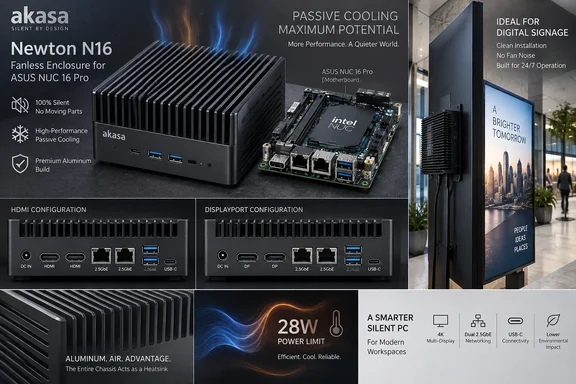
The Newton N16 arrives in two board-specific versions. The A-NUC109-M1B fits NUC 16 Pro systems with two rear HDMI ports, while the A-NUC109-M2B is for the two-DisplayPort configuration. TechPowerUp’s launch coverage and separate reporting by VideoCardz confirm the basic proposition: Akasa replaces the compact NUC’s active cooling arrangement with an aluminum chassis that acts as the system heatsink, with thermal hardware for the CPU and both M.2 SSDs.
For IT buyers deploying digital signage, kiosks, point-of-sale systems, industrial controllers, or quiet desk-side endpoints, the appeal is straightforward. Eliminating fans removes a moving part, avoids fan noise, and potentially reduces the maintenance burden in installations where dust buildup and failure of small blowers are recurring problems. But the enclosure’s thermal ceiling means the purchase decision starts with the installed NUC model and its BIOS profile, not the case dimensions or port count.
The 28 W limit changes the NUC 16 Pro’s operating profile
Akasa rates the Newton N16 for a maximum of 28 W TDP and explicitly instructs owners to set both the sustained Package Power Limit 1 and burst Package Power Limit 2 to 28 W. Its BIOS guide also tells users to set Power Mode to Custom, disable Dynamic PL1 Support, set the power time window to 1.00, and disable Dynamic PL4 Support before saving the configuration.
That guidance is more consequential than a routine thermal recommendation. ASUS’s own NUC 16 Pro datasheet lists Core Ultra 5 325 and Ultra 5 335 configurations at 45 W cTDP, while Core Ultra 7 356H, Ultra 7 366H, Core Ultra X7 358H, Core Ultra X9 378H, and Core Ultra X9 388H models are listed at 65 W. The 28 W ceiling therefore constrains even the lowest-power listed CPU configuration, and cuts the headroom of 65 W models by more than half.
Akasa warns that operating above 28 W can cause thermal throttling or reduced stability. The practical implication is that an installer should not simply transfer the NUC board into the chassis and let ASUS’s default firmware behavior decide power consumption. The standard NUC 16 Pro uses dual CPU fans, three heat pipes, and fin arrays to maintain higher sustained settings; Akasa’s case is intentionally trading that cooling capacity for silence.
That trade can be sensible for a signage player decoding video, a point-of-sale terminal, a remote-management appliance, or an edge device with steady and predictable utilization. It is far less attractive for workloads purchased specifically to exploit the NUC 16 Pro’s higher-end Core Ultra X7 or X9 configurations: sustained local AI inference, heavy multi-display graphics, compilation, data processing, or long-running CPU and GPU jobs.
Akasa has not published comparative performance, acoustic, surface-temperature, or ambient-temperature test results for the Newton N16. There is also no public evidence yet showing how the 28 W limit affects individual NUC 16 Pro processor models under Windows 11 workloads. Buyers should treat the published TDP figure as a thermal design constraint, not as proof of equal performance at lower power.
Buyers must match the rear display layout before ordering
The two Newton N16 product codes are not cosmetic variants. The HDMI case, A-NUC109-M1B, is made for the ASUS NUC 16 Pro’s HDMI rear-panel layout; the DisplayPort case, A-NUC109-M2B, has openings for the alternate DisplayPort arrangement. A wrong purchase leaves display ports physically mismatched, even though the underlying NUC family and internal board format are otherwise closely related.
That distinction matters in deployments where the display connector is already dictated by existing monitors, commercial panels, or cabling. ASUS specifies two HDMI 2.1 ports for its HDMI configuration and two DisplayPort 2.1 ports for the DP configuration, in addition to two Thunderbolt 4 Type-C ports with DisplayPort support. The Newton N16 does not convert or expand those display capabilities; it preserves the selected board’s native rear I/O.
The enclosure maintains access to the board’s two 2.5 GbE ports, rear USB ports, DC input, Kensington lock opening, and two antenna mounting holes. At the front, it exposes one USB 3.2 Gen 2 Type-C port and two USB 3.2 Gen 2 Type-A ports, all rated at 10 Gbps by ASUS for the NUC platform.
Akasa also includes a serial cable for the NUC 16 Pro board’s internal RS-232 header. That is a more meaningful enterprise feature than the company’s broad “AI” positioning. RS-232 remains common in payment equipment, industrial machinery, access-control hardware, and legacy kiosk peripherals; using the native header avoids adding a USB-to-serial adapter, another component that can complicate driver deployment and hardware support.
Fanless does not mean smaller
Akasa calls the Newton N16 compact, which is fair in rack, kiosk, and VESA-mount terms, but it is materially larger than the stock NUC 16 Pro enclosure. The Newton measures 188.6 by 204 by 53.6 mm and occupies 2.1 liters. ASUS lists the standard NUC 16 Pro chassis at 144 by 117 by 42 mm, or roughly 0.7 liters.
In other words, the silent chassis is about three times the volume of the original system. That is the physical cost of using a much larger aluminum surface area and exterior fins to shed heat without airflow. It remains small enough for behind-display installations and embedded cabinets, but it no longer has the footprint normally associated with a palm-sized NUC.
The case supports the VESA hardware included with the product and has two optional installation accessories: the A-NUC109-KT01 wall-mount bracket and the A-NUC109-FP02 10-inch rackmount front panel. Those options fit the target market well, particularly where the NUC must be secured out of sight or standardized in a shallow network or controls rack.
For board-only deployments, Akasa also lists an optional 120 W, 19 V power adapter. ASUS’s documentation shows that some NUC 16 Pro configurations use a 150 W adapter, while other configurations use a 120 W unit. Akasa has not explained which processor, memory, and storage combinations it has validated with its optional adapter, so integrators using bare boards should confirm power delivery requirements against the exact ASUS SKU rather than assume the lower thermal cap settles the question.
Silent edge deployments are the credible use case
ASUS markets the NUC 16 Pro around Intel Core Ultra Series 3 processors, integrated Intel Arc graphics, an NPU rated up to 50 TOPS, dual 2.5 GbE networking, Wi-Fi 7, and optional Intel vPro on select models. It also supports Windows 11 Home and Pro on Mini PC systems, while the barebone kits add Windows 11 IoT Enterprise, Windows 11 Pro Education, Ubuntu 24.04 LTS, and Red Hat Enterprise Linux 10.0 to the supported operating-system list.
The Newton N16 does not change those platform capabilities, but the power cap changes how they should be evaluated. A fanless Windows 11 Pro endpoint can still be a compelling fit for a reception display, a quiet office appliance, an industrial gateway, or a device running a narrowly defined local service. Remote-management features, dual wired networking, NVMe storage, and serial connectivity can be more valuable in those settings than maximum CPU boost clocks.
For local AI work, however, the term edge AI needs qualification. The NUC 16 Pro’s NPU remains present, and applications designed to run efficiently on the NPU may be appropriate for a passively cooled installation. But total platform power is shared across CPU, graphics, memory, storage, and I/O activity. A 28 W system limit necessarily reduces the available thermal budget for simultaneous CPU and GPU-heavy workloads, precisely where ASUS’s 45 W and 65 W configurations were designed to run with active cooling.
Akasa’s product listing currently identifies the Newton N16 as an upcoming product and does not state a retail price, regional availability date, warranty terms for transplanted NUC hardware, or tested ambient conditions. Those omissions matter most to fleet purchasers: the case may be ready for an engineering sample or planned deployment, but it is not yet possible to price the full conversion against buying a purpose-built fanless industrial PC.
The Newton N16 is therefore best read as a specialized thermal conversion kit. It preserves the ASUS NUC 16 Pro’s modern connectivity and legacy serial option while requiring administrators to deliberately turn a 45 W or 65 W-class mini PC into a 28 W machine. For quiet, fixed-function Windows deployments, that is a defensible trade. For installations chosen for the NUC 16 Pro’s peak Core Ultra performance, the stock dual-fan chassis remains the configuration ASUS actually designed to sustain it.
References
- (PR) Akasa Launches Newton N16, Compact Fanless Case for ASUS NUC 16 Pro TechPowerUp · 2026-09-18T16:22:19+00:00