

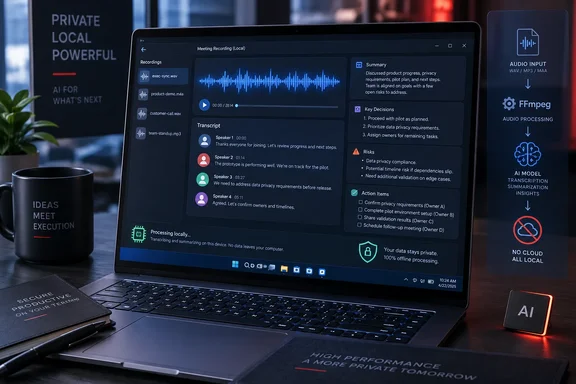
The result is a practical addition for Ryzen AI PC owners who handle sensitive internal calls, support escalations, design reviews, or customer meetings. GAIA can ingest a saved recording such as an MP4, M4A, MOV, MP3, MKV, or WAV file, extract its audio with FFmpeg, transcribe it through AMD’s local Lemonade server, separate speakers, produce a readable Markdown transcript, index it for later queries, and generate a brief with decisions, risks, and assigned work.
The useful news is not simply that AMD has added speech-to-text. Plenty of meeting products already do that. GAIA’s implementation preserves a durable local artifact before the AI refinement and summarization steps run. That design means an interruption or model failure during the later stages should not force an employee to repeat the expensive transcription job—or, worse, lose the only usable record of the meeting.
The workflow starts with an existing recording
GAIA 0.24 is a post-meeting transcription workflow, not an automatic Zoom, Teams, or Google Meet recorder. AMD’s documentation instructs users to provide a local recording and ask the agent to transcribe it, for example by pointing it to a file in a recordings folder and requesting action items.
That distinction deserves emphasis for Windows administrators assessing whether this can replace a meeting-notes service. GAIA does not appear to join calls as a bot, automatically capture every Microsoft Teams meeting, or offer the calendar-driven recording flow described in some of AMD’s longer-term planning material. The shipped transcription guide is specifically built around files already on disk.
For many organizations, that is an advantage. It keeps the initial deployment bounded: the system processes a file an operator deliberately supplies rather than introducing an always-listening meeting agent or a cloud-connected participant into every call. But it also leaves the capture problem to Teams, Zoom, OBS, a voice recorder, or another approved tool—and it leaves users responsible for following the recording-consent rules that apply in their jurisdictions and workplaces.
AMD’s GitHub documentation says the tool writes a raw transcript to a local GAIA transcripts directory first. It then creates a refined Markdown version that can include speaker turns, a speaker list, corrections for recognizer errors, and an AI-generated brief. The refined material can be indexed so the user can later ask a question such as what a particular participant said about a pricing change.
The raw transcript is the recovery point. This is a sound engineering choice. Meeting transcription takes meaningful compute time, while reformatting, summarization, and retrieval indexing are separate and comparatively cheaper operations. Separating those stages protects the underlying work when a later AI step fails.
Speaker separation is stronger than speaker naming
The release’s most consequential technical addition is diarization: identifying when different voices are speaking. AMD says GAIA uses local pyannote segmentation and WeSpeaker embeddings through sherpa-onnx to divide a recording into distinct speakers. The pipeline runs alongside the transcription and produces timing data that later stages use to form speaker turns.
AMD’s documentation carefully makes a distinction that many consumer transcription products blur. Separating four distinct voices from the audio is one task; deciding that a particular voice belongs to “Priya Raman” is another. GAIA can infer names from contextual clues in the conversation—introductions, direct address, and role references—but AMD describes those names as best-effort. A transcript can therefore show accurately distinct speakers while attaching an incorrect real-world name to one of them.
Administrators should treat that as a deployment constraint, not a footnote. A wrong speaker name can turn a reasonable meeting summary into an inaccurate personnel, legal, or project record. The safest procedure is to retain neutral labels such as “Speaker 1” until a human confirms the mapping, especially for HR discussions, incident reviews, disciplinary meetings, financial approvals, and customer commitments.
AMD also documents a fallback path. If the local diarization components cannot run, GAIA can still create a transcript and attempt speaker-turn inference from pauses and textual context. The resulting output identifies which method it used. That visibility is welcome, because it lets the user distinguish between an acoustically derived split and a less reliable text-based approximation.
Long-recording summaries avoid a common silent failure
AMD’s strongest implementation detail is how GAIA handles lengthy meetings. The project notes that a 46-minute recording can generate roughly 135,000 characters of transcript—far beyond what should be passed casually into one model prompt or tool response.
GAIA saves the entire transcript, then has its summarization workflow read the file in sections. According to AMD’s documentation, that avoids a deceptively common failure mode: an AI produces a polished, confident summary of the first part of a long meeting while silently omitting decisions and action items from the final third.
That design has direct value for IT operations. The part of a bridge call that matters most is often the close: the mitigation decision, the owner of a follow-up task, the rollback approval, or the time of the next update. A system that truncates the tail of a call without warning is worse than a partial transcript because it creates false confidence. GAIA’s file-based, staged method is a defensible response, though users should still verify the final brief against the transcript before treating it as an authoritative meeting record.
AMD says the transcript is processed locally through Lemonade, with Whisper-Large-v3-Turbo as the default transcription model. The initial use is not lightweight: the first transcription can pull roughly 1.62 GB for the Whisper model, plus FFmpeg and approximately 73 MB of speaker-diarization software and models. That means this is better suited to a provisioned workstation than a locked-down endpoint where unreviewed model downloads, package installs, or large local caches are prohibited.
Windows support exists, but hardware and setup still matter
GAIA’s current repository lists Windows 11 and Linux as supported operating systems, with AMD Ryzen AI 300-series hardware as the minimum processor target and 16 GB of RAM as the stated minimum. AMD recommends a Ryzen AI Max+ 395 system with 64 GB of memory.
Those requirements place the feature firmly in the emerging AI PC category rather than the broad installed base of Windows machines. GAIA has expanded beyond its earlier Windows-only roots—Phoronix covered its Linux support in 2025—but AMD continues to present the project as optimized for Ryzen AI hardware. Enterprises with Intel, Nvidia, Apple, or non-AI AMD fleets should not assume that this is a general-purpose cross-vendor meeting transcription platform.
There is another caveat specific to AMD’s own NPU path. The transcription guide says the NPU-oriented whisper-v3-turbo-FLM build does not provide the word-level timing GAIA needs to flag low-confidence words. Rather than silently bypassing that quality-control step, GAIA rejects that requested configuration and directs users toward a whisper.cpp model such as the default Whisper-Large-v3-Turbo.
That is an important correction to the simplistic assumption that an NPU is automatically the best local-AI engine. For this workflow, the documented default model supports features that the NPU build does not. GAIA 0.20 added per-agent device selection, Phoronix reported in June, so users with compatible AMD hardware can make deliberate trade-offs among CPU, GPU, and NPU resources. For meeting transcription, feature completeness should take priority over choosing the lowest-power accelerator.
Privacy is local, but local retention needs policy
AMD characterizes GAIA as local-first and says nothing leaves the machine during this transcription path. The repository’s documentation backs that up at the architectural level: Lemonade handles the transcription locally; diarization models run locally; and the output is written to disk for subsequent summarization and search.
That claim has a practical security consequence: it can reduce the exposure created when meeting audio, transcripts, and summaries are uploaded to a third-party SaaS platform. It may be useful for air-gapped deployments, confidential engineering conversations, regulated workloads, or organizations that want to control where meeting records reside.
But “local” does not mean “disappearing.” GAIA deliberately retains raw transcripts, refined transcripts, speaker-related timing data, and an index for future question answering. Those are sensitive records in their own right. An organization rolling this out should set storage locations, access controls, backup behavior, encryption expectations, retention periods, and deletion processes before treating the tool as a privacy solution.
For an individual Windows user, the immediate takeaway is more modest. GAIA 0.24 offers a credible local pipeline for converting a recording into searchable notes, with a transparent fallback when speaker diarization fails and a design that protects the raw transcript from later-stage errors. For a managed environment, its value will depend on whether IT can pair that local processing with disciplined recording consent and retention controls—the files GAIA creates may never leave the PC, but they still need to be governed like meeting records.
References
- AMD's GAIA Local AI Now Able To Transcribe & Summarize Meeting Recordings Phoronix · Wed, 16 Sep 2026 10:19:10