

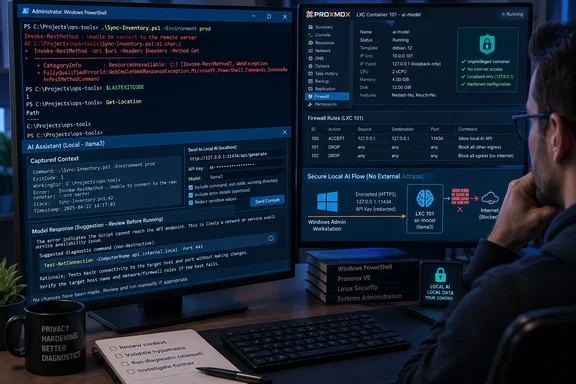
But the privacy claim needs a sharper boundary. A local model does keep error output away from a cloud model provider only if the path between the terminal and inference server is also secured. In the setup XDA describes, the model server sits in a Proxmox LXC and is reached through a network address. That is materially different from a model process listening only on the same Windows PC. Anyone building this should treat the endpoint like an internal service carrying credentials, hostnames, package details, and potentially production error output—not like an innocuous local chatbot.
AMD’s Lemonade documentation confirms the useful part of the approach: Lemonade Server exposes an OpenAI-compatible API, normally on port 13305, so an existing client can point at it without custom model integration. Simon Willison’s llm tool supports defining extra OpenAI-compatible models in configuration, making it a reasonable lightweight client for the job. The missing work is the operational hardening around that convenient compatibility layer.
The terminal has context screenshots throw away
A screenshot is a poor diagnostic artifact even before privacy enters the discussion. It can clip the relevant lines, omit the working directory and command history, obscure copyable identifiers, and turn a structured text stream into an image that an assistant must transcribe before it can reason about it.
The wrapper described by XDA takes a more useful approach: run a command once, collect its recent output only on failure, then attach metadata the model would otherwise need to ask for. The exit code matters. So does the shell: a PowerShell error, a Bash error, and output from a native executable have different conventions and remedies. The current directory can distinguish a missing file from a command run in the wrong repository or virtual environment.
This is the practical advantage over manually pasting a red error block into a browser. It produces a compact incident record at the moment the failure occurs. For Windows administrators, that could include whether the shell was PowerShell 7 or Windows PowerShell, whether the command was executed locally or through an SSH session, and the relevant error stream—without pretending that the model has access to the whole machine.
The decision to avoid automatic retries is also sound. A troubleshooting helper should explain a failed command, not silently replay it. Re-running an installer, a package transaction, a deployment script, or a destructive hypervisor command can change the state that produced the original failure. Once the wrapper begins executing suggested actions, it stops being an assistant and becomes an automation system requiring a far higher safety bar.
The local API is the real security boundary
The source calls the result “local,” but that word covers several very different arrangements. A model running in the same Windows user session is local in the strictest sense. A model in a virtual machine or LXC on the same host is still under local administrative control, but requests cross a virtual network boundary. A server at another address on the LAN is local to an organization, not necessarily private to the user.
AMD’s current Lemonade Server guidance explicitly recommends binding a container deployment to loopback where possible and setting an API key to limit exposure. Those details should not be optional in a terminal-error workflow. An unauthenticated OpenAI-compatible service listening on a reachable LAN interface creates a simple target: any system that can reach it may be able to submit prompts, consume compute capacity, or retrieve model-service behavior that was never intended to be shared.
For a Windows machine using a remote Lemonade instance, the minimum sensible design is:
- Bind the inference endpoint to localhost whenever the client and server can reside on the same host.
- If the terminal must reach a VM, LXC, or another machine, require authentication and restrict firewall rules to the specific client addresses.
- Use encrypted transport or an encrypted tunnel when the request crosses a network you do not fully control.
- Keep the model server off port-forwarded, public, guest Wi-Fi, and broadly accessible home-LAN interfaces.
- Log access metadata separately from prompt contents if auditing is needed, so the privacy benefit is not undone by verbose server logging.
The source’s redaction function is a worthwhile second line of defense, but it cannot make an exposed endpoint safe. Regular expressions can catch obvious bearer headers, JWT-shaped strings, password fields in URLs, and long hex sequences. They will miss secrets with unusual formats, values passed through environment variables, private source code, customer data, and credentials embedded in output that does not match the expected pattern.
A local model reduces third-party exposure. It does not absolve an operator from deciding which diagnostic text is safe to hand to another process.
PowerShell’s error model complicates “last error” helpers
The XDA test exposes a limitation administrators will encounter quickly: PowerShell’s $Error collection does not reliably represent failures from native programs such as winget, git, robocopy, or command-line tools invoked through SSH. Native programs commonly communicate failure through their exit code and standard error rather than by generating a PowerShell error record.
That means a bare helper invoked after the fact can explain a failed Get-Item, but may have nothing meaningful to explain after winget install fails. Wrapping the command before it runs is the robust pattern because the wrapper can capture all output streams and $LASTEXITCODE itself.
The catch is that output capture can alter the terminal experience. Piping output through a file or stream-processing step may remove ANSI colors and progress rendering. It can also change buffering, which makes a long-running command feel less responsive. A useful implementation should preserve live output for the operator while recording a bounded transcript for the model, rather than hiding output until the process exits.
Bounded capture is more than a token-saving measure. Sending “the last 150 lines” may work for a small build error, but it can omit the first meaningful exception in a noisy package log. A stronger wrapper should preserve both the initial failure region and the tail of the output, while reporting that intervening lines were omitted. For production logs, it should also impose a byte limit before a runaway process turns one support prompt into a multi-megabyte inference request.
Diagnosis is safer than repair
The five tests XDA ran demonstrate the division of labor that makes this setup credible. The model identified straightforward causes: a nonexistent WinGet package, a missing path, a Rust type mismatch, a misspelled apt package, and an incorrect systemd unit name. It was substantially less reliable at choosing the appropriate action.
That result is not a failure of the concept. Error classification and error remediation are separate tasks. A model can accurately recognize “this path does not exist” while having no evidence whether the operator should create a directory, correct a typo, mount a volume, change directories, restore a deleted file, or stop running the command. Suppressing the error with -ErrorAction SilentlyContinue is especially dangerous because it can make a script appear successful while concealing the condition that needs attention.
The strongest response in the test was investigatory: use systemctl list-unit-files to establish the actual unit name rather than guessing a repair. That is the right operating model for a terminal assistant. It should first quote the line that supports its diagnosis, then propose a non-destructive verification command, and only then offer a narrowly scoped remediation if the evidence supports one.
A short output limit helps here. The article’s 120-word response target is not merely stylistic. It makes hallucinated solutions easier to audit because the operator sees one claimed cause, its evidence, and one next command instead of a sprawling recipe that mixes sound advice with invented assumptions.
Microsoft’s Intelligent Terminal solves a different layer of the problem
The comparison with Microsoft’s Intelligent Terminal should be made carefully. Microsoft describes Intelligent Terminal as an experimental fork of Windows Terminal with native integration for Agent Client Protocol-compatible agent CLIs. Its documentation says the terminal itself passes prompts, recent shell context, and basic environment metadata to the selected agent through local interprocess communication; the chosen agent determines where the information goes next.
That means Intelligent Terminal is not automatically a cloud service, nor is it automatically a local-model solution. With GitHub Copilot as the selected agent, data handling follows that agent’s service model. With a custom or locally configured agent, the routing can be different. Microsoft’s own documentation is clear that the terminal does not itself make cloud API calls, but its default setup and the full agent path still matter to anyone making claims about data staying on-device.
For people who live inside Windows Terminal and use a supported agent CLI, Microsoft’s tool may provide a more integrated experience than a homemade wrapper. The wrapper has a different advantage: it can be used in PowerShell, Bash, SSH sessions, and other environments where an operator wants the same failure-capture behavior without changing terminals or adopting an agent-oriented workflow.
The practical conclusion is modest but valuable. Use a local terminal model as a diagnostic index, not an authority. Capture failures once, preserve enough context to make the output meaningful, redact aggressively, secure the inference endpoint, and make every suggested command subject to human review. That replaces the screenshot ritual with something faster while keeping the final decision—especially on a production machine—where it belongs: with the person at the terminal.
References
- I stopped screenshotting error messages after wiring a local model directly into my terminal XDA · 2026-09-19T23:00:16+00:00