

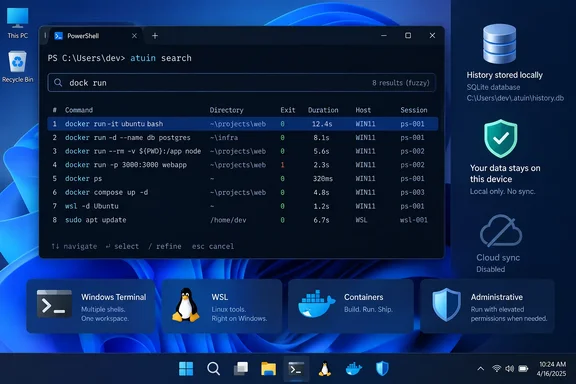
MakeUseOf recently framed Atuin as a way to stop memorizing lengthy Docker, PowerShell, and Linux commands. The practical Windows case holds up under Atuin’s own documentation: the project officially supports PowerShell, recommends installation through WinGet, and installs shell hooks through a PowerShell profile. Microsoft’s PSReadLine documentation also shows why the pitch has traction: PowerShell history normally lives in host-specific text files, rather than in a queryable record with execution metadata.
The important caveat is that Atuin is more than a prettier Ctrl+R. It changes what gets recorded, adds code to every interactive PowerShell launch through $PROFILE, and can create a much broader collection of sensitive command history than a user realizes. For an administrator who types credentials, access tokens, tenant IDs, connection strings, or emergency remediation commands at a prompt, that deserves a deployment decision rather than a casual install.
PowerShell already has history, but it is fragmented
PowerShell users are not starting from zero. PSReadLine saves persistent command history, and its default Windows history file is generally under the user profile’s AppData\Roaming\Microsoft\Windows\PowerShell\PSReadLine directory. It also supports configurable history-search keybindings and predictive suggestions based on prior commands.
The problem is scope. A PowerShell session in Visual Studio Code can use a different history file from the regular Console Host, and Windows Terminal is only a terminal host—it does not itself provide a unified history store for the PowerShell, Command Prompt, WSL, SSH, and developer shells it can launch. A command that was run successfully in a project folder last month may exist somewhere locally, but the built-in experience offers little help identifying which version of a similar command succeeded.
Atuin’s useful contribution is attaching context to each captured command and indexing it in SQLite. Instead of finding five near-identical docker run, winget, robocopy, az, or powercfg commands and guessing which one mattered, a user can see whether it ran successfully, how long it took, where it ran, and how recently it was used.
That is a material improvement for work that shifts between PowerShell on Windows, Bash in WSL, and Zsh or Bash on a remote Linux host. Atuin’s documented shell filtering defaults to the current shell, so a PowerShell search should not automatically become a wall of unrelated Bash commands. Users who genuinely want a cross-shell view can explicitly configure it.
The Windows installation is simple, but the profile change is the real install
Atuin’s Windows documentation recommends the following WinGet package:
winget install -e Atuinsh.Atuin
Installing the executable alone does not activate history capture. The recommended PowerShell setup appends this initialization command to the current PowerShell profile:
atuin init powershell | Out-String | Invoke-Expression
That line is the mechanism that matters. Every new interactive session evaluates Atuin-generated PowerShell code to install command hooks and keybindings, including its default Ctrl+R search integration. This is normal for shell extensions, but it also means administrators should treat it like any other profile customization: inspect $PROFILE, know which PowerShell edition and host it applies to, and test it before rolling it into a standard workstation image.
There is a second operational detail missing from the easy-install narrative. $PROFILE can point to different files depending on whether the user runs Windows PowerShell 5.1 or PowerShell 7, and whether the profile is specific to a host such as Windows Terminal or Visual Studio Code. Adding Atuin to one profile does not guarantee it will load everywhere an administrator runs PowerShell.
Atuin’s own importer identifies the standard Windows PowerShell PSReadLine ConsoleHost_history.txt location. That helps with old command recall, but it does not mean every historical command from every PowerShell host has automatically been collected. Teams that work heavily in VS Code, remote sessions, elevated shells, or separate admin accounts should assume history remains segmented until they verify the actual profile and history paths in use.
Search context is the feature worth keeping
The submitted MakeUseOf report focuses on fuzzy matching, and that is only part of the benefit. Atuin can search by command text while preserving attributes ordinary history does not expose well: current directory, execution duration, exit code, machine, shell, and session.
That can change an everyday recovery task. An administrator may remember running an icacls command against a troublesome directory or a winget export command before rebuilding a machine, but not the exact path, quoted argument, or output options. Searching within the directory or filtering for commands that returned exit code zero narrows the field far faster than cycling backward through a flat history list.
Atuin supports global, machine, session, directory, and workspace filtering. Workspace filtering can use the current Git repository, which makes it useful for developers who run similar build, test, container, and deployment commands in several repositories. Its search modes include prefix, full-text, and fuzzy matching; the newer daemon-backed fuzzy mode adds an in-memory index for users who want faster ranking and are willing to run the background component.
The workflow has one safety issue worth changing by habit. Atuin can execute a selected historic command directly, while Tab places it back on the PowerShell line for review and editing. The latter should be the default muscle memory for commands involving deletion, permissions, registry changes, package removal, firewall rules, production subscriptions, or old infrastructure paths. A command that worked last Tuesday can still be wrong for today’s directory, tenant, server, or environment.
Sync is optional, and that should be the default choice
Atuin can work entirely offline with a local SQLite database. The vendor also offers hosted synchronization and supports self-hosted servers, with the project describing synchronized history as end-to-end encrypted. Each device retains a local copy, so interactive search does not depend on a live network connection.
That design is attractive to people who move among a Windows desktop, laptop, WSL environment, Mac, and Linux servers. But shell history is often operational memory containing more than commands: it can reveal internal hostnames, repository paths, customer environments, deployment scripts, storage locations, and the sequence of an incident response. Encryption protects data in transit and on the sync service from straightforward server-side inspection; it does not reduce the sensitivity of the data gathered from endpoints.
Atuin maintains an encryption key for sync, and the project’s documentation makes clear that the key path is local and that recovery is not a simple account-reset exercise. A user considering sync should back up that key through an approved password manager or enterprise secrets process, not in the very home folder whose loss sync is meant to mitigate.
For managed environments, the simpler decision is usually sound: enable Atuin locally for individual engineers who need it, leave hosted sync disabled, and decide separately whether a self-hosted service meets the organization’s data-classification and retention rules. Installing a history-search client is not the same as approving a multi-device repository of command activity.
Secret filtering reduces obvious mistakes, not the underlying risk
Atuin includes a secrets filter that recognizes several common credential formats and attempts to keep matching commands out of history. Its published configuration covers patterns associated with AWS, Azure, Google Cloud, GitHub, GitLab, Slack, Stripe, npm, Pulumi, and Atuin’s own login flow. It can also redact recognized values from captured command output.
That is a worthwhile guardrail, but Atuin explicitly describes it as a safety net rather than a guarantee. The filter cannot reliably identify every proprietary API key, internal bearer token, password embedded in a URL, one-off connection string, or credential passed in an unfamiliar flag format. Commands such as dumping .env files or printing token values are particularly poor candidates for any persistent history system.
Windows admins should therefore use the same discipline they should already apply to PSReadLine: avoid passing secrets directly as command-line arguments, prefer managed identities and secure credential objects where possible, exclude known-sensitive working directories, and delete old records when a command should not have been retained. Atuin supports directory-based filtering and pruning, but filters added after the fact do not retroactively make previously captured data harmless.
A better recall tool, not a reason to abandon command discipline
Atuin does not make PowerShell syntax easier to learn, and it does not replace scripts, runbooks, source control, or audited automation. What it does is eliminate a common form of wasted time: reconstructing a command from fragments when the machine already knows what was executed.
For a Windows enthusiast working across PowerShell, WSL, and remote Linux shells, the local SQLite-backed history and contextual Ctrl+R search are sufficient reason to try it. For enterprise users, the responsible version of that experiment is narrower: inspect the PowerShell profile change, verify which hosts contribute history, preserve Tab-to-edit as the replay habit, and keep synchronization off until the contents of the history database have been treated as the sensitive operational record it can become.