

What the preview does
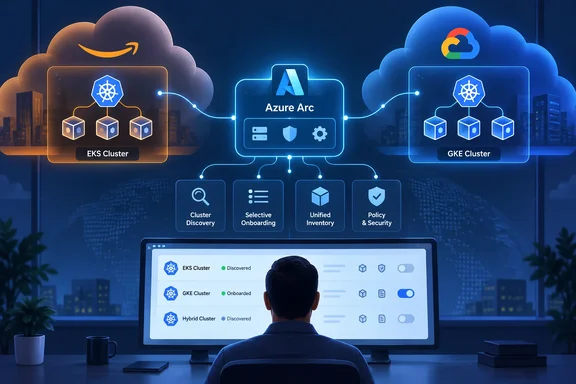
The EKS Arc onboarding solution autodiscovers Amazon EKS clusters in a connected AWS account, then helps onboard supported clusters to Azure Arc-enabled Kubernetes. Microsoft's announcement extends the same model to GKE clusters in connected GCP projects. In practice, the connector:
- Scans the source-cloud regions you choose for eligible clusters.
- Shows discovered clusters in Azure next to your other resources.
- Installs the Arc-enabled Kubernetes agents on the clusters you select.
- Re-scans on a schedule you define, so new clusters get picked up.
This is an onboarding bridge, not a conversion. Your EKS and GKE clusters stay where they are. They gain an Azure Arc-enabled Kubernetes resource and do not become AKS clusters.
Why you might want it
Microsoft says that once a cluster is Arc-enabled, you can attach several Azure services to it:
- Azure Policy for Kubernetes
- Microsoft Defender for Cloud
- Azure Monitor container insights
- Flux v2 GitOps and Arc-enabled Kubernetes extensions
- Azure Resource Graph queries, including metadata and tags carried over from AWS or GCP
Each of those services has its own regional and feature requirements. Arc onboarding alone doesn't guarantee that every capability works in every region or cluster configuration. Microsoft's documentation says this explicitly.
Scoping, sync and status
Filters. You can scope by source-cloud region. By default, all supported regions are scanned, and you can exclude some when you configure the solution. You can also filter by AWS tag or GCP label, and the matching is case-insensitive.
Periodic sync. The sync interval controls how often the source cloud is scanned. With sync on, the connector evaluates newly discovered clusters against the onboarding prerequisites. If onboarding fails for an eligible cluster, a later sync can retry it, as long as the cluster is still in scope for your filters. Sync also keeps Azure's view aligned with the source. For example, a cluster deleted in AWS or GCP can have its discovered inventory entry removed on a later sync. If you turn sync off, new clusters are not automatically discovered or evaluated after the initial setup.
Status in the portal. Microsoft lists these common connectivity states:
| Status | Meaning |
|---|---|
| Connecting | An onboarding attempt is in progress |
| Connected | The cluster is onboarded to Arc-enabled Kubernetes |
| Agent Not Installed | The cluster is eligible or selected, but the agents aren't installed yet |
| Offline | The cluster is onboarded, but it is offline |
| Expired | The cluster's Arc connection has expired |
Microsoft notes that the exact portal wording might vary. The announcement also describes selecting the clusters to onboard, so don't assume every discovered cluster ends up Arc-connected automatically.
Readiness checklist
- Connect the cloud first. Link the AWS account or GCP project through the multicloud connector. For AWS, Microsoft's setup steps use a CloudFormation template. For GCP, they use a Terraform template that you apply with
terraform init,terraform plan -out tf.planandterraform apply tf.plan. - Check Azure permissions. The general connector documentation calls for the Contributor role on the subscription. It also lists resource providers to register on first use, including Microsoft.HybridCompute, Microsoft.HybridConnectivity, Microsoft.AwsConnector and Microsoft.Kubernetes.
- Check AWS permissions. For Arc EKS onboarding, the service requires EKS Read & Write access to install the Arc-enabled Kubernetes agent.
- Check GCP permissions. The general setup page words its GCP Arc onboarding permission around the Connected Machine agent, which is the server-side scenario. Confirm the exact GKE permissions on the Kubernetes-specific onboarding page before you deploy. Don't assume the server permission applies.
- Confirm reachability. The cluster must be reachable from the onboarding environment so the agents can be installed. The Kubernetes API server endpoint must also be accessible for the connectivity method you choose.
- Plan connectivity. Depending on your environment, you may need to supply API server details, HTTP/HTTPS proxy settings, proxy skip ranges, or an Arc gateway resource. The cluster also needs network access to the required Arc endpoints. Arc gateway can reduce the number of endpoints you must allow. If you use a proxy, it must be reachable from the cluster and must permit the Arc traffic.
- Meet the base Arc requirements. Microsoft's system requirements page lists a CNCF-certified cluster, a kubeconfig and context, and at least one linux/amd64 or linux/arm64 node. The Arc agents need at least 850 MB of free memory and about 7% of one CPU.
- Watch ARM64-only clusters. Cluster extensions other than Flux (GitOps) are not supported on ARM64-based clusters. Other extensions need at least one linux/amd64 node. This could affect Graviton-based EKS node groups, so check your node mix before counting on Defender or Monitor extensions. That implication is my inference from Microsoft's stated rule, not something Microsoft says about EKS.
Limits to know about
- Supported platforms. Only Amazon EKS clusters in AWS and GKE clusters in GCP are supported. Clusters must be in regions the connector supports.
- Clusters already connected to Arc. Do not re-onboard these through the connector. Doing so might create duplicate Azure resources or fail. Keep using the existing Arc-enabled Kubernetes resource. If an existing Arc agent is unhealthy or disconnected, fix that problem on the cluster instead of onboarding again.
- Brownfield onboarding. Microsoft says brownfield onboarding for clusters with an existing Arc agent might not be supported in the initial preview.
- Preview terms. The features fall under the Supplemental Terms of Use for Azure Previews. The announcement gives no general-availability date.
Context and analysis
The connector isn't new. Microsoft introduced GCP support in preview around Ignite 2025. At that point it covered inventory and Arc onboarding for GCP VMs. This release extends the same discover-then-onboard pattern from servers to Kubernetes.
For platform teams running a mix of AKS, EKS and GKE, the appeal is plain. You get one inventory and one policy and security plane without hand-running Arc connect commands on every cluster. The tag and label filters help you pilot on a handful of clusters first.
The caveats are real too. This is preview software. It doesn't cover brownfield clusters yet. Every downstream Azure service brings its own constraints. A sensible approach is to scope the first run narrowly by region and tag, in a non-production account. Verify the agents and the connectivity states, then widen the scope.
Microsoft has not published pricing details for this feature in the material I reviewed. Check the Azure pricing pages for the downstream services you attach, such as Defender for Cloud and Azure Monitor.
References
- Public Preview: Onboard Kubernetes Clusters to Azure Arc with the Multicloud Connector Azure Arc Blog · 2026-10-07T13:59:49+00:00
- Onboard Amazon EKS clusters to Azure Arc through the multicloud connector (preview) - Azure Arc learn.microsoft.com
- Add a public cloud with the multicloud connector in the Azure portal - Azure Arc learn.microsoft.com