

What managed connectors add
Functions already had triggers and bindings for many Azure services. This preview adds two things for external SaaS systems:
- Connector triggers. Microsoft lists examples such as Office 365 new-email, Teams message-posted, SharePoint item-created/updated, Dataverse row-changed and Salesforce record-updated. In C# you declare these with the
[ConnectorTrigger]attribute, as the Azure SDK Blog post shows. - Typed connector SDK clients. These let function code take actions in the connected service. Microsoft names clients such as OutlookClient, TeamsClient, Office365UsersClient and DataverseClient, and says the list is growing.
The pitch is that you skip webhook registration code and OAuth token handling. The Connector Namespace is a separate Azure resource. It hosts trigger configurations and outbound connections, and it manages authentication to SaaS systems. A single function app can combine connector triggers and actions with HTTP, timer, queue, Service Bus, Event Grid and Durable Functions. So this adds to the existing model and replaces nothing.
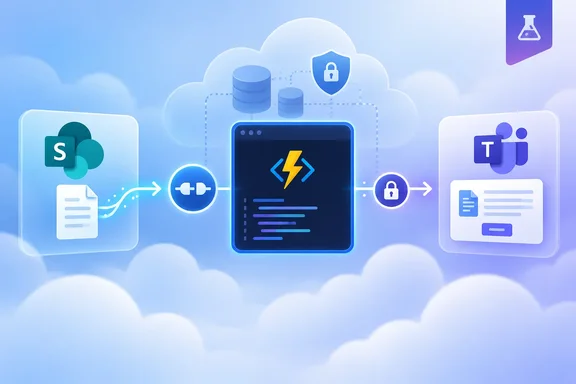
The sample: from SharePoint upload to Teams card
The sample is a .NET app for RFP intake. The flow works like this:
- Someone uploads an RFP to a SharePoint document library.
- The SharePoint "When a file is created" trigger calls the function.
- The trigger delivers file properties, not file contents. The function therefore uses a typed SharePoint client to fetch and decode the bytes.
- Azure Content Understanding's
prebuilt-layoutanalyzer extracts text and layout. - Deterministic C# rules pull out the customer and the numbered "Required Capabilities" headings. They map those to subject-matter-expert roles.
- A typed Teams client posts the result as an Adaptive Card to a channel.
The source blog describes this as automating the process. The sample repository is more precise about what it does. It says Content Understanding does OCR and layout extraction without invoking a generative model. The classification is plain parsing code. If the expected capabilities section is missing, the parser returns empty lists instead of guessing. That is a sensible design choice for a routing workflow. Don't read the sample as "AI reads your RFPs".
Preview boundaries to check first
This is a preview, and Microsoft's documentation says features, configuration names and supported connectors can change before general availability.
- Languages. The Learn overview names .NET isolated, Python 3.13+ and Node.js 22+. Java, PowerShell and Go aren't supported. The wording differs between Microsoft's pages. One version of the Learn page lists .NET 10 only. An earlier page version and the sample indexes list .NET 10 and .NET 8 isolated. The sample repository requires the .NET 10 SDK. Confirm the current page before you pick a runtime.
- Language parity. The docs say some pieces aren't available in every language yet. The Python and Node.js SDKs carry notes that action coverage is still expanding. Typed trigger models also vary, and connectors without typed models give you raw JSON. The .NET path in the sample is the most complete.
- Hosting. Flex Consumption is recommended. Premium, Dedicated (App Service plan) and Azure Container Apps are also listed.
- Regions. This detail has changed between pages. Earlier Microsoft pages and sample repos say the namespace is available in West Central US only, while the Learn page version supplied for this story says any supported region. The function app itself can be deployed in any region that supports the chosen hosting plan. The sample also limits its region prompt to those supported by Content Understanding.
- Cost and support. There is no extra charge for the connector trigger or SDK during preview, but the Connector Namespace resource has its own billing. A Microsoft tech community post says there's no SLA and it isn't recommended for production workloads during preview. The same post says pricing isn't finalized and may change before GA.
- Connector count. The blog cites about 1,700 connectors. Microsoft's own announcement post cites 1,400+ connectors. I'd treat the figure as approximate. It is also a catalog size. Typed SDK coverage and trigger support are much narrower in preview.
Security: two separate authentication boundaries
"No OAuth tokens to manage" needs a caveat. There are two distinct pieces:
- Connector to upstream service. You still authorize SharePoint and Teams. The sample uses a script because Bicep creates the connections but a user must grant OAuth consent. Microsoft's Connector Namespace documentation says managed identity authentication for connections isn't available yet during preview.
- Namespace callback to your function app. By default the namespace presents a shared
connector_extensionsystem key. For production, Microsoft recommends App Service built-in authentication with a managed identity. In that pattern the namespace's identity gets an Entra token for each callback. The app validates the issuer, audience and object ID. Theconnector_extensionkey check can then be relaxed inhost.json.
The RFP sample uses the system-key approach and says it does not use built-in authentication. Treat it as a demo. Before exposing a connector-triggered function to production traffic, consider the built-in auth pattern. If you test locally, the sample says to run func start --enableAuth whenever you use a dev tunnel. Otherwise the endpoint is unauthenticated on the public internet.
Running the sample
The prerequisites are:
- A SharePoint site and library.
- A Teams team and channel.
- Azure Developer CLI.
- Azure CLI 2.75.0 or later.
- Functions Core Tools.
- The .NET 10 SDK.
- Azurite.
- The
connector-namespaceCLI extension.
The Teams Workflows app must be allowed in the Teams admin center, because the card-posting action needs it. Setup is azd up, which prompts for subscription, region, SharePoint site and library, and Teams team and channel IDs. It then opens browser consent flows. To test, upload sample-data/contoso-rfp.pdf under a new filename, since the trigger fires on newly created files. Allow up to five minutes for the trigger to poll.
If no card appears, the README suggests checking these:
- The trigger's callback URL and key.
- For local runs, whether port 7071 is forwarded and public.
- Whether Azurite is running.
- Whether the Teams connection was authorized by a user with channel access.
- Whether the file format is supported.
- Whether the document has a numbered Required Capabilities section.
Functions or Logic Apps?
Microsoft's guidance is consistent. Choose Functions with connectors for code-first work. That means custom branching, existing libraries, other bindings, or document and AI processing between trigger and action. If the job is mostly orchestrating connector operations with little code and you want a visual designer, Logic Apps is usually simpler.
Functions with connectors does not remove integration work. You still provision a namespace, authorize connections, write business logic and secure the callback path. What it removes is the per-service webhook and token plumbing. Microsoft 365-heavy shops will probably find that trade attractive. The preview terms mean it is best for prototypes today.
References
- Connect Azure Functions to more services with managed connectors Azure SDK Blog · 2026-10-05T19:43:44+00:00
- Use managed connectors in Azure Functions | Microsoft Learn learn.microsoft.com
- Announcing managed connectors for Azure Functions (Preview) techcommunity.microsoft.com