

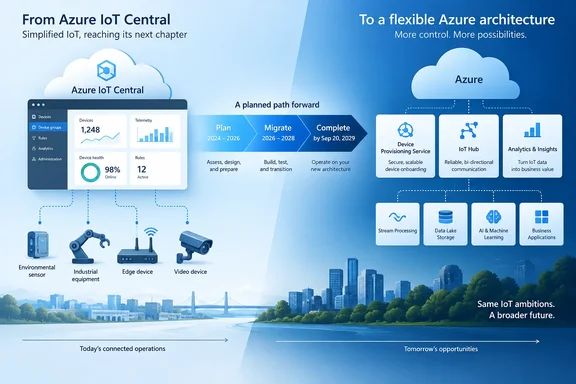
Microsoft calls this an "evolution," not a shutdown. The practical effect is the same. Customers have about three years to move off a managed IoT application and onto a set of Azure services they will run themselves.
The key dates
Microsoft's IoT blog on Tech Community lists the dates plainly: New IoT Central application creation is unavailable starting September 23, 2026. Existing applications continue to work as-is through September 20, 2029. After September 20, 2029, IoT Central applications are no longer available.
| Date | What happens |
|---|---|
| September 23, 2026 | You can't create new IoT Central applications |
| Until September 20, 2029 | Existing applications keep working as they are |
| After September 20, 2029 | IoT Central applications are no longer available |
The retirement covers IoT Central applications only. Microsoft names Azure IoT Hub, Device Provisioning Service (DPS), Azure Device Registry and Microsoft Fabric as the services customers should move to. None of them is being retired. It is also not a hard stop today. Existing fleets have a long runway.
Section summary: New IoT Central applications are already blocked. Existing ones work until September 20, 2029, and then they stop being available.
Haven't we heard this before?
Yes. In February 2024, a message in the Azure console caused a stir. The Register reported that Microsoft confirmed the Azure IoT Central service is being retired on March 31, 2027, and that new application creation would stop from April 1, 2024. Other outlets repeated that date.
Microsoft then withdrew it. On the Tech Community forum, a Microsoft representative said the error message you received regarding the retirement of Azure IoT Central is inaccurate and was presented in error. For a while, the 2027 date lived on in forum posts and in vendor marketing aimed at IoT Central customers.
The 2029 date is different. It comes with official documentation, a mapping of each IoT Central feature to a replacement service, a migration playbook and a device-migration tool. If you planned around March 31, 2027 because of the 2024 reports, replace that date with September 20, 2029. Keep the urgency, though.
Why Microsoft is doing this
Microsoft's own explanation is about focus. In the Microsoft Learn guidance, it says IoT Central was an easy managed on-ramp to IoT, but it now wants to put its investment into Azure-native building blocks. That means IoT Hub and DPS for connectivity and provisioning, and Azure Device Registry, which manages devices as ARM resources. Fabric Real-Time Intelligence handles analytics.
Microsoft's blog says the new approach leverages IoT Hub capabilities such as certificate management, along with Microsoft Fabric capabilities such as the operations agent, to modernize connected solutions.
My read, based on general industry experience rather than anything Microsoft has said: this is a vendor retiring a complete, all-in-one product in favor of separate components. Components are more flexible and scale further. They also leave you owning the architecture, running more resources and paying for more than one line item. IoT Central's appeal was that dashboards, rules, device templates and users all lived in one place. Those pieces are now split across several services.
What replaces each IoT Central feature
Microsoft's Learn page maps IoT Central features to replacement services:
| IoT Central feature | Microsoft's recommended replacement |
|---|---|
| Device connectivity and messaging | Azure IoT Hub |
| Device onboarding and provisioning | Device Provisioning Service (DPS) |
| Device inventory and governance | Azure Device Registry (in preview) |
| Rules, automation and integration | Message routing, Event Grid, Functions / Logic Apps, Fabric Activator |
| Dashboards and analytics | Microsoft Fabric Real-Time Intelligence, Power BI |
Two points stand out:
- Azure Device Registry is still in preview. You probably won't want a production governance plan that depends on a preview service, at least not yet.
- Rules and automation are split across four services. In IoT Central, a rule was something you clicked together. Now it becomes a routing configuration, an Event Grid subscription, a Function or Logic App, or a Fabric Activator trigger. Expect this to be where most of the rebuild work goes.
For dashboards, Microsoft points to its Azure IoT Solution Accelerator Workload for Fabric Real-Time Intelligence. It deploys Eventstream ingestion, an Eventhouse/KQL database and ready-made real-time dashboards on top of IoT Hub telemetry. It gives you a working analytics pipeline to start from. Microsoft doesn't claim it recreates your existing IoT Central dashboards or workflows.
Section summary: There is no single replacement product. You rebuild on IoT Hub, DPS, Fabric and supporting services, and the rules and automation layer takes the most work.
How device migration works
Microsoft's IoTC Migrator tool moves devices, not whole solutions. The Learn documentation says so directly and points to separate architecture guidance for feature parity, target design, analytics, rollout and rollback.
What the tool does
- It creates device registrations in your destination IoT hub.
- It sends each device the ID scope of the DPS instance linked to that hub, using a
DeviceMovecommand. - Each device must then stop sending telemetry, disconnect from IoT Central, provision itself through DPS with the new ID scope, and connect to the destination IoT hub.
Device firmware must support the command
For this to work, your devices must implement DeviceMove in a component named migration, with the interface ID dtmi:azureiot:DeviceMigration;1. The tool's repository includes a sample DTDL component that you can add to your device templates, plus sample device code.
If your deployed firmware doesn't handle that command, you need a firmware update first. For devices in remote locations, or devices that are rarely updated, that could take longer than anything else in the migration. Start there.
Prerequisites
- The source IoT Central application
- A destination IoT hub linked to a DPS instance
- Node.js and npm on the machine that runs the tool
- A Microsoft Entra app registration set up as a single-page application, with a redirect URI of
[url]http://localhost:3000[/url]and the documented API permissions added in the app's manifest - Your devices' existing credentials added to a DPS enrollment: the shared access signature keys from IoT Central's device connection groups, or your root or intermediate X.509 certificates
Running it
After you clone the repository, create a .env file with your client ID, tenant ID and redirect URI. Run npm install and npm start, then open the tool at [url]http://localhost:3000[/url]. For each migration, pick a device group, a device template that includes DeviceMove, and the destination DPS instance. The tool registers the matching devices and creates an IoT Central job that sends the command to them.
How to tell it worked
A migrated device shows as Disconnected in IoT Central. In IoT Hub it shows as registered and provisioned, and its telemetry arrives there.
Where migrations commonly go wrong
- Unassigned devices. The tool works by device group, and unassigned devices can't be added to a device group. That means the tool can't currently migrate unassigned devices. Assign them to a template before you plan your migration waves.
- Billing. Migrated devices are not deleted from IoT Central automatically. They keep incurring IoT Central charges until you remove them. Put cleanup on the checklist.
- Historical data. The tool doesn't move historical data. Set up continuous export of telemetry and properties to a destination such as Azure Data Lake, Event Hubs or a webhook. You can export device templates through the IoT Central UI or the REST API. The REST API can also export users.
- Big-bang cutovers. Microsoft recommends running the new solution alongside IoT Central, sending both data streams to the same data lake, and migrating in waves by region or device group. Check each wave, and if one goes wrong, move those devices back to IoT Central.
Your first moves
Microsoft suggests starting with an inventory of your device templates, device groups, jobs, rules, exports, dashboards and users. Next, assess an IoT Hub and DPS design, adding Device Registry where it fits, and plan a phased migration that keeps IoT Central running until you're done. Microsoft also lists two partners, Mesh Systems and Helin, and suggests contacting your Microsoft account team for help.
Practitioners are giving similar advice. Writing on the Beyond Cloud blog, one consultant argues that the deadline is not an instruction to disconnect devices today. The author recommends assigning a migration owner and proving a full operator workflow before you celebrate a successful telemetry connection.
Bottom line
Three years sounds like plenty of time. Much of it can go to firmware updates, rebuilding rules and dashboards, testing in parallel, and the cleanup needed to stop paying for devices that have already moved.
If you run IoT Central in production, treat this as a redesign project, not an endpoint change. Also check which date your plans are built on. The 2027 date from 2024 was withdrawn, and September 20, 2029 is the official deadline.
References
- Retirement: Azure IoT Central will be retired on September 20, 2029 Azure Updates · 2026-09-29T17:25:10Z
- Re: Azure IoT Central retirement? - Microsoft Community Hub techcommunity.microsoft.com
- Migrate devices from Azure IoT Central to Azure IoT Hub - Azure IoT Central | Microsoft Learn learn.microsoft.com