

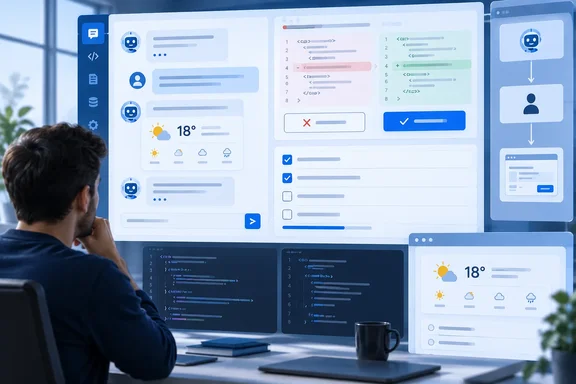
The package is Microsoft.AspNetCore.Components.AI. It is aimed at .NET developers testing .NET 11 RC1. It is not a finished library, and Microsoft says so plainly.
What shipped, and what "experimental" means here
The official ASP.NET Core release notes for .NET 11 RC1 say the new package includes an initial set of Blazor AI components for streaming chat, rich-text and tool rendering, human approval flows, and typed, shared, and predictive UI state. The notes also set expectations early: the Microsoft.AspNetCore.Components.AI package is experimental and will remain prerelease throughout .NET 11. For .NET 11 RC1, use version 0.1.0-preview.1.26459.102.
You don't need to wait for a stable release to try it. You should plan for API changes, though. The package keeps its preview label for the whole .NET 11 cycle.
The components are built to work with the rest of Microsoft's AI stack for .NET:
- Microsoft.Extensions.AI, which provides the
IChatClientabstraction - The AG-UI .NET SDK, for talking to remote agents
- Microsoft Agent Framework (MAF), for building agents
- ASP.NET Core, for hosting agent endpoints
- Microsoft Foundry, for model inference
- Aspire, to wire everything together and add logs and traces
Section summary: This is an experimental, prerelease-for-all-of-.NET-11 package for rendering agent interactions in Blazor. It sits on top of Microsoft's existing AI abstractions and doesn't replace them.
Getting started: the one-liner and the gotcha
According to Microsoft's blog post, setup takes two steps:
- Install the .NET 11 RC1 SDK.
- Add the package:
dotnet add package Microsoft.AspNetCore.Components.AI --prerelease
The quickest entry point is ChatPage, which bundles a message list, a text input, streaming status and retry behavior. You pass it a UIAgent, which wraps any IChatClient, reads its streaming ChatResponseUpdate values, and turns them into observable ContentBlock objects. In a Razor page that's <ChatPage Agent="_agent" Placeholder="Ask me anything…" /> plus _agent = new UIAgent(chatClient);.
The known restore problem. Our search of the dotnet/aspnetcore issue tracker found a packaging problem that could stop you at step two. In issue #69261, opened September 13, 2026 by Roth himself, Microsoft.AspNetCore.Components.AI version 0.1.0-preview.1.26459.102 is published to NuGet.org, but its net11.0 dependency group references a Microsoft.AspNetCore.Components.Web 12.0.0 alpha build that is not available on NuGet.org. The issue says that as a result, consumers cannot restore the Components AI package using only NuGet.org and must either add a .NET shipping feed or force a package downgrade. The workaround it records: the app builds successfully when the dependency is explicitly pinned to Microsoft.AspNetCore.Components.Web 11.0.0-rc.1.26425.128, but that requires suppressing NU1605.
The search results don't show whether the issue has been fixed. If dotnet restore fails on a missing Components.Web 12.0 alpha, check the issue's current status before you start blaming your NuGet cache.
The building blocks
Here are the main pieces of the component model, in plain terms:
| Piece | What it does |
|---|---|
ChatPage | Ready-made chat UI: messages, input, streaming status, retry |
UIAgent | Wraps an IChatClient and turns streamed updates into content blocks |
UIAgent<TState> | Adds strongly typed app state that Razor components and the agent can both update |
ContentBlock | One piece of an interaction, with identity, role, lifecycle state and change notifications |
AgentBoundary | Sets up the interaction context for custom layouts |
MessageList / MessageInput | Show the turns and submit text |
BlockRenderer<TBlock> | Picks the Razor markup for a given block type |
Built-in blocks cover conversational content, tool calls, approvals and frontend actions. You can register handlers to map other model content into your own block types.
There are some limits in this preview. MessageInput handles text only. For images, files or audio, you build your own input component and call AgentContext.SendMessageAsync(ChatMessage). Capturing, transcribing and processing media is still the job of your app and your AI service. The package also doesn't choose a Markdown parser for you. You either build the rich-text node tree yourself or add IChatClient middleware that converts the model's output.
AG-UI: optional for basic chat, required for the rest
Every Blazor developer will hit this architectural question at some point. The RC1 release notes say that while basic chat functionality is supported with any IChatClient, AG-UI is required when a remote server and the Blazor client need to exchange frontend tool declarations, backend tool events, approval interrupts, shared-state events, or AG-UI conversation identifiers.
AG-UI is an open, event-based protocol that defines interaction events, not UI components. The Blazor components follow its interaction model without being tied to it directly. On the client side, AGUIChatClient from the AG-UI .NET SDK implements IChatClient. That means UIAgent works the same way whether the agent is remote, in-process or tied to a specific provider.
On the server, Microsoft's sample calls AddAGUIServer() and maps one endpoint per scenario with MapAGUIServer("/route", agent). Both methods come from Microsoft.Agents.AI.Hosting.AGUI.AspNetCore. Events travel over HTTP and Server-Sent Events.
Eight patterns, one sample app
Microsoft's AgenticUI sample on GitHub splits each pattern into its own page. According to its README, the Blazor front end runs in Interactive Server mode. Here's what each page shows:
- Streaming, formatted chat. A
DelegatingChatClient(the sample'sFormattedChatClient) collects streamed Markdown by message ID and insertsRichTextContentsnapshots. Paragraphs, lists, tables and code then render as structured nodes. - Backend tools. The server runs
get_weather. A[ToolBlock("get_weather")]source generator maps the arguments and the result into a typedWeatherToolBlock, and aBlockRenderershows "Fetching weather…" untilHasResultflips. The tool runs entirely on the server. The weather card is just how the Blazor app chooses to display it. - Frontend tools.
set_accent_coloris registered inChatOptions.Toolsand runs inside the Blazor app throughAGUIChatClient's client-side tool pipeline. It returns a result so the agent can carry on. - Human in the loop. The consequential
book_meetingtool is wrapped inApprovalRequiredAIFunction. It shows up as aFunctionApprovalBlockwithApproveandRejectactions. Rejecting returns the decision without running the tool, andAgentContext.CancelAsynclets users cancel a response mid-stream. - Shared state. In the recipe editor, the client sends its typed state in
RunAgentInput.State. The server maps thegenerate_reciperesult to aSTATE_SNAPSHOT, and a client-sideStateMapperapplies it. When the user edits directly, those edits go out with the next request. - Predictive state. The agent calls a
propose_documentUI action, and the editor shows the proposal as a diff against the committed baseline. Accepting commits it. Rejecting restores the baseline, and so does a run that fails, gets cancelled or finishes without a decision. - Agentic generative UI.
create_planproduces aSTATE_SNAPSHOT, and eachupdate_plan_stepproduces aSTATE_DELTAcarrying an RFC 6902 JSON Patch. A Razor checklist re-renders as each one arrives. - Reasoning summaries. A
ReasoningActivityHandlercollectsTextReasoningContentinto a collapsible panel. Roth stresses that this is a summary the model chooses to provide, not hidden chain-of-thought.
One detail from Microsoft Learn's "What's new in ASP.NET Core in .NET 11" page is worth knowing before you copy pattern 7. For activity deltas, Microsoft says the app defines the activity payload and completion semantics; Components.AI doesn't include an AG-UI-specific activity handler or JSON Patch implementation. The ApplyDelta helper in the sample is your code to own, not a framework API.
Section summary: The patterns move from "chat that streams" to "agent and user editing the same document with a diff and an accept button." That last step is what separates this from a demo chatbot.
Running the sample: prerequisites and pitfalls
According to the AgenticUI README, you need:
- The .NET 11 RC1 SDK
- The Aspire CLI and the Azure CLI
- A Microsoft Foundry resource with a
gpt-5-minideployment, used for both the chat and reasoning scenarios
The setup steps:
- Clone the repo, then run
dotnet restoreanddotnet build. - Run
az loginwith an identity that has the Cognitive Services OpenAI User role on the Foundry resource. - Set the endpoint with
dotnet user-secrets set "Parameters:foundry-endpoint" "https://<resource>.services.ai.azure.com/" --project src/AgenticUI.AppHost. - If your deployment names aren't
gpt-5-mini, setParameters:foundry-modelandParameters:foundry-reasoning-modelthe same way. - Run
aspire run, open the Aspire dashboard, launch the web resource and pick a scenario.
The app authenticates with Microsoft Entra ID through DefaultAzureCredential. A deployed agent server's managed identity needs the same role you use locally. The AppHost treats Foundry as an externally managed dependency and won't create or change your Foundry account. The README lists these fixes for common failures:
- No endpoint configured: set the
Parameters:foundry-endpointuser-secret. - Authentication failures: run
az loginagain and check the role assignment. - Deployment not found: make the model parameters match your Foundry deployment names.
The reasoning page takes a separate code path for a reason. The README explains that reasoning models only return summaries through the OpenAI Responses API, so that scenario builds its client with GetResponsesClient().
Package versions also need care. The README lists the AG-UI SDK packages (AGUI.Client, AGUI.Server and the rest) at 1.0.0 stable. MAF's AG-UI hosting package is still 1.15.0-preview, and Azure.AI.OpenAI is a beta. So the full stack is a mix of stable and preview parts, not just the Blazor layer. These are the sample's pinned versions, not a compatibility matrix.
The analysis: promising design, preview-grade plumbing
The best idea here is the control boundary Roth describes: the agent can request an action, while the application decides how the user sees it and whether it goes ahead. Approval blocks, UI actions and predictive state with automatic rollback turn "human in the loop" into actual types and components, not a slide in a keynote. For enterprise teams who worry about an LLM booking meetings or rewriting documents on its own, that design matters more than any streaming animation.
The sample also shows a sensible defensive habit. When the recipe state goes to the model, the server labels it as JSON data, not instructions. That's a small nod toward prompt-injection risk in shared state. (This is our read of the code, not a security guarantee from Microsoft.)
There are good reasons to hold off on production use:
- Experimental for the whole release. The package stays prerelease throughout .NET 11. Consultancy GAPVelocity notes that .NET 10 is an LTS release supported through November 14, 2028, while .NET 11 is an STS release. Building on an experimental package on a short-term-support runtime will make any change-control board nervous.
- Rough packaging. The dependency issue above shows the first preview wasn't clean to restore from NuGet.org alone.
- Azure-heavy sample. The component model works with any
IChatClient, but the reference app assumes Foundry, Entra ID and Aspire. Teams using other model providers will need to adapt it. - Some assembly required. You bring your own Markdown parser, JSON Patch implementation and multimedia input.
Is this Microsoft's answer to the React-first world of agent UI frameworks? Partly. The bet is that Blazor shops would rather keep C#, Razor, dependency injection and their existing component libraries than bolt a JavaScript front end onto a .NET back end. For those teams, the typed tool blocks and state mappers make that bet a lot more credible.
Bottom line for Windows and .NET developers
- Try it if you're on .NET 11 RC1 and want to build agent UIs in C# without writing JavaScript.
- Start small:
ChatPageover an existingIChatClient. Add AG-UI only when you need remote tools, approvals or synchronized state. - Put consequential actions behind
ApprovalRequiredAIFunctionor UI-action confirmations. - Watch issue #69261 if restore fails, and expect API changes throughout the .NET 11 cycle.
- Send feedback: Microsoft is asking for API feedback, missing scenarios and usability issues in the dotnet/aspnetcore repository. While the package is experimental, that feedback can still change the design.
For more on this, see WindowsForum's coverage of the .NET 11 release candidates, Microsoft Agent Framework and Aspire orchestration.
References
- Build Agentic UI with the new Blazor AI components .NET Blog · 2026-09-28T17:05:00+00:00
- core/release-notes/11.0/preview/rc1/aspnetcore.md at main · dotnet/core github.com
- .NET 11 RC1 Adds an Agent Layer to Blazor. Here's Where It Fits in a Migration gapvelocity.ai