

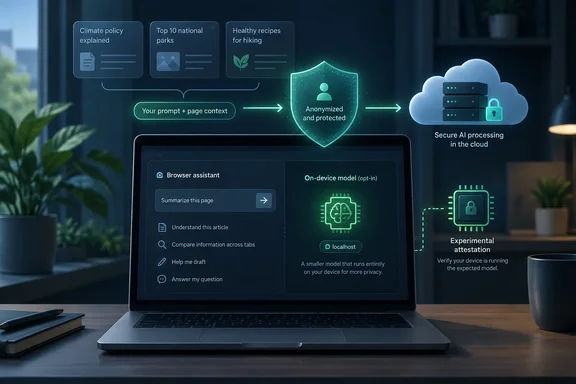
Brave Leo's privacy model starts with what leaves the browser
Brave's browser privacy policy, last updated August 26, 2026, lists what Leo sends to its backend for each feature. A normal chat sends your prompt plus the conversation so far. Every follow-up includes the earlier messages, so the whole thread goes to the server each time. Sometimes Leo also turns your question into search queries, sends them to Brave Search, and uses the results in its answer.
Page summaries and suggested questions send the text of the page or pages you're viewing, including any text you've highlighted. Tab-management features send the titles and URLs of your open tabs, but not Private or Tor tabs. A tab-history mode can also send passages of text that match results in your tab history. The feature doesn't send the contents of those tabs. Still, a list of tab titles often reveals what you're working on.
Most other AI assistants that run in a browser work the same way: large models run in a data center, so your text has to get there. Brave's claims are about what happens after the data arrives. They don't say the data never leaves your machine. If you want nothing to leave the device, Leo's default setup won't give you that, and the answer is in the Bring Your Own Model section below.
Brave's reverse proxy and no-retention promise
Brave describes three protections that apply once a request leaves the browser. First, requests go through an anonymizing reverse proxy, which removes the IP address so the server running the model can't tie the request to your network address. The policy says Brave doesn't collect identifiers that can be linked to you, such as your IP address.
Second, Brave says it doesn't keep prompts, responses, context or personal data on its servers. The policy calls this processing "ephemeral": data is discarded soon after the chat ends. Large prompts may be cached briefly for performance, and Brave says those caches are deleted within minutes. Brave's Help Center says the same thing in plainer terms: conversations aren't stored or logged after a response is generated, and they aren't used to train models.
Third, Brave says model makers don't get your data. According to the Help Center page on Leo's models, updated February 19, 2026, Brave now hosts all AI models, including Claude, through its own secure infrastructure. Brave says it changed this on June 30, 2025. Before then, some models ran through outside providers. Older articles saying Leo sends some traffic to zero-retention setups at cloud providers such as AWS Bedrock describe that earlier arrangement. The current page says there is no data sharing between Brave and the original model creators. Its example: using Meta's Llama in Leo is completely separate from Meta.
All of this is Brave describing its own service. Outside coverage matches it: CyberInsider reported that Leo operates without logging IP addresses, storing chat histories, or using user data for model training, and TechRadar's review said the same. Those outlets are repeating Brave's documentation, though. Neither published an audit of Brave's servers. For every model except one experimental option, Leo's privacy depends on Brave's policy and on Brave following it.
Where "no data" stops: telemetry, feedback and local history in Brave Leo
Brave does collect some Leo data. The privacy policy describes aggregate query analytics using two of its privacy-preserving measurement systems, STAR and Nebula. They pull out basic information about each request: the rough category of the query, its language, and which model answered. Brave says this lets it see patterns, such as what share of users ask for creative writing, without learning who asked or what they wrote. The query text itself isn't collected.
The rating buttons on Leo's answers are a bigger exception. Brave's privacy policy says that if you choose to send feedback on a response, Brave receives the full current conversation. It also receives your language, selected model, browser version, Premium status and rating, plus any optional details or current website you add. Brave says it deletes feedback from its servers after one year. Normal chats are discarded within minutes, so rating a response is a separate choice to share more. If a conversation includes anything sensitive, don't send feedback on it.
Chat history is stored on your device. When it's turned on, Brave says history is encrypted and kept locally, not on Brave's servers. You can turn it off or clear saved chats at brave://settings/leo-ai, and the Help Center says a "Clear Leo data" option removes them. Chats can also be temporary, so they're never saved even locally. Clearing your browsing history removes page content attached to chats. Chat history isn't available in Private Windows or Private Windows with Tor.
Some reviews say Leo has no memory between sessions. Brave's Help Center now has a page on "Leo customization and memory features", so that's out of date. How those memory features store data isn't covered here. If you depend on them, look up where that data is kept before assuming it follows the same rules as chat history.
Leo Premium keeps your payment separate from your chats
You don't need an account for free Leo. Leo Premium costs $14.99 per month or $149.99 annually. Premium adds more models and higher usage limits, and Brave's Help Center shows the same privacy protections in both tiers. You don't have to pay to get Leo's core privacy protections.
Premium adds one protection of its own. To confirm your subscription, Brave issues unlinkable tokens, which prove you've paid without revealing which subscriber you are. The Help Center says Brave cannot connect your subscription information to your actual usage of the models. It also says the email address on your account can't be linked to your everyday use of Leo. Many other paid assistants tie chats, account and payment together. Here Brave says they're kept apart.
The models on each tier change often. Brave's Help Center currently lists Qwen 3 VL 30B, Claude 4.5 Haiku, Llama 3.1 8B, Llama 4 Scout, Llama 4 Maverick and GPT-OSS 20B for free users. Premium adds larger models, including Qwen 3 VL 235B, Qwen 3 Coder 480B, DeepSeek V3.1, Claude 4.6 Sonnet, Claude 4.6 Opus, Mistral Large 2407, Pixtral Large 2502, GPT-OSS 120B and Gemma 3 12B. Third-party reviews from 2026 list different models, and Brave itself says the lineup will change from time to time. Check the model menu in Leo for the current list. An Automatic mode picks a model for you, and you can choose one yourself or set a default at brave://settings/leo-ai.
Brave Nightly's TEE option lets hardware back up the promise, for one model
The most technically interesting part of Leo's privacy work is still experimental. On November 20, 2025, Brave announced that Leo could run models inside Trusted Execution Environments (TEEs). A TEE is a hardware-isolated area of a processor or GPU, with memory that nothing outside it can read. Brave's version uses NEAR AI's TEEs on Nvidia GPUs, and is available in Brave Nightly (our testing and development channel) for early experimentation with DeepSeek V3.1. The Register and CyberInsider both reported the same limits: Nightly only, one model.
Brave says the TEE produces a signed attestation report, a record containing hashes (unique fingerprints) of the loaded model and the code running it. Checking that report shows the request ran on a genuine Nvidia TEE, stayed encrypted, and was handled by the expected model and open-source server code without changes. Brave's blog says a TEE-enabled CPU such as Intel TDX paired with a TEE-enabled GPU such as Nvidia Hopper can protect the whole inference process. Brave's own background section says that even a fully compromised operating system can't read or change what's inside the TEE.
It also covers a second worry beyond privacy. CyberInsider noted that attestation directly addresses growing concerns about model substitution, where providers quietly swap premium AI models with cheaper, lower-quality alternatives to reduce costs. For a Premium subscriber, that's a way to confirm you got the model you paid for.
The limit is in who does the checking. In what Brave calls Stage 1, Brave performs this verification internally and communicates the outcome to users with a "Verifiably Private with NEAR AI TEE" label in the Leo interface. So the green label is still Brave telling you the check passed. You can't yet check the attestation yourself. Brave says it's researching how to move verification into the browser so users can confirm it themselves, and it plans to open-source every stage. It also wants to eliminate any noticeable slowdown before rolling TEEs out more widely. The sources found here don't show that user-side verification has shipped or that the feature has reached stable Brave.
Bring Your Own Model on Windows is the only setup where your data stays on your PC
Leo's Bring Your Own Model (BYOM) feature connects Leo to a model you choose. According to Brave's Help Center, it needs Brave 1.69 or later on a desktop system: Windows, macOS or Linux. BYOM supports two very different setups, and it's worth knowing which one you're using.
With a local model, Brave says all processing happens on your device and conversations, webpages and prompts never leave your machine. For sensitive material, this is the only setup where you don't have to trust anyone else. Brave lists these hardware requirements: at least 8GB of RAM, between 829MB and 40GB of storage depending on the model, and enough processing power to run it. Brave suggests small models, such as the 2GB, 3B-parameter version of Llama 3.2, for less powerful PCs.
Brave's documented local setup uses Ollama:
- Download and install Ollama for Windows (or your platform) from Ollama's download page.
- In a terminal, download a model, for example
ollama pull deepseek-r1. - In Brave, open Settings, go to Leo settings, scroll to "Bring your own model" and click "Add new model".
- Enter a label for the model menu and the model request name (for example
deepseek-r1). Set the server endpoint to[url]http://localhost:11434/v1/chat/completions[/url]and leave the API key blank unless your setup needs one. - Open Leo, click the model menu, and pick your custom model.
If the endpoint is localhost, it's running on your own machine. A remote endpoint works differently, even though you configure it the same way. When BYOM points at a third-party API such as OpenAI's, Brave says requests go straight from your device to that provider without passing through Brave's servers, and Brave's Leo supports both local and cloud-based AI models. Brave's help page says plainly that its own protections, including the reverse proxy and retention rules, don't apply in this case. The provider may keep your conversations, train on them, or process them in other countries. BYOM with a remote endpoint gets whatever privacy that provider offers, not Brave's.
What this means for you
Choose based on what you're sending to Leo. Everyday questions and summaries of public pages are covered well by Brave's default protections on the free tier. For confidential material such as client documents, health information or internal work, rely only on a local model. Once your data leaves the PC, you're trusting a written policy, apart from the experimental option in Nightly.
- Leo sends your prompt, the full conversation, and, depending on the feature, page text, highlighted text or open-tab titles and URLs to Brave's servers. Brave says these are discarded within minutes.
- Rating a Leo response sends the full conversation to Brave, where it's kept for up to a year, so skip feedback on anything sensitive.
- Free and Premium Leo have the same privacy protections. Premium adds more models, higher limits, and unlinkable tokens that keep your payment separate from your chats.
- You can manage or clear local chat history at
brave://settings/leo-ai, and temporary chats aren't saved at all. - BYOM keeps data on your PC only when the endpoint is local, such as Ollama at
localhost:11434. A remote endpoint gets the provider's privacy rules, not Brave's. - The "Verifiably Private" TEE label covers only DeepSeek V3.1 in Brave Nightly, and for now Brave performs the check, not you.
Leo already has a better privacy setup than most cloud assistants: requests are stripped of IP addresses, chats aren't kept on the server, and payment is kept separate from use. Nearly all of that still depends on trusting Brave, and TEE attestation is the start of Brave's effort to back it up with hardware proof. The next step is whether verification moves into the browser and reaches models beyond DeepSeek V3.1 in stable Brave. Until then, local BYOM is the only way to keep Leo conversations completely on your PC.