

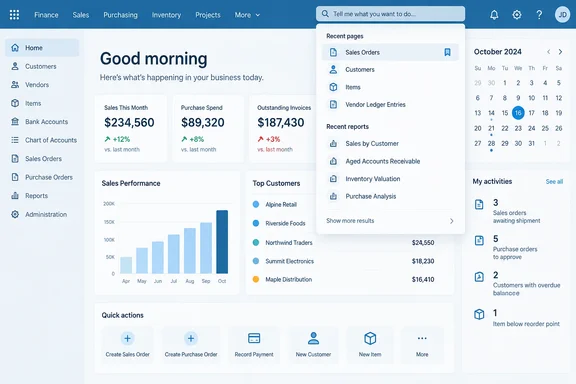
It is a small convenience rather than a headline-grabbing overhaul—but repeatedly finding the same report is exactly the kind of everyday friction worth removing.
What changes—and what remains unconfirmed
The enhancement brings recent searches into Tell Me. Microsoft’s feature description does not specify the number retained, their retention period, cross-device synchronization, or controls for clearing or disabling history. It also does not document changes to search matching or result ranking. Treat this as a navigation improvement, not evidence of a redesigned search engine.
The practical benefit is easy to understand: someone returning to a previously searched-for page or report should have less search text to reconstruct. That is an interpretation of the feature’s purpose, not a measured productivity claim.
October availability needs an environment-level check
Microsoft’s roadmap record for item 573371 lists the feature as Launched, with general availability in October 2026. Its stated scope is the Web platform and Worldwide (Standard Multi-Tenant) cloud instance. Microsoft cautions that roadmap dates and descriptions are estimates and subject to change.
There is an important distinction between that status and confirmed availability in an individual environment. As of October 1, 2026, Microsoft Learn’s update 29.0 overview remains labeled prerelease documentation and describes general availability in the first week of October. Its preview guidance applies only to online sandbox environments, not production or on-premises deployments. Those documents do not establish that every eligible tenant already has the feature.
For administrators, the sensible next step is to confirm availability in the relevant Business Central environment before announcing it to users.
A useful companion to bookmarks
Microsoft’s existing Tell Me documentation provides practical context beyond the roadmap description:
- Open Tell Me with Alt+Q, or select Search in the upper-right corner.
- Type a page, task, or report name to display matching results.
- Use Tab and the arrow keys to choose a result.
- For frequently used pages, select the bookmark icon to add a link to the Role Center.
That last option is worth remembering. Recent searches offer a route back to something found earlier; bookmarks provide a deliberately saved route to a regularly used page. The two serve different habits rather than competing for the same job.
Bottom line: Business Central’s recent-search addition is a modest, useful navigation update. Watch for it in the October rollout, keep Alt+Q handy, and avoid assuming undocumented history-management or synchronization features come with it.
References
- Dynamics 365 Business Central: User experiences - Show recently searched in Tell Me Microsoft 365 Roadmap · 2026-09-30T23:31:03.389585Z
- Finding Pages and Information with Tell Me - Business Central | Microsoft Learn learn.microsoft.com
- What's New or Changed in Business Central 2026 release wave 2 - Update 29.0 preview - Business Central | Microsoft Learn learn.microsoft.com