

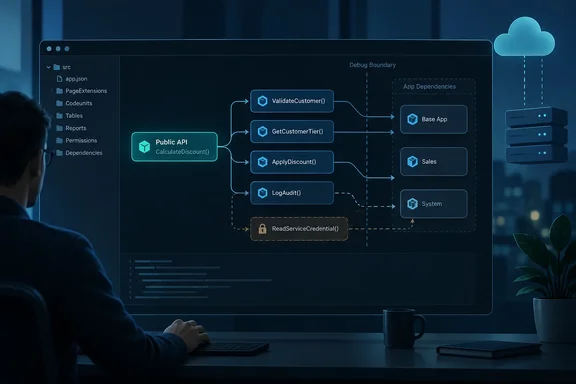
For extension developers, the attraction is architectural visibility rather than another screen full of diagnostic noise. The important distinction: a call graph can guide a security review, but it is not itself a security boundary. Microsoft’s existing source-exposure settings and sensitive-value protections still determine what developers can inspect.
What the audit feature promises
Microsoft’s roadmap listing, item 573336, describes analysis spanning an app and its dependencies. Its stated purpose is to help teams understand how public APIs lead into internal implementation, review unintended exposure, and identify situations where sensitive values could become inspectable through debugging.
The listing reports Launched, with general availability in October 2026, for the Web platform in Worldwide (Standard Multi-Tenant) environments. Those are roadmap-reported availability details, not confirmation that every eligible tenant already has access.
There is independent corroboration of the feature’s scope: Microsoft Learn lists it among the development changes for Business Central 2026 release wave 2, update 29.0. However, that page remains explicitly preview documentation, covering online sandbox environments rather than production or on-premises deployments. As of October 1, 2026, the evidence supports the announced capability and release association—not a universal deployment claim.
The inspected feature description does not specify commands, query syntax, export formats, required permissions, or how “elevated code” is classified. Those details should not be guessed into existence.
Accessibility is not the same as source exposure
The most useful practical context comes from Microsoft Learn’s documentation for resourceExposurePolicy in an extension’s app.json. Its controls address different kinds of access:
| Setting | What it controls |
|---|---|
allowDebugging | Debugging into an extension when it is a dependency |
allowDownloadingSource | Downloading extension source and media |
includeSourceInSymbolFile | Including source in downloaded symbol files |
applyToDevExtension | Applying the exposure policy to developer extensions |
Microsoft documents these as separate controls. In particular, excluding source from symbols does not prevent consumers from calling exposed functionality through symbols and signatures. Conversely, enabling debugging can expose source and variables when execution enters the dependency, subject to [NonDebuggable] restrictions.
One easily missed detail deserves attention: although the policy properties default to false, Microsoft explicitly says the AL: Go! template enables debugging, source downloading, and source inclusion in symbols. Audit the actual manifest rather than assuming a newly created project inherited restrictive settings. Also check applyToDevExtension when validating protection on DEV deployments.
That makes the proposed graph a useful review map: follow a public entry point, identify the dependencies it reaches, then inspect the relevant controls. A connecting line is a reason to investigate—not a finding that source or credentials have leaked.
Sensitive values need protection throughout their journey
Microsoft Learn recommends SecretText for credentials such as API keys and licensing tokens in Business Central version 23 and later. The documentation breaks credential handling into retrieval, transit, and consumption, warning that unprotected values can be exposed during regular or snapshot debugging.
The supported protection pattern matters:
- Protect retrieval and conversion with an appropriate
[NonDebuggable]procedure scope. - Carry credentials between procedures as
SecretText. - Use HTTP methods that accept secret values when constructing requests.
Microsoft documents that SecretText prevents ordinary assignment into debuggable types, including Variant, preserving protection during transit.
Consider a hypothetical public integration procedure that calls an internal token-retrieval helper and then sends an authenticated request. An architectural review should ask where the credential first exists as ordinary text—not merely whether the final request uses a secret-aware API. That review approach follows Microsoft’s credential-lifetime guidance; it is not a claim that the new audit automatically performs data-flow analysis.
Where this fits in a development review
A sensible use of the feature, once available in the relevant environment, would be to prioritize public-to-internal paths, cross-app calls, debugging transitions, and code identified as elevated. Reviewers should then validate the underlying implementation and policy rather than treating the visual export as a clean bill of health.
It should also remain distinct from performance profiling. Microsoft’s existing AL Profiler records running-code execution details and provides call-stack views, timing information, and performance analysis. The announced accessibility audit instead describes static call relationships and boundary inspection. Similar-looking graphs can answer very different questions.
The practical takeaway is straightforward: Business Central’s new audit view promises a better map of extension relationships. Its value will come from helping developers ask sharper questions about API design, debugger access, and credential handling—not from replacing the controls that protect those boundaries.
References
- Dynamics 365 Business Central: Development - Audit AL app accessibility and debugging boundaries Microsoft 365 Roadmap · 2026-09-30T23:31:03.389585Z
- Debugging in AL - Business Central | Microsoft Learn learn.microsoft.com
- Resource exposure policy setting - Business Central | Microsoft Learn learn.microsoft.com