

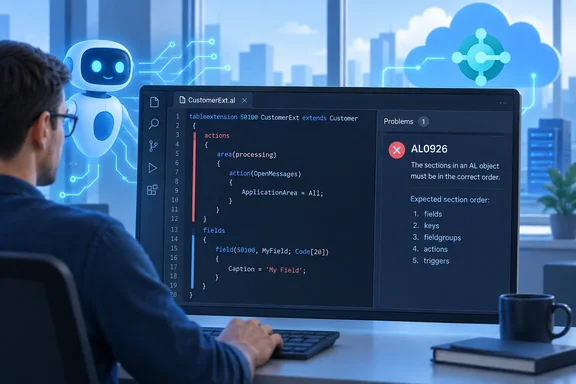
It's a small feature. It still matters to anyone who has opened Visual Studio Code and found a list of errors that all came from one block of code in the wrong place.
What's changing
Microsoft's preview overview for Business Central 2026 release wave 2 (update 29.0) lists "Get clearer guidance for AL object structure" under Development. According to that page, AL0926 tells you directly that object sections are out of order, so you no longer have to interpret "multiple secondary and less specific parser errors."
The roadmap entry describes the benefit for two kinds of user:
- Human developers get a direct explanation of what went wrong, rather than a chain of follow-on parser errors.
- Coding agents and automated code generation get a precise signal, which Microsoft says makes generated code "easier to correct."
The second point fits the rest of the release. The same update 29.0 Development list includes features for letting agents allocate free AL object IDs, configuring AL MCP workspaces dynamically, and running the standalone AL language server for AI agents and other editors. AI code generators can produce AL that compiles almost but not quite, and an unambiguous diagnostic is something an agent can act on without guessing.
Section summary: AL0926 is a targeted compiler diagnostic for one class of mistake: object sections out of order. Microsoft presents it as a clarity improvement for both people and coding agents.
Why section order trips people up
AL is strict about structure. Microsoft's "Best practices for AL" guidance sets out a general sequence for code inside an .al file:
- Object properties
- Object-specific constructs, such as table fields, page layout, actions and triggers
- Global variables, including labels
- Methods
The same page says these practices are additive to the rules and guidelines the compiler already enforces. That's the gap AL0926 fills: some ordering problems aren't just style issues. They make the object hard to parse at all.
The correct order also depends on the object type. Microsoft's table-object documentation describes four sections: table-level properties, a fields section, a keys section, and then triggers and code. It states plainly that the order of the sections matters. The documented shape is:
table 50100 MySampleTable
{
    // table properties
    fields { }
    // keys (optional)
    keys { }
    // AL code (optional)
}
Put keys above fields and you have the kind of structural mistake AL0926 is meant to name directly. Report objects follow their own pattern: properties, a dataset, then optional request-page and rendering sections, and optional code. One fixed mental template won't cover every object type.
Section summary: Every AL object type has a defined section order. Breaking it has historically caused a cascade of confusing parser errors.
Where AL0926 fits in the AL diagnostics system
Microsoft keeps per-diagnostic reference pages on Microsoft Learn. Examples include AL0126, which reports that no overload for a method takes the supplied number of arguments. Many of these pages are marked as previews. The site notes that the AL diagnostics topics are in preview and asks the community to contribute content through GitHub.
Linking errors to documentation isn't new either. Writing about Business Central v19, blogger Yun Zhu noted that an option of adding a URL for additional documentation on what is causing the issue, and options for how to resolve the issue had become available, with the caveat that not all diagnostic messages will take advantage of this from the beginning.
A search for AL0926 on October 1, 2026 didn't turn up a dedicated reference page for it, so its exact message text, severity and any fix guidance are still undocumented. Nothing confirms whether it appears as an error or a warning, which object types or violations trigger it, or whether the tooling offers an automatic fix. This article doesn't guess at any of those.
Section summary: AL0926 joins Microsoft's numbered AL diagnostics. Its detailed reference documentation hadn't been published as of October 1.
What it means in practice
Imagine a partner developer, or an AI agent, generating a page extension or a new table. One section ends up in the wrong place. Without a targeted diagnostic, the parser fails on the first unexpected token, and every error after that is a side effect of the parser being lost. You spend time trying to fix errors that aren't real while the actual problem sits a few lines earlier.
With AL0926, the compiler is supposed to name the actual problem. If AL0926 appears in your output, Microsoft's documentation supports a straightforward approach:
- Identify the object type you're working in: table, page, report, codeunit, extension object and so on.
- Check that type's documented section order on Microsoft Learn. For example, the table-object page requires
fieldsbeforekeys, with code last. - Treat the AL0926 message as the root cause. Fix the section order first, then recompile. Many of the secondary errors should go away with it. That last part is an inference from how parsers cascade, not a measured result Microsoft has published.
- Use the general sequence in "Best practices for AL" (properties, object-specific constructs, globals, methods) as a backup check.
For teams running automated builds, AL0926 should work well with another update 29.0 change. WindowsForum has already covered how Microsoft is adding structured, project-specific compiler diagnostic logs to ALTool workspace builds. A specific diagnostic code is far easier to search, count and trend in a build log than a pile of generic syntax errors. An agent in a CI loop can use it the same way.
Section summary: Fix the order AL0926 identifies first, using the documented structure for that object type. Then look at whatever errors are left.
Availability and caveats
This is where it pays to read carefully.
- Roadmap status: The AI at Work roadmap entry says Launched, General Availability, October 2026, Worldwide (Standard Multi-Tenant), Web platform.
- Preview documentation: Microsoft's update 29.0 page, last updated September 7, still describes the release as a public preview. That preview applies only to Business Central online sandbox environments, not production or on-premises. The page says preview features aren't meant for production use and may change.
- GA timing: The same page expects update 29.0 to reach general availability in the first week of October 2026. It says details about on-premises deployments will be added at that point. Nothing here confirms exactly when AL0926 reaches any given tenant, or what its on-premises status will be.
- Preview sandboxes: Microsoft says preview sandbox environments are deleted automatically 30 days after update 29.0 reaches GA, sometime in early November 2026, and that they can't be updated to a different version. If you've been testing AL0926 in a preview sandbox, plan for that.
- Roadmap change: Microsoft says it stopped publishing Business Central release plans in September 2026. New capabilities now appear on the AI at Work roadmap, which is why this compiler change is listed alongside Copilot model announcements.
The verdict
Is AL0926 a big deal? Not in the way a new language feature is. Microsoft hasn't published any figures on time saved, and AL0926 doesn't reformat or repair your code. It identifies the problem; you fix it.
Even so, a clearer diagnostic helps every developer who hits this mistake. As more AL is generated by agents that read compiler output and try again, a precise message also makes those retries more reliable. With update 29.0 also bringing ALTool test runs, structured build logs and agent tooling, AL0926 is one more part of a toolchain Microsoft is building to suit both developers and coding agents.
If you work on Business Central extensions, test it on a 29.0 environment and see whether your usual pile of ordering errors comes down to a single AL0926 message.
References
- Dynamics 365 Business Central: Development - Get clearer guidance for AL object structure Microsoft 365 Roadmap · 2026-09-30T23:31:03.389585Z
- What's New or Changed in Business Central 2026 release wave 2 - Update 29.0 preview - Business Central | Microsoft Learn learn.microsoft.com
- Best practices for AL code - Business Central | Microsoft Learn learn.microsoft.com