

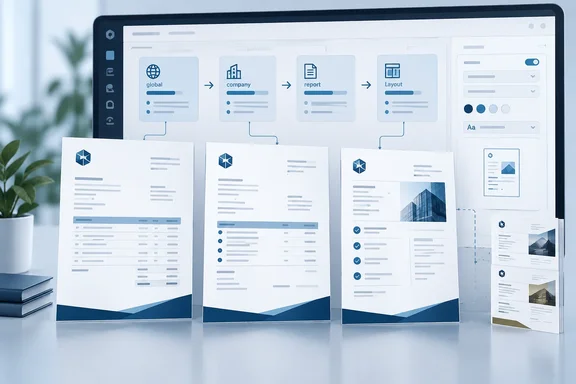
The practical attraction is centralized branding with room for exceptions. Instead of treating every document layout as a separate formatting project, administrators gain a way to establish shared presentation defaults. That is an operational implication of the documented design, not a measured claim about time saved.
What report themes change
In Business Central, “report” does not mean only an internal management report. Microsoft’s layout overview explicitly includes customer-facing documents such as sales invoices and order confirmations sent as PDFs. Existing layouts control which dataset fields appear, their arrangement, text formatting, images, and page settings.
Report themes add a reusable presentation component to that system. Microsoft’s base-application reference describes theme parts being applied to body layouts during a process called Composite Layout Merge. The same configuration mechanism also handles header/footer parts, although reusable headers and footers are a separately listed reporting capability.
The distinction matters: applying a theme is not the same thing as redesigning the report’s dataset. Microsoft’s announcement promises consistent PDF appearance; it does not establish changes to calculations, underlying business data, or Excel output.
The takeaway: this is a document-presentation feature, not a new analytics engine.
Defaults, inheritance, and visible exceptions
The four configuration scopes are the heart of the feature:
- Global: establish a broad default.
- Company: accommodate a company-specific presentation.
- Report: specialize a particular report.
- Layout: assign a theme to an individual layout.
Microsoft’s implementation reference adds useful detail beyond that headline. The Report Layout Themes and Header/Footers page lists the layouts of a selected report, shows the theme and header/footer that effectively apply, and identifies the level from which each setting resolves: layout, report default, company, or global.
That visibility could be particularly useful when troubleshooting a document that looks different from its neighbors. The administrator can inspect the effective assignment rather than assuming the broadest default is in control.
The reference also documents a Manage action that writes a layout-level configuration entry. Layouts without an explicit assignment continue to display inherited company/global defaults. This supports an inheritance-and-exceptions model, but it should not be stretched into an undocumented precedence matrix for every possible combination.
For developers and administrators examining the configuration model, Microsoft documents three concrete scope rules:
| Configuration value | Documented meaning |
|---|---|
Report ID 0 | Global wildcard for reports |
| Empty layout name | All layouts for the specified report |
| Empty company name | All companies |
Microsoft also says the platform validates that a selected theme part resolves to a Theme-subtype layout when configuration records are inserted or modified. These are implementation details, not a complete setup procedure.
October release timing needs a qualification
Roadmap item 573327 lists the feature as Launched, with October 2026 general availability, targeting the Web platform and Worldwide (Standard Multi-Tenant) cloud.
However, as of October 1, 2026, Microsoft’s inspected Business Central 29.0 overview still describes a public preview limited to online sandbox environments, excluding production and on-premises environments. It places general availability in October and warns that preview functionality is not intended for production use. That documentation does not confirm that every production tenant already has report themes.
The sensible reading is to distinguish the roadmap’s release status from availability in a particular environment. Microsoft itself describes roadmap dates as estimates and says roadmap information can change.
What administrators should evaluate
Business Central supports Word, RDLC, Excel, and External report layouts, but the theme announcement does not provide a compatibility matrix covering all four. Universal support should therefore not be assumed.
For an initial evaluation, a sensible administrator-led checklist is to:
- Identify representative customer-facing PDF documents.
- Decide which should share a default and which need exceptions.
- Inspect effective theme assignments and their resolving scope.
- Compare generated PDFs before adopting broader defaults.
This is a suggested validation approach, not Microsoft’s documented installation workflow. Its success criterion is straightforward: consistent intended presentation, with exceptions still behaving as expected.
Report themes could turn branding from repeated layout maintenance into a more manageable configuration task. The promising part is not merely that PDFs can look consistent—it is that administrators have documented ways to see where that consistency, or an exception, comes from.
References
- Dynamics 365 Business Central: Reporting and data analysis - Brand document reports with report themes Microsoft 365 Roadmap · 2026-09-30T23:31:03.389585Z
- Report and document layouts overview - Business Central | Microsoft Learn learn.microsoft.com
- What's New or Changed in Business Central 2026 release wave 2 - Update 29.0 preview - Business Central | Microsoft Learn learn.microsoft.com