

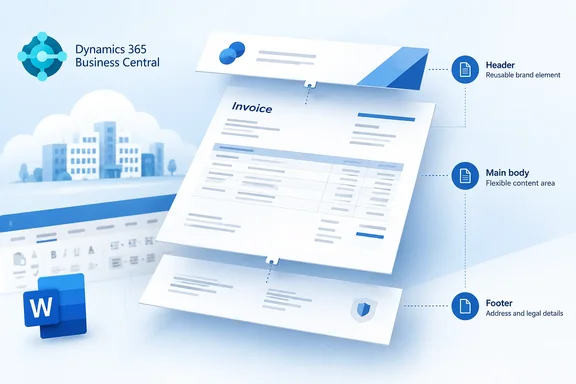
The roadmap entry shows the feature as Launched, on the General Availability release ring, for Worldwide (Standard Multi-Tenant) Business Central online on the Web platform, with general availability in October 2026. It is a small item, but it matters more once you see the composable-layout system it belongs to.
What changed
The roadmap description gives very little detail:
- Feature: new header and/or footer "document samples" controls in the Business Central Word add-in
- Purpose: to design header and footer layouts for document reports
- Audience: samples meant for internal or external reports
- Product area: Reporting and data analysis in Dynamics 365 Business Central
- Timing: GA in October 2026, as part of Business Central 2026 release wave 2 (update 29.0)
Microsoft's own "What's New" documentation for update 29.0 lists the same feature with the same description, so this is a confirmed part of the release. That document also says the 29.0 public preview runs from the first week of September until 29.0 becomes generally available in the first week of October. Microsoft will automatically delete preview sandbox environments 30 days after GA, so sometime in early November 2026.
What Microsoft has not published: what the samples actually contain, the exact button names in the add-in, step-by-step instructions, whether the controls are in the stable add-in or only the preview add-in, and whether the samples insert static text, data-bound fields or both. Until Microsoft documents those points, treat any claimed screenshots or sample catalogues with caution.
In short: Business Central 29.0 gives Word add-in users starter samples for headers and footers. The details of those samples are still undocumented.
Why it matters: composable layouts
On its own, a header/footer sample is a convenience. Its real purpose shows up next to another 29.0 feature, "Reuse header/footer layouts across document reports." Microsoft describes that feature this way: "With the new composable layouts feature, you can apply a header/footer on layouts to get consistent look and feel on the PDF output. It is possible to set defaults on a global level, per company, per report, or per layout, giving the administrator full flexibility of theming."
That changes how Business Central document layouts are put together. Until now, each Word layout was one monolithic file that held the body, the header and the footer together. In 29.0, those pieces can be authored separately and combined when the report renders.
Business Central MVP Yun Zhu tested the 29.0 preview and reported that this new Subtype feature is specifically for Word layouts, and in Report layouts, Microsoft added a new field called Subtype. The field specifies the role of the layout in the Composite Layout Merge: full body (Default), header/footer part, or theme part. In his testing, layouts with HeaderFooter and Theme subtypes appear on the new Manage themes and header-footer layouts page, and in Report Layouts you can set a report theme and header-footer for layouts with the subtype set to Body.
The header/footer samples feature covers the authoring step. The "Reuse header/footer layouts" feature covers assignment and reuse. A sibling 29.0 item, "Design document report themes with the updated Word add-in," does the same authoring job for themes.
| 29.0 feature | What it does |
|---|---|
| Design header/footer layouts with the updated Word add-in | Header/footer document samples controls in the add-in |
| Reuse header/footer layouts across document reports | Apply a header/footer to layouts, with defaults set globally, per company, per report or per layout |
| Brand document reports with report themes | Apply a theme to layouts for consistent PDF output |
| Design document report themes with the updated Word add-in | Document samples controls for themes |
| Control the lifecycle of all report layouts | Set a status on layouts to control which ones end users can see |
In short: the samples are the design half of a new body + header/footer + theme model for Word layouts.
Constraints to know before you start
Yun Zhu's preview testing turned up several limits that are worth checking before you plan a rollout. They come from preview builds, so confirm them in your own 29.0 environment.
- Word layouts only. He reports that themes and headers/footers can only be applied to Word layouts, and only for reports where the Subtype is set to Body; for an RDLC layout, the actions are grayed out.
- No Body layouts out of the box, yet. At the time of his testing, there were no standard layouts with a Subtype of Body, so to test the feature you need to create one; you can simply export a standard layout and import it directly. The error message he hit explains the design: only a body layout carries them: a theme and header/footer are merged onto it when the report renders.
- Approval gating. He also notes that only approved themes and header/footer parts can be assigned. That fits with the 29.0 feature for controlling layout lifecycle status.
- Standard Body layouts are on the way. In Microsoft's BCApps repository, a 29.x backport pull request adds new Word Body layouts (Subtype = Body) for reports 107, 114 and 115, and the existing Word layout is marked ObsoleteState = Pending with ObsoleteTag 30.0. If you maintain custom layouts based on standard reports, expect the old monolithic layouts to be phased out over the next major release or so.
An older caveat that still applies
Microsoft's developer documentation has a header/footer limitation that predates this feature but matters more now that headers and footers are separate parts: the Different first page and Different odd and even options for headers and footers in Word aren't supported for HTML conversion. If you select either of these options, the header and footer don't appear in rendered output, such as an Email Body.
So if your sales invoices go out as email bodies and you design a clever first-page-only letterhead, the recipient may get a document with no letterhead at all. Test both PDF and email output before you approve a header/footer part.
How the existing Word add-in workflow fits
The documented add-in workflow still applies, and you will use it to get layouts into and out of Business Central:
- Install the add-in. In Word, select Home > Get Add-ins, search for Dynamics 365 Business Central Word Add-in, and add it. A Business Central tab appears in the ribbon. Microsoft offers a stable version and a preview version, and you can install both and switch between them. Preview features may change or may not ship.
- Export correctly. In Business Central, open Report Layouts, select the Word layout, and choose Actions > Update and Export Layout. Microsoft says this action is required so the file includes the layout metadata the add-in needs. Without it, the add-in shows a message instead of working.
- Design in Word. Use the add-in's controls, such as Add Data, layout comments and the Hide-if-empty controls. In 29.0, the header and footer samples controls join this set.
- Import and test. Back in Report Layouts, import the file as a new layout or use Replace Layout, then run the report to check the output.
Success looks like this: the rendered PDF shows your header and footer exactly as designed, and email-body output shows them too if you avoided the unsupported first-page and odd/even options. If Word complains about missing metadata, re-export with Update and Export Layout rather than plain Export Layout.
Analysis: who benefits, and what to watch
This is a sensible change. Microsoft's 2026 release wave 1 notes say the broader Word add-in work is meant to let non‑technical users customize and maintain report layouts without developer support. Headers and footers are where most branding and legal text lives: logos, registered addresses, VAT numbers and bank details. They are also the parts of a document that most need to be identical across reports. A shared, reusable footer means the next address change is one edit instead of a dozen.
There are reasons for caution too:
- Undocumented samples. "Document samples controls" could mean anything from a basic page-number footer to a fully data-bound letterhead. Until Microsoft documents them, plan to adapt the samples rather than use them as they are.
- Migration work. Composable layouts need Body-subtype layouts. Partners with heavily customized invoice layouts will have to separate header and footer content from the body, which is real work, especially with obsolete legacy layouts coming in 30.0.
- Rollout timing. "Launched" with an October 2026 GA month does not mean every tenant gets it on the same day. Check your environment version in the admin center before you announce anything to users.
Bottom line: if you design Business Central document layouts, spin up a 29.0 sandbox, create a Body layout, try the new header/footer samples, and test the result in both PDF and email output before the deadlines for the legacy layouts arrive.
References
- Dynamics 365 Business Central: Reporting and data analysis - Design header/footer layouts for document reports with the updated Word add-in Microsoft 365 Roadmap · 2026-09-30T23:31:03.389585Z
- Work with Word Layouts - Business Central | Microsoft Learn learn.microsoft.com
- Get easier editing of document report layouts with the enhanced Word add-in learn.microsoft.com