

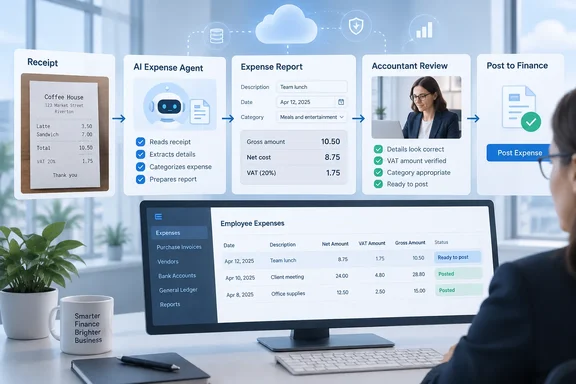
The roadmap entry (ID 573262) lists the feature as "In development" for the web platform. Preview is targeted for October 2026 and general availability for December 2026, on the Worldwide (Standard Multi-Tenant) cloud. October has already started, but the entry still says "In development," so a preview date is not the same as a preview you can switch on. Microsoft's roadmap pages say release dates are estimates and that all information can change.
What Microsoft says the feature will do
The roadmap description lists five capabilities:
- Automatic VAT calculation: the Expense Agent identifies expense transactions that involve VAT and calculates the VAT amount from the information in submitted expense reports.
- VAT in expense processing: VAT values become part of the review and processing workflow, so less tax calculation has to be done by hand.
- VAT reporting: VAT amounts from employee expenses are added up and reported, to support financial reporting and tax recovery.
- Consistency: VAT is handled the same way across the organization. Microsoft presents this as a compliance benefit.
- Human in the loop: when VAT calculation is turned on for expense reports, accountants must review the calculation and confirm it before posting.
The last point matters most. Microsoft is not describing an agent that approves and posts tax figures by itself. An accountant has to check the numbers before anything reaches the books.
Section summary: The Expense Agent is planned to calculate VAT, carry it through review and add it up for reporting, with accountant sign-off required before posting. The accuracy and compliance gains are Microsoft's stated goals, not measured results.
Where this fits in the current Expense Agent
The VAT feature is an addition to an expense workflow that already exists in preview. Microsoft Learn describes the Expense Agent as an AI-powered agent that automates expense processing in Business Central, which handles receipt intake, data extraction, categorization, itemization, and expense line creation, then groups expenses into expense reports for review and approval.
What the agent extracts today is relevant here. Microsoft's prerelease documentation says that from each receipt the agent pulls out the merchant name, expense date, total amount, currency, payment method, and line-item details (when available and itemization is required). The fields it fills in on expense report lines are merchant, description, receipt number, amount, currency, payment method, expense date, and expense category.
Neither list includes a VAT or tax field. In the current documentation, the agent captures totals but nothing that splits out tax. That gap is presumably what roadmap item 573262 is meant to fill. Microsoft has not said whether the VAT figure will be read from the receipt, calculated from configured rates, or both. The roadmap only says it will be based on "the information in submitted expense reports."
Microsoft already treats extraction as something people must check. The documentation says the user must review all expenses before submitting the report. As extraction and categorization are performed by the agent, the user is required to validate the accuracy of all data. The VAT feature adds a second check after that, this time by an accountant.
The report lifecycle, and where the VAT check goes
To see where the VAT step lands, it helps to know the report statuses Business Central already uses. According to Microsoft's expense management overview:
| Status | Meaning |
|---|---|
| Open | The report is being prepared. You can add or remove expenses. |
| Pending Approval | The report was submitted and is waiting for a manager's decision. |
| Released | The report was released for processing. |
| Approved | A manager approved the report. It's ready to post. |
| Rejected | A manager rejected the report. The submitter can make changes and resubmit. |
| Processed for Payment | The report was posted and payment processing started. |
| Completed | Reimbursement is complete. |
The roadmap puts the accountant's VAT confirmation before posting, which means somewhere between "Approved" and "Processed for Payment." That leaves several questions open. Is the accountant the same person as the approving manager? In most organizations they are different people: the manager decides whether the team dinner was justified, and the accountant decides whether the VAT on it can be recovered. The roadmap doesn't say, and it doesn't say where the confirmation appears in the interface or whether a failed check blocks posting.
The current preview can also submit reports without a person pressing the button. Microsoft's 2026 release wave 1 notes say the agent groups expenses within a defined time period into an Expense Report and can automatically submit it when approvals are enabled and no rule violations are found. Automatic submission is a separate step from the VAT gate. Nothing in the roadmap suggests auto-submitted reports skip the accountant's review.
Section summary: Today the agent extracts receipt totals but has no documented VAT field. The new feature adds VAT calculation and an accountant confirmation before posting. Who does that confirmation, and how it is enforced, is not yet documented.
Why finance teams will care
Anyone who has run month-end close in a VAT country knows the routine. Employees submit receipts with gross amounts. Someone in finance splits out the tax, codes it, and hopes the hotel invoice was a valid VAT receipt and not just a card slip. Done by hand at volume, this is slow and inconsistent, and it is often skipped. That means VAT the company could recover goes unclaimed.
If the Expense Agent captures VAT at intake and carries it through to posting, companies could recover more of the tax they are owed with less manual work. Whether that happens depends on details Microsoft hasn't published:
- Supported countries and regions. VAT rules vary widely by country. Microsoft's setup documentation already requires that the Business Central environment is a country or region version supported by the Expense Agent as listed in Feature availability by country/region and language. The broader agent preview started in English and the US only, with Australia, New Zealand and the UK listed for July 2026. That timeline applies to the agent in general, not to this VAT feature, and the US does not have VAT.
- Receipts with more than one VAT rate. A restaurant bill can mix food and alcohol at different rates. The roadmap doesn't say how these are handled.
- Posting configuration. The roadmap doesn't say how calculated VAT connects to Business Central's existing VAT posting setup.
- Recoverability. Calculating VAT does not decide whether that VAT can be claimed. That still depends on local rules and proper invoices, and the roadmap makes no claim to handle it.
Some third-party blogs have already written about how the agent handles VAT. Until Microsoft publishes final documentation for this feature, treat those descriptions as guesses.
A readiness checklist for Business Central administrators
You can prepare now, even though the feature isn't here yet:
- Check your environment's country/region version against Microsoft's Expense Agent availability list. If the agent isn't supported in your localization, the VAT feature won't be either.
- Check permissions. Setting up the agent requires the SUPER permission set or a combination including AGENT - ADMIN, EXPENSE MGMT. ADMIN, EXPENSE AGENT, SECURITY.
- Review your expense categories and posting groups. The agent's guided setup already walks through expense categories, subcategories and expense posting groups. Clean category mapping will probably matter more once tax is calculated from it. That is our inference; Microsoft hasn't documented it.
- Decide who the "accountant" is. Choose the person or team responsible for confirming VAT before posting, separate from the managers who approve reports.
- Run the preview in a sandbox, not your live books. When the preview arrives, compare the agent's VAT figures with receipts your team has already calculated by hand, including foreign-currency and mixed-rate examples.
- Read the final documentation before relying on it. Look for supported expense types, required receipt data, how corrections are recorded, whether exceptions block posting, and how the totals reach your VAT returns.
Licensing
Licensing could affect adoption. Microsoft says expense users who work exclusively through the Expense Agent web app or email don't need a Business Central license. The overview adds that these channels use Copilot credits. The VAT roadmap entry lists no separate licensing requirement. Microsoft hasn't said whether VAT calculation uses more credits per report, so check before you budget.
The bottom line
This is a modest roadmap item with a practical goal. A tool that currently captures receipt totals will start handling the tax inside them, and an accountant will still have to confirm the numbers. Requiring human review is the right decision, because a wrongly claimed VAT amount is a problem tax authorities will eventually ask about. Finance teams should plan around the October preview and December GA dates but treat them as estimates, and should wait for the detailed documentation before relying on the feature for anything their auditors will review.
References
- Dynamics 365 Business Central: Expense Agent - Calculate and report VAT based on expense reports Microsoft 365 Roadmap · 2026-09-30T23:31:03.389585Z
- Expense Agent Overview for Business Central - Business Central | Microsoft Learn learn.microsoft.com
- Create and Submit Expense Reports in Expense Agent - Business Central | Microsoft Learn learn.microsoft.com