

Here is what Microsoft has said, what it hasn't, and how the feature relates to the vendor withholding tax tools Business Central added earlier this year.
What the roadmap entry promises
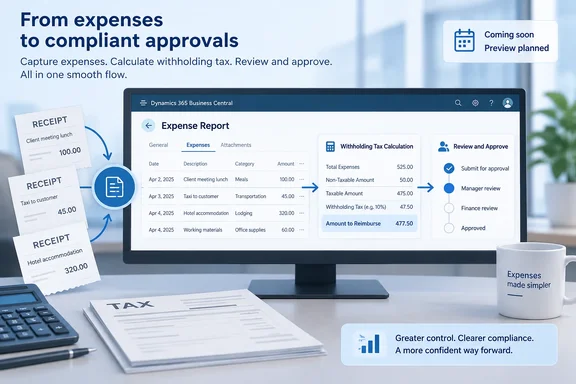
According to the roadmap description, organizations will be able to calculate employee withholding taxes as part of the expense report process. When an employee submits an expense that is subject to withholding, Business Central applies the tax calculation inside the expense report workflow.
The listed capabilities are:
- Automatic WHT calculation for employee expense transactions that need tax deductions.
- One or more withholding taxes per expense category, depending on your setup.
- Simple or compound calculations.
- Thresholds measured over different periods and scopes: per record, per document, per category (period accumulation), and in total (period accumulation).
- A gross or net calculation base.
The listing names Android, iOS, and web as platforms, Worldwide (Standard Multi-Tenant) as the cloud instance, and both Preview and General Availability release rings.
The entry leaves a lot out. It gives no formulas, setup pages, field names, list of supported jurisdictions, rounding rules or worked examples. It doesn't explain how the four threshold scopes interact, and it doesn't say whether "compound" means tax calculated on tax or something else. Anyone who answers those questions with confidence before preview builds arrive is guessing.
Section summary: The feature is configurable WHT calculation inside employee expense reports, with options for how many taxes apply, how they stack, how thresholds accumulate, and whether gross or net is the base. It is planned, not shipped.
The context: vendor withholding tax shipped first
The roadmap entry doesn't mention this, but it matters. Business Central's 2026 release wave 1 added built-in vendor withholding tax. Microsoft's release plan for that feature says Business Central customers can benefit from features for setting up, calculating, and reporting withholding taxes for vendors in all countries/regions where it's relevant, and that customers no longer need to source a non-Microsoft application or create a customization because withholding tax functionality is built into the standard version of Business Central.
In that vendor feature, Business Central calculates withholding tax when you pay a vendor invoice, or when you post it, based on your setup. The tax amount is withheld from the payment and reduces the total amount owed to the vendor. Microsoft's setup documentation describes Withholding Tax Revenue Types, which categorize withholding tax (WHT) entries and are used for withholding tax certificates. It also describes posting groups set on item and G/L account cards through the Withholding Tax Bus. Post. Group and Withholding Tax Prod. Post. Group fields.
Dynamics blogger azurecurve noted that the earlier dependence on third-party apps or customisations created inconsistency and added cost. They listed Latin America, Asia, Africa and parts of Europe among markets where withholding is mandatory.
Our analysis, not a Microsoft statement: The new expense item looks like the next step, carrying withholding from purchase documents into employee reimbursements. The wording is similar ("based on your setup"; thresholds; gross versus net), so the two features may share setup. Microsoft has not confirmed that expense WHT reuses the vendor posting setup, revenue types or settlement process. Plan for it, but don't build on it until the documentation exists.
How the existing expense report workflow works
To see where WHT would fit, here is the workflow that exists today. Both the Expense Agent and its documentation are labeled production-ready preview and prerelease, so details can change.
Business Central runs expense management in two modes. With the Expense Agent, expense users submit receipts through a web app or email. Expense Agent automatically extracts data, categorizes and itemizes expenses, creates expense records, and groups them into expense reports. Without the agent, expense users create expense reports in Business Central and add expense lines manually.
Microsoft's documentation describes the report lifecycle this way:
- Grouping. The agent creates a report automatically when a new expense falls outside the periods covered by existing reports, and groups all expenses from the same period into it.
- Review. Users review expense lines and policy warnings before submitting.
- Release. In the Business Central client, releasing a report locks it for editing (Ctrl+F9). Choosing Reopen unlocks it.
- Submission. The status changes to Pending Approval (Submitted in the agent web app), the approver is notified, and the report becomes read-only.
- Approval, posting and reimbursement. After approval, the report posts to the general ledger and reimbursement is processed.
Expense rules raise violations in a Rule Violations FactBox. Microsoft says these violations don't block submission, but approvers see them and may reject the report.
Microsoft also says three roles are involved: expense users, approving managers, and administrators who set up expense categories, rules, approval workflows, and posting groups. Because WHT can be configured per category, administrators will most likely own this feature. That is an inference; Microsoft hasn't assigned it.
Section summary: WHT would be added to a workflow that already runs from capture to report to approval to posting to reimbursement. The roadmap doesn't say at which step the tax is calculated, posted or deducted.
Why the threshold options matter
The threshold scopes are the most technically interesting part, and Microsoft explains them least. A rough reading of the labels:
| Threshold scope (roadmap label) | Plausible meaning (not confirmed) |
|---|---|
| Records | Threshold checked per individual expense line |
| Documents | Threshold checked per expense report |
| Categories (period accumulation) | Running total per category across a period |
| Total (period accumulation) | Running total across all categories over a period |
The period-accumulation options matter most. Many withholding rules start only after cumulative payments pass a limit within a period. A tool that checks only one line at a time would miss those cases or apply the tax too early. If cumulative thresholds work as the labels suggest, accountants would no longer need to track running totals in spreadsheets.
Some questions that preview testers should be able to answer:
- Does withholding reduce the reimbursement paid to the employee, as vendor WHT reduces the amount owed to a vendor?
- Can approvers or accountants see, override or recalculate the WHT amount?
- What happens to accumulated thresholds when a report is rejected, reopened and resubmitted?
- Does the AI agent play any part in the calculation, or is it ordinary rule-based tax logic within the agent's workflow? The roadmap puts it under the Expense Agent, but nothing suggests a language model is deciding tax amounts. Auditors will probably prefer it that way.
Availability caveats
- Dates may change. Microsoft's roadmap says all information is subject to change and that entries can be removed when features ship, are canceled or are postponed.
- Region is uncertain. The broader Expense Agent preview started in English in the US only, with Australia, New Zealand and the UK planned for July 2026, according to Microsoft's 2026 wave 1 release plan. Those aren't typical withholding-heavy markets, so check whether the WHT preview actually reaches your country.
- Not mentioned: minimum Business Central version, licensing, on-premises support and language availability.
- Roadmap venue has changed. Microsoft says it stopped publishing Dynamics 365 release plans in September 2026 and now posts new capabilities to the AI at Work roadmap. That is why this item has a roadmap ID instead of a release-plan page.
What admins and partners can do now
- Learn the vendor WHT setup if your company operates where withholding applies. If the expense feature turns out to share it, you'll have a head start.
- Review your expense categories. WHT is configured per category, so loosely defined categories could cause wrong deductions.
- Write down your local rules before preview: which expense types are subject to WHT, the thresholds, the accumulation periods, and whether tax is calculated on gross or net.
- Test in a sandbox when the preview arrives. Use known cases with hand-calculated answers and compare the results.
- Keep your tax adviser involved. A calculation engine applies the rules you give it. It doesn't know whether those rules are correct.
Bottom line
This roadmap item fills an obvious gap: Business Central gained native vendor withholding this year, and employee expense reimbursements are the next place withholding is needed. The described options (multiple taxes per category, compound calculation, cumulative thresholds, gross or net base) suggest Microsoft designed for complicated local tax rules. Still, it is an in-development feature with an October preview target and no public documentation on setup, posting or reimbursement. For now, prepare your categories and tax rules, and wait for the preview before relying on it.
References
- Dynamics 365 Business Central: Expense Agent - Calculate withholding tax automatically in expense reports Microsoft 365 Roadmap · 2026-09-30T23:31:03.389585Z
- New Functionality In Microsoft Dynamics 365 Business Central 2026 Wave 1: Calculate Withholding Taxes for Vendors azurecurve.co.uk
- Create and Submit Expense Reports - Business Central | Microsoft Learn learn.microsoft.com