

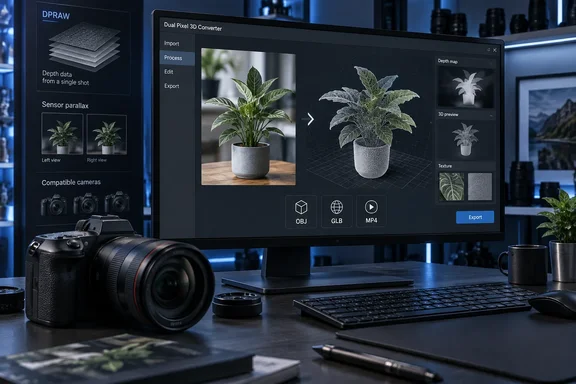
TechRadar first highlighted the announcement alongside Canon’s EOS R8 Mark II launch. Canon’s own U.S. product page confirms the core details: Dual Pixel 3D Converter will run only on 64-bit Windows 11 version 24H2 or later, accept images from a short list of EOS R bodies and RF lenses, and export OBJ, GLB, or MP4 files. The point worth underlining is that Canon is repurposing sensor data its compatible cameras already collect; it is not turning an ordinary JPEG library into an automatic 3D archive.
For Windows-based photographers, product teams, and developers who already shoot Canon Dual Pixel RAW, the tool could offer a much faster route to a usable 3D starting point than a conventional multi-image photogrammetry workflow. But the announcement’s “single photo” pitch leaves out several constraints that will decide whether a conversion succeeds.
The cameras are compatible, but the files are not interchangeable
Canon lists the EOS R5 Mark II, EOS R5, EOS R6 Mark III, EOS R6 Mark II, EOS R7, EOS R8 Mark II, EOS R8, and EOS R10 as compatible bodies. It also requires one of 12 specific RF or RF-S lenses, including the RF24-70mm F2.8 L IS USM, RF24-105mm zooms, RF35mm F1.8 Macro, RF50mm F1.8, RF85mm F2 Macro, RF100mm F2.8 L Macro, and the RF-S 18-45mm and 18-150mm kit zooms.
That two-part requirement matters. Having a supported EOS R camera alone will not be sufficient, and the compatibility list excludes many otherwise capable Canon RF lenses. A photographer who used, for example, an RF85mm F1.2 L or another lens not on Canon’s approved list should not assume the software will process those files simply because the camera supports Dual Pixel CMOS AF.
More importantly, Canon divides the supported input workflow into two groups. Existing compatible cameras are expected to provide Dual Pixel RAW, or DPRAW, files. Canon describes those files as containing depth and phase-detection information derived from the sensor’s two photodiodes at each pixel. The Converter uses the slight viewpoint difference represented in that data to estimate a subject’s shape and depth.
The new EOS R8 Mark II gets a separate privilege: Canon says JPEGs with embedded distance information from that camera can also be converted. That does not mean JPEGs shot on the EOS R5, R6 Mark II, R7, R8, or R10 are generally supported. For owners of those cameras, ordinary RAW files and ordinary JPEGs are not the promised path; they will need images shot in the appropriate Dual Pixel RAW mode.
This is the largest gap between the simple public description and the workflow users will actually face. Canon is making new software available, but for most supported camera owners, the useful source material must already have been captured with DPRAW enabled. A shoot made last month in conventional RAW or JPEG may be excellent for editing, but it may have none of the information the 3D Converter needs.
Dual Pixel 3D makes an estimate, not a full scan
Canon’s presentation is technically credible, but it should not be confused with a full 3D scan of an object. Traditional photogrammetry normally reconstructs geometry by comparing many photographs from different positions. A dedicated structured-light or LiDAR system actively measures distance. Canon’s method begins with one exposure, using the parallax information inherent in its Dual Pixel autofocus sensor architecture.
That lets the app infer shallow depth and form while preserving the photograph’s original texture. Canon says the output can be a 3D photo retaining the background, a model that isolates the main subject, or an MP4 animation. The OBJ and GLB exports are particularly significant on a Windows workstation because they can move into established 3D, web, product-visualization, and game-engine workflows rather than remaining trapped in Canon’s own software.
The limitation is equally clear: a one-shot depth estimate cannot reveal surfaces the camera never saw. It cannot create a reliable rear view of a product, reconstruct the underside of a chair, or resolve fine geometry hidden by reflections, shadows, hair, foliage, or overlapping objects. Canon’s own examples emphasize food, plants, and similarly close-range subjects, which is a useful clue to the intended sweet spot.
For e-commerce work, that suggests a role as a rapid content-production tool rather than a replacement for 360-degree product capture. An isolated GLB model built from a single hero image may work well in a product teaser, PowerPoint presentation, web mock-up, or social video. It will be less suited to an interactive catalog that promises customers a faithful view from every angle.
Canon Japan’s announcement also says the company intends to offer business-oriented solutions, including a Dual Pixel 3D SDK, during 2026. That may prove more consequential than the desktop application for organizations that already have controlled shooting stations and want to automate image-to-asset conversion. Canon has not yet published the SDK’s supported platforms, licensing terms, system requirements, or integration details.
Capture settings will determine whether the Windows conversion works
Canon’s U.S. guidance is unusually specific about how images should be shot for the Converter. It recommends an aperture of f/5.6 or wider, says not to use an aperture smaller than f/8 because the conversion will error, and advises keeping ISO at 1600 or below to reduce noise.
Those rules make sense for a depth-based process. A subject that falls out of focus gives the converter less reliable detail to map; high ISO noise can interfere with the fine image information it needs. Canon’s guidance also means this is not a tool that rewards stopping down a macro or product shot to f/11 or f/16 for maximum depth of field, even though those apertures are routine in studio photography.
The better approach will be to plan shots specifically for 3D conversion:
- Use a listed EOS R body and one of Canon’s approved lenses, then confirm Dual Pixel RAW is selected where the camera supports it.
- Keep the intended subject sharp, separated from a confusing background, and within the useful depth of field.
- Shoot at f/5.6 or wider while avoiding apertures beyond f/8, which Canon says will cause a conversion failure.
- Keep ISO at 1600 or below and avoid dark, noisy scenes.
- Treat the resulting OBJ or GLB as a first-pass asset that may need cleanup in 3D software before it is used commercially.
Canon has not published performance figures for conversion time, GPU requirements, memory usage, image-size limits, or batch-processing support. Those omissions matter more to Windows users than the headline claim of “free” software. A tool that converts one image quickly on a modern laptop is one thing; a production-capable process for hundreds of product images is another.
The release date depends on where you are
There is also a date discrepancy that prospective users should not overlook. TechRadar reported an October 3 availability date, and Canon’s European regional announcement similarly says the software will be downloadable from October 3, 2026. Canon U.S.A. and Canon Japan, however, list October 8, 2026.
Neither Canon regional announcement explains why the dates differ. The most reasonable reading is a staggered regional release, but Canon has not publicly set out whether the applications, feature set, downloads, or availability terms will differ by market. U.S. Windows users should therefore work from Canon U.S.A.’s October 8 date rather than assuming the earlier October 3 date applies everywhere.
There is one further qualification to the “free” label. Canon Japan describes the Converter as free at launch and explicitly says that future specifications and availability terms may change. That does not establish an upcoming subscription or paid tier, but it does mean Canon has not committed to permanent zero-cost access.
What Canon owners should do now
The immediate action is not to update camera firmware; Canon has not announced a firmware release as the mechanism for Dual Pixel 3D. Instead, compatible EOS R users who want to test it should begin preserving suitable DPRAW captures and verify their Windows PCs are on Windows 11 24H2 or later.
The software’s value will be clearest for photographers who can control a close-up scene and need a textured 3D asset quickly. For everyone else, the announcement is a reminder that Canon’s Dual Pixel sensor data has become more useful—but only when the right body, lens, file mode, capture settings, and Windows PC all line up.