

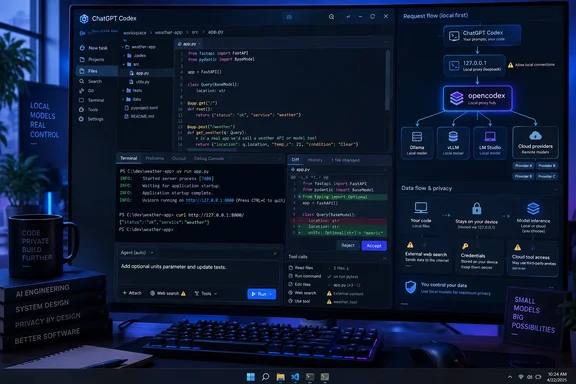
XDA-Developers demonstrated the setup with locally hosted Qwen and GLM models as well as external providers. OpenAI has separately confirmed that it is merging the standalone Codex app into its new ChatGPT desktop client, meaning this is no longer a niche Codex-only trick: it targets the coding environment that OpenAI is positioning as part of ChatGPT on Windows and macOS.
The catch is important. This does not turn the whole ChatGPT app into an offline local-LLM client, and it is not an OpenAI-supported configuration. It is a compatibility layer that changes where Codex sends model requests. For developers who understand that boundary, it is a useful way to consolidate tools. For managed Windows environments, it is also a new configuration path worth watching because it can redirect code, prompts, credentials, and tool output through a locally installed proxy.
How opencodex changes Codex’s route
Codex communicates with OpenAI’s Responses API. Opencodex listens on the local machine, normally at 127.0.0.1 on port 10100, accepts those Responses API-style requests, and translates them to the protocol expected by the selected provider. The project supports OpenAI-compatible endpoints and adapters for other common model interfaces, including Anthropic-style Messages APIs.
Its installation process can update Codex’s local configuration so that the desktop client uses the local proxy as its base URL. The proxy then generates a model catalog that makes routed models appear in the Codex picker under namespaced identifiers such as provider/model. In effect, the ChatGPT desktop app remains the front end, but the model picker and request path become controlled by opencodex.
That architecture is more durable than modifying the ChatGPT application binary. A desktop update may change the client’s behavior and break compatibility, but it does not automatically remove the local configuration that points Codex at a loopback endpoint. The opencodex project also includes a restore mechanism intended to remove its injected settings and return Codex to its normal OpenAI route.
The distinction matters for troubleshooting. If the proxy is not running, the desktop client is no longer talking to OpenAI directly; it is trying to reach a local service. A broken or stopped proxy can therefore look like a Codex network outage, often producing connection or streaming errors rather than an obvious “custom provider unavailable” message.
“Local” applies to the model path, not every feature
XDA-Developers’ account correctly identifies the biggest limitation: a locally selected text model does not guarantee that every action stays on the local PC.
The core prompt and model response can remain local when opencodex routes Codex to a self-hosted runtime such as Ollama, vLLM, or LM Studio. That can be useful for source-code experiments, offline work, cost control, or organizations that want to keep inference inside their own network. Opencodex’s documentation explicitly supports local endpoints at the default addresses commonly used by those runtimes.
But Codex is more than a chat-completion window. It has file-editing tools, shell access, model-assisted planning, search capabilities, and other agent functions. The XDA-Developers testing found that web search could still use OpenAI services unless the user configures an alternative search backend. Its report also says image handling for a text-only model can involve an OpenAI-based vision step that turns the image into text before the selected model receives the prompt.
That means administrators and developers should treat “local model” as a statement about inference routing, not a blanket privacy guarantee. Before using this with proprietary source code, determine whether the workflow invokes web search, vision, remote model fallback, cloud-hosted MCP services, package registries, or any external tool. The app’s visible model selection alone is not enough to answer that question.
For sensitive repositories, the safer operating assumption is simple: every enabled tool needs its own network and data-flow review. A local LLM can reduce exposure, but it does not automatically isolate an agent that has access to a browser, terminal, remote APIs, and a ChatGPT login.
Tool calling is the real compatibility test
The ability to send a prompt to an LLM is the easy part. The meaningful test is whether that model can operate Codex’s tools reliably.
Codex does not merely request a block of text. It asks a model to use structured capabilities, such as command execution, code edits, tool discovery, and MCP integrations. Opencodex has to translate the client’s request format for the selected upstream provider, while the model has to recognize when to call a tool, select the correct tool, construct valid arguments, and use the returned result coherently.
XDA-Developers reported that MiniMax M3 struggled with this workflow while the writer’s Qwen 3.8 27B and GLM-5.3-Flash tests performed better. That should be read as an implementation result, not a universal model ranking. Tool-use behavior varies by model version, quantization, prompt template, provider adapter, and the task itself.
The more useful conclusion is that a model which performs well in an ordinary chat interface can still be a poor replacement for Codex in an agentic coding session. A model may write competent code yet fail to apply a patch, loop on shell commands, misunderstand tool results, or stop midway through a multi-step task.
Teams evaluating this configuration should begin with low-risk, repeatable jobs:
- Ask the model to inspect a disposable repository, describe the files it reads, and make no changes.
- Test a narrowly defined edit followed by a local build or unit-test command.
- Review the exact shell commands and patches before enabling wider permissions.
- Keep a first-party Codex model available as a control when diagnosing whether a failure comes from the repository, the desktop client, the proxy, or the alternate model.
This approach is particularly relevant for Windows developers using agent permissions that allow terminal commands. A weak model’s failure mode is not always a wrong answer in chat; it can be a confused sequence of filesystem changes and commands.
Windows has two extra failure points
The configuration works on Windows, but it has Windows-specific pitfalls that the “install a package and restart the app” version of the story leaves out.
First, the ChatGPT desktop client is packaged as an MSIX application. A July issue filed in the opencodex repository documented a case where Windows loopback restrictions prevented the packaged ChatGPT app from reaching the local proxy at 127.0.0.1. The report said that the application may need a loopback exemption before it can communicate with a localhost service. That is a Windows application-container behavior, not a flaw unique to opencodex, but it means a proxy that is healthy in a browser or terminal may still be unreachable from the ChatGPT app.
Second, configuration can land in the wrong Codex home directory. The same issue describes a conflict with Orca, another AI development tool that can set the CODEX_HOME environment variable to its own runtime directory. In that situation, opencodex may report success after writing configuration into Orca’s location, while the ChatGPT app continues to read the user’s normal .codex directory and shows only native OpenAI models.
The observable symptom is deceptively simple: opencodex appears to be running, but its usage dashboard shows no incoming requests and the ChatGPT model picker never gains the configured providers. The corrective action is to verify which directory the ChatGPT desktop app is actually using before assuming the model integration has failed.
That makes this a configuration-management concern, not just a hobbyist convenience. On a Windows workstation with multiple coding agents installed, environment variables and overlapping configuration directories can silently determine which application gets redirected.
The local dashboard is powerful enough to deserve controls
Opencodex’s dashboard can store provider settings, API keys, OAuth credentials, model-selection rules, usage logs, and—in some configurations—multiple ChatGPT or Codex accounts. The project says its default binding is loopback-only, which means the service is reachable only from the same machine and does not require an extra authentication token for local access.
That default is sensible for a personal workstation, but it should not be mistaken for an access-control system. Any process running under the same user context can potentially connect to an unauthenticated loopback service. Browser extensions, local malware, shared-user setups, and poorly isolated developer tools change the risk calculation.
The project requires authentication when a user explicitly binds the service beyond loopback for LAN or remote access. That is the minimum acceptable posture. Anyone exposing the proxy to another device should use a firewall, an authenticated tunnel or VPN, and a distinct credential rather than simply changing the bind address to all interfaces.
Enterprise administrators should also note that this setup may circumvent a simple policy assumption: that a user signed into ChatGPT desktop is necessarily using OpenAI-hosted models for every coding request. The client UI can remain familiar while the inference provider, billing path, logging location, and data residency change beneath it.
OpenAI’s own enterprise messaging around ChatGPT Work and Codex emphasizes governance and controls for local files, apps, browsers, and agent network access. A user-installed routing layer does not automatically inherit an organization’s intended review process for third-party model providers.
Opencodex is a practical answer for developers who want one coding interface for local models, OpenAI models, and other providers. Its strongest feature is not that it makes a model name appear in ChatGPT’s picker; it is that it preserves Codex’s project and tool workflow while making the inference endpoint replaceable.
But the installation should be treated as a controlled change to a coding agent, not as a cosmetic extension. Verify the active configuration directory, confirm the ChatGPT app can reach the local listener, test tool calls in a disposable project, and map which features still leave the machine. Once those checks are complete, the ChatGPT desktop app can serve as a capable front end for local LLM work—without pretending that every part of the workflow is local.