

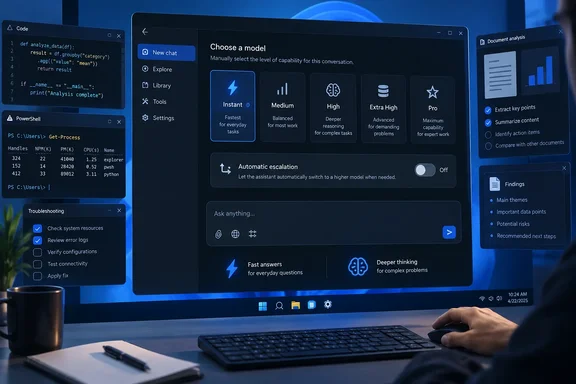
Notebookcheck first highlighted the practical consequence: prompts such as “think harder” and “think deeply” no longer cause ChatGPT to move to a higher reasoning level. OpenAI’s own support documentation confirms that wording explicitly. A user who leaves the chat set to Instant will receive an Instant response, even when the request is complex, unless they select a higher option themselves.
For Windows users who treat ChatGPT as a coding assistant, troubleshooting aide, research tool, or document-analysis companion, this is a workflow change rather than a model retirement. The higher-capability modes remain available. The automatic decision to spend more compute has been removed.
Instant now means Instant on Plus and Pro
OpenAI previously allowed ChatGPT to determine when an Instant conversation merited escalation to Thinking. That automatic routing has now been retired for consumer Plus and Pro accounts. The company says it can still change behavior automatically for safety purposes, but ordinary difficult requests no longer trigger the higher-reasoning path.
The distinction is easy to miss because nothing necessarily looks broken. A Plus or Pro user can ask for a PowerShell deployment script, a root-cause analysis of a Windows crash dump, or a review of a complicated C# function while Instant remains selected. ChatGPT will answer, but it will not silently move into a more time-intensive reasoning mode because the task appears difficult.
That also changes the usefulness of familiar prompting habits. Telling ChatGPT to be thorough, to double-check its work, or to “think step by step” can still influence the format and thoroughness of a response. It no longer changes the selected reasoning tier. OpenAI’s documentation draws that line clearly: language in the prompt cannot automatically switch the chat to Medium, High, Extra High, or Pro.
The result is a more predictable system, but one that puts more responsibility on the subscriber. A quick answer may now be quick because the model was instructed to stay in the lowest-latency mode, not because the request was genuinely simple.
The Higher intelligence setting is gone on the web
The automatic-routing retirement comes with a second interface change: OpenAI has removed the Higher intelligence setting from ChatGPT on the web for Plus and Pro plans. That setting previously governed whether Instant could automatically use additional reasoning.
OpenAI’s support page says the replacement is the model picker’s Thinking slider. Eligible paid users can choose an effort level directly rather than allowing Instant to escalate. The available levels are Instant, Medium, High, Extra High, and Pro, although the account’s plan determines which of those choices appear.
This is not a universal removal of automatic reasoning from every OpenAI customer type. OpenAI says ChatGPT Business retains the Higher intelligence control under Settings and General, where it continues to govern automatic additional thinking while Instant is selected. Enterprise users may also continue to see an older picker while the newer controls reach their workspace.
That split is important for organizations with mixed accounts. An employee using a personal Plus subscription and a managed Business workspace may see materially different behavior for the same task. A support runbook that says “leave Instant selected and let ChatGPT decide” is now inaccurate for Plus and Pro, while it may still describe a Business configuration.
Plus users stop below the top reasoning settings
The new picker gives subscribers visible control, but it does not give every paid tier the same ceiling. OpenAI’s current availability table says Plus includes Medium and High reasoning with GPT-5.6 Sol. It does not include Extra High or Pro selections.
Pro, Business, and Enterprise accounts can access Medium, High, Extra High, and Pro, subject to workspace controls. Free and Go users are in a different lane entirely: they use the Think button for harder questions, but that feature runs on GPT-5.6 Luna rather than GPT-5.6 Sol.
This makes the UI label more consequential than it first appears. “Think” on a Free or Go account and “High” on a Plus subscription do not merely represent different waiting times. OpenAI identifies different underlying models and different available reasoning budgets. Users comparing results between accounts should not assume that two similarly named controls are equivalent.
For Plus subscribers, the actionable change is straightforward: select Medium or High before sending a task where accuracy, multi-step reasoning, or careful code review matters more than response speed. Leaving the conversation on Instant is now an affirmative choice to prioritize low latency.
The published account-limit summary needs one correction
Notebookcheck’s report correctly identifies that OpenAI is steering users toward explicit model selection, but its summary of the Pro allowances compresses two materially different policies into one. OpenAI’s own help documentation says the $200 Pro tier allows 200 GPT-6 Pro messages per week, but GPT-5.6 Sol Pro has a separate allowance of 170 messages per day. The two models are also capped together at 200 messages per day.
The $100 Pro tier works differently. Its 50-message weekly allowance is shared across GPT-6 Pro and GPT-5.6 Sol Pro, meaning switching between those two Pro options does not provide an additional pool of messages. OpenAI states this directly because users could otherwise mistake model switching for a way around the limit.
That difference affects how advanced users should ration access. Someone on the $200 plan who has exhausted the weekly GPT-6 Pro allowance can still have GPT-5.6 Sol Pro capacity remaining, provided the daily Sol Pro and combined daily limits have not been reached. On the $100 plan, no such separation exists.
OpenAI also says that after a $200 Pro user reaches the GPT-6 Pro weekly allowance, ChatGPT automatically falls back to GPT-5.6 Thinking at Medium. That fallback is distinct from the retired Instant-to-Thinking escalation. In other words, OpenAI has removed automatic upward routing for ordinary hard prompts while retaining an automatic downward fallback when a user exhausts a specified Pro-model allowance.
A manual selection should become part of technical workflows
For individual Windows users, the sensible response is to treat the model picker like a performance setting rather than a cosmetic preference. Instant remains appropriate for routine questions, command syntax, short rewrites, or simple follow-ups. Medium and High should be selected deliberately for tasks where a mistaken inference is expensive: interpreting Event Viewer entries, checking Group Policy changes, reviewing scripts that touch production systems, or comparing security configurations.
This also means prompt templates and team guidance should be updated. Instructions that rely on a phrase such as “think carefully” to obtain a stronger reasoning pass are no longer enough on Plus and Pro. The template should instruct the person running the query to choose the intended level before sending it, especially when reproducing results matters.
Administrators should avoid assuming that a visible model option guarantees access for every user. OpenAI says Business and Enterprise administrators can restrict model availability through workspace settings, and the option list can vary by plan, workspace permissions, and product surface. The company’s new Model Test feature for Business admins is useful here because it lets them check what a particular member can access without changing that member’s permissions.
The immediate consequence is uncomplicated: ChatGPT Plus and Pro subscribers now have to request more reasoning through the interface, not through prose. Users who leave Instant selected will still get an answer, but OpenAI has stopped making the hidden decision to spend additional reasoning time on their behalf.
References
- ChatGPT stops switching to Thinking by itself on Plus and Pro Notebookcheck · 2026-09-17T07:05:00+00:00