

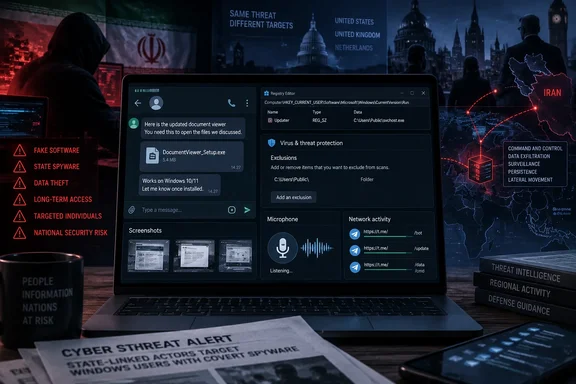
BleepingComputer first highlighted the public advisory on September 16, while the NCSC’s technical report and the FBI’s accompanying material show a broader and more troubling pattern. Once installed, the malware can collect email and browser-resident messaging data, record audio, capture screenshots, download additional payloads, and in at least one observed case wipe a Windows system. The agencies say stolen material from some victims has later appeared on pro-Iranian leak sites, turning endpoint compromise into an instrument of intimidation.
For Windows administrators, the important detail is that the operators explicitly try to move victims off managed work hardware and onto personal devices when corporate controls interfere. Security teams that treat staff-owned Windows PCs as outside the threat model can miss the device actually used to collect sensitive communications, contacts, and location clues.
The attack begins with a relationship, not an exploit
The NCSC says the operators research their intended victims, impersonate a known contact or messaging-platform support representative, and establish rapport before sending a file. Lures have posed as installers for Pictory, RunwayML, Norton Antivirus, Telegram, Adobe Flash Player, and KeePass; other files have claimed to contain MRI scan results.
That approach deserves more attention than the fake filenames. The advertised applications are merely the wrapper around a two-stage Windows infection. The victim sees a screen that resembles the promised software or document, while the malicious program quietly downloads and launches the persistent component in the background.
The advisory says attackers often start with a work-related device. When delivery fails or the operator fears enterprise protections will expose the attempt, they ask the target to open the same file on a personal machine. This is a practical bypass of the usual corporate boundary: a managed laptop may be protected by application control, endpoint detection, proxy inspection, and incident response, while a home Windows device may have none of them.
There is no campaign-specific Microsoft patch to deploy because the agencies have not described exploitation of a Windows flaw. The critical control is preventing execution of software delivered through a chat conversation, even when the sender appears familiar and the software seems plausible. A user who needs KeePass, Telegram, or creative software should obtain it independently from the vendor’s legitimate site or a trusted app store, rather than following a link or attachment supplied in a message.
Run-key persistence and Microsoft Defender evasion
CHOSEN BRICK persists through the current user’s Run key:
HKCU\Software\Microsoft\Windows\CurrentVersion\Run
That location is mundane, requires no administrator privileges, and runs configured programs whenever that user signs in. It is therefore useful to attackers precisely because it blends into normal Windows startup behavior and is rarely checked by end users.
The NCSC named two previously observed value names: SMQDService and winappx. Those names are investigative starting points, not durable signatures. The agencies warn that filenames, directories, and registry value names can change; defenders should review the executable path and publisher rather than declaring a system clean because those two value names are absent.
On a potentially affected endpoint, a quick inventory can be obtained with:
reg query HKCU\Software\Microsoft\Windows\CurrentVersion\Run
That is only an initial triage step. A suspicious entry should not be casually deleted and the matter forgotten. It may point to a second-stage implant, downloaded tools, staged data, or active command-and-control traffic. Preserve the entry, its target path, file hashes, file timestamps, parent process history, and relevant Windows Defender and endpoint telemetry before remediating the host.
The malware also attempts to add Microsoft Defender exclusions. This is a more significant signal than an unfamiliar Run-key name because exclusions directly weaken a local control that is supposed to examine the payload and its working directories. Administrators should investigate new or unexpected Defender exclusion changes, especially when they coincide with new Run-key persistence or executables in user-writable and ProgramData locations.
Telegram traffic is part of the command channel
After infection, each device uses a distinct Telegram bot ID for command-and-control. The NCSC says this per-victim separation limits cross-contamination between cases from the operator’s perspective; it also means defenders should not expect a single universal bot identifier to identify every infection.
The malware uses Telegram for both tasking and data transfer, while the agencies also observed exfiltration through cloud object storage including VultrObjects and StorjShare. Recent variants can route Telegram activity through HTTPS or SOCKS5 proxy services. The named services are legitimate platforms and should not be blocked indiscriminately simply because the campaign abused them. What matters is unexpected use: a workstation that has no business talking to Telegram’s API, proxy providers, or unfamiliar object-storage destinations warrants scrutiny.
The joint advisory specifically calls out unexpected connections involving Telegram’s API, Backblaze B2, VultrObjects, StorjShare, IPRoyal, and LightningProxies. For enterprise defenders, that should translate into a focused hunt across DNS, web-proxy, firewall, and endpoint network logs, correlated with the affected user, browser activity, recently downloaded executables, and persistence changes.
The malware’s listed capabilities explain why this is more than a conventional information-stealing incident. Screenshots, recorded microphone audio, email, and browser-held WhatsApp or Telegram data can expose a target’s associates and habits. The NCSC says that material can help operators identify contacts, locations, and a person’s pattern of life—data that may carry risk beyond the compromised computer.
CHOSEN BRICK and HEAVYGRAM: the public naming needs care
The new joint advisory calls the malware family CHOSEN BRICK, while the FBI’s related September material refers to HEAVYGRAM. Several security outlets, including The Hacker News, report that the two labels describe the same activity. The FBI’s March 20 FLASH, meanwhile, documented a related Windows malware campaign using Telegram command-and-control and attributed it specifically to Iran’s Ministry of Intelligence and Security, or MOIS.
The public records do leave one point that should not be simplified away. The NCSC says CHOSEN BRICK has targeted people from at least 2025, while the FBI’s March report dates the wider Telegram-controlled Windows campaign to autumn 2023. These are not necessarily contradictory dates: one may describe the agencies’ respective observations or different stages of the operation. But the joint advisory does not explicitly publish a formal alias statement that collapses CHOSEN BRICK and every FBI-described HEAVYGRAM sample into one identical malware family with a single start date.
What is firm is the operational overlap: targeted social engineering through messaging services, Windows masquerading payloads, Run-key persistence, Telegram bots for control, data theft, and targeting of people Iran considers politically hostile. The FBI’s MOIS attribution is its assessment; the jointly published advisory more broadly attributes the activity to Iranian state cyber actors.
What Windows teams should do now
Organizations with personnel who may be visible targets—journalists, researchers, advocates, Iran-focused policy staff, executives, and their support networks—should extend the hunt beyond corporate endpoints. The advisory explicitly recommends helping likely targets check their personal devices as well.
A proportionate response should include the following actions:
- Review current-user Run keys and newly created executables for unexplained entries, particularly
SMQDService,winappx, and paths intended to resemble Windows or Microsoft directories. - Hunt for Microsoft Defender exclusion changes and determine which user, process, and command line made them.
- Search proxy and DNS data for unexpected connections to Telegram infrastructure, the named cloud-storage services, and proxy providers, then correlate findings with file downloads and user execution.
- Ensure Microsoft Defender, SmartScreen, endpoint protection, application allowlisting, and operating-system updates remain enabled on managed systems.
- Brief at-risk users that a message from an apparent acquaintance, platform-support agent, or medical contact can be part of a long-running impersonation effort, rather than an ordinary phishing blast.
The agencies say CHOSEN BRICK has no observed automated lateral-movement capability and has largely concentrated on single devices. That limits one common enterprise fear, but it should not create false comfort: the implant can download other malware, and a single unprotected personal Windows PC may hold the conversations and contacts the operator wanted in the first place.
References
- Iranian hackers use CHOSEN BRICK Windows malware to spy on targets BleepingComputer · 2026-09-16T16:24:55-04:00