

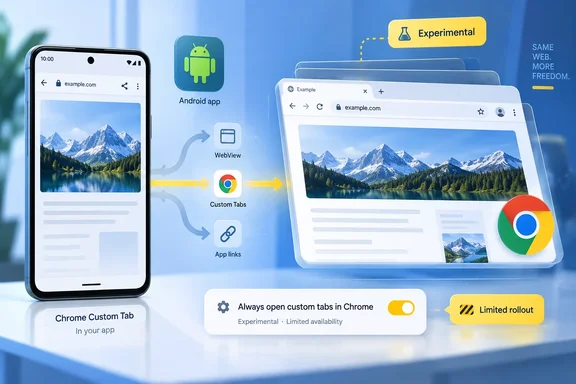
Windows Report spotted the user-facing switch in Chrome Canary under Settings > Tabs and tab groups, labeled “Always open custom tabs in Chrome.” Its stated purpose is direct: open web pages in Chrome instead of Custom Tabs. Chromium’s own source code confirms the feature exists, and shows that Google registered both a CCTAlwaysOpenInBrowser feature flag and a CUSTOM_TABS_ALWAYS_OPEN_IN_BROWSER preference in September 2026.
That primary record adds a detail missing from the Canary screenshot: the underlying feature flag was introduced disabled by default. In other words, the visible setting is not evidence of a live rollout to Canary users, let alone a commitment for Chrome’s stable Android release.
Chrome is changing the destination, not replacing Custom Tabs
A Custom Tab is already browser-backed rather than a traditional embedded WebView. Android’s developer documentation describes it as an in-app browsing surface powered by the user’s preferred browser, sharing browser state such as cookies, saved passwords, payment methods, and addresses. The design is deliberate: the user can view web content with browser capabilities while retaining a back path to the app that opened the link.
That can feel awkward in daily use. A page opened from Google Search, a messaging client, a productivity app, or a news reader may look like Chrome, yet it behaves as part of the launching app’s task. Users who want a link in their permanent tab list, alongside their existing Chrome session and tab groups, currently often need to use the menu command that moves the page into Chrome proper.
The new preference appears intended to make that transfer automatic for Custom Tabs handled by Chrome. It does not mean that Custom Tabs will cease to exist. Android developers use them because they can preserve app branding, customize toolbar controls and transitions, and keep readers or sign-in flows close to the originating app. Chromium’s work is adding a user choice over Chrome’s presentation of those requests, rather than removing the developer-facing technology.
The present Canary toggle is not yet reliable
Windows Report says that enabling the option in the current Chrome Canary build did not consistently change the result: tested pages continued to open as Custom Tabs. The outlet’s observation fits the state of Chromium’s public development trail. Google has landed the feature flag, the stored preference, the flag description, and the settings UI in separate recent changes, but there is no public Chrome release note declaring that the end-to-end behavior has shipped.
This is exactly the point where Canary users should resist treating a settings screen as a supported feature. Canary is Chrome’s most experimental Android channel; flags and preference pages often arrive before every code path that consumes the preference is enabled, and some never progress to the stable channel.
Google also has not published a timeline, a Chrome version number, or a minimum Android version for the feature. There is no documented policy control for managed Android devices, no announced enterprise configuration, and no indication that administrators will be able to enforce or disable the choice through Chrome Enterprise management. For now, it is a test surface for people willing to run pre-release software, not a deployment setting for organizations.
It will not override every Android app’s link handling
The wording “always open” needs a narrower reading than it first suggests. Android has several ways to display or route a web address, and Chrome cannot unilaterally take control of all of them.
An app can display a site through a WebView that it owns, use a Custom Tab backed by the user’s default browser, send an ordinary browser intent to Android, or trigger an App Link that opens a native app such as YouTube, Maps, or a retailer’s client. The Chrome preference under development addresses the Custom Tabs route associated with Chrome. It cannot turn an app’s internal WebView into Chrome, and it cannot prevent Android from routing a verified deep link into another installed app.
It also should not be mistaken for a way to make Chrome prevail when another browser is configured as Android’s default. Android’s guidance says Custom Tabs are powered by the user’s preferred browser where that browser supports the protocol. The new control is being developed inside Chrome and is explicitly named for opening Custom Tabs in Chrome browser. Nothing in the Chromium changes indicates that it changes Android’s default-browser selection or takes over links handled by Microsoft Edge, Firefox, Brave, Samsung Internet, or another browser.
That distinction matters for Windows users who use Edge on Android to keep tabs, favorites, passwords, and history aligned with Edge on their PC. Setting Chrome’s experimental option, if it reaches stable, would be a poor substitute for choosing Edge as Android’s default browser and configuring the source app’s own link-opening controls. It is a Chrome behavior preference, not an Android-wide browser-routing policy.
Why the choice still has practical value
The feature addresses a real friction point for Chrome users who prefer a single, durable tab session over app-contained browsing. A normal Chrome tab is easier to find later, group, revisit from Chrome’s history, and continue through Chrome Sync on another signed-in device. It also avoids the visual ambiguity of a browser-powered window that looks like Chrome but returns to the original app when the user presses Back.
There is a tradeoff. Apps use Custom Tabs partly because users can return to the source app without a disruptive browser switch. For a shopping link, documentation page, or quick article, that can be the faster flow. Moving every compatible request into full Chrome gives the user more persistent browser context but may make the originating app feel less continuous.
For business and authentication scenarios, Custom Tabs also have a purpose beyond convenience. Android’s enterprise guidance recommends browser Custom Tabs instead of WebView for sign-in flows because the app cannot inspect the browser context in the same way, while shared cookies can reduce repetitive authentication. Chrome’s prospective user preference concerns how the page opens, not the security properties Android attributes to browser-based Custom Tabs. Still, IT teams should wait for final implementation details before assuming that SSO workflows, return redirects, or managed-device behavior will remain identical.
What Chrome users can do now
There is no action required for stable Chrome users. The setting identified by Windows Report is currently tied to Chrome Canary and an experimental Chromium flag, with no announced stable release date.
Users who need links in their main browser today still have more dependable options:
- Use the originating app’s own “Open in browser,” “Open externally,” or equivalent command when it offers one.
- Set the intended browser as Android’s default browser, understanding that this affects ordinary browser intents rather than every in-app surface.
- Review the Google app’s link-opening preference separately if Google Search results are the specific links being kept inside an in-app browser.
- Do not rely on Chrome Canary flags for work authentication, managed devices, or workflows where a broken return path to the source app would cause trouble.
The significant development is not that Google has solved Android’s fragmented link handling. It has not. Chromium is building a narrowly scoped preference for one common case: Chrome-backed Custom Tabs that a Chrome user would rather have land immediately in the full browser. Until the preference actually changes behavior in a public build, the old manual handoff remains the dependable route.
References
- Chrome for Android may soon let you open web pages directly in Chrome instead of Custom Tabs Windows Report · 2026-09-17T02:51:24+00:00