

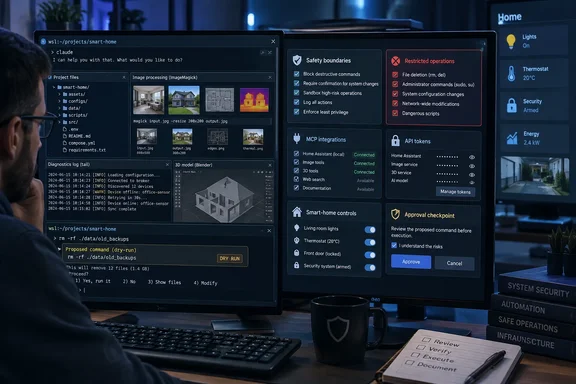
Anthropic’s documentation confirms that Claude Code can read files, invoke shell tools, edit local files, and connect to external tools through Model Context Protocol, or MCP. On Windows, however, it is designed to run through WSL, WSL 2, or Git for Windows—not as a native replacement for PowerShell administration. That distinction matters for anyone who assumes an AI session launched from a project folder has narrow scope: adding directories, allowing shell commands, or connecting an MCP server can substantially expand what it can see and do.
The MakeUseOf article’s five examples are less a case for handing an agent the keys to a PC than for adopting a disciplined workflow: inspect, propose, review, execute, and verify. The agent is valuable because it can translate an outcome into commands and interpret their output. It is risky for precisely the same reason.
File cleanup should begin with an inventory, not deletion
The least controversial use is taming a Downloads folder filled with installers, duplicate screenshots, archives, and old documents. Claude Code can use ordinary command-line tools to enumerate files, group them by extension or age, calculate sizes, identify exact duplicate hashes, and draft a move plan into dated folders. That is a considerable improvement over searching for one-off cleanup commands and hoping their wildcard syntax does what you think it does.
But a cleanup plan is only trustworthy when its criteria are concrete. “Delete old files” is not a rule; “move .msi, .exe, and .zip files older than 180 days into Downloads\Archive\Installers, excluding anything modified in the past 30 days” is a rule that can be inspected. The right first request is to generate a CSV or plain-text inventory and a dry run that prints intended changes without making them.
For destructive work, ask for a reversible move operation rather than deletion, and require a manifest recording each original and destination path. Do not grant a blanket approval for shell operations simply because the first few requests were harmless. Claude Code’s current documentation lists permission modes including plan, which is intended for analysis without file edits or command execution, as well as modes that accept edits or bypass prompts. The latter setting should have no place on a personal Windows installation containing irreplaceable data.
The MakeUseOf article refers to a “Manual permission mode,” but Anthropic’s published Claude Code permission terminology is different: its documented modes include default behavior, acceptEdits, plan, and bypassPermissions. Readers should verify what their installed version actually displays rather than treating a generic label as a guaranteed safeguard.
ImageMagick is a strong fit—if originals stay untouched
The batch-image example is one of the better uses for a conversational terminal agent. ImageMagick’s magick utility can convert formats, resize images, create thumbnails, crop, and remove embedded profiles and comments. Its syntax is flexible enough that users regularly lose time looking up quoting rules, resize geometry, quality settings, and how to avoid overwriting an input file.
Claude Code can eliminate much of that lookup work by inspecting a folder first and then generating a command for a defined output. A request such as “make JPEG copies of all WebP files under this folder, maximum width 2,000 pixels, preserve aspect ratio, put them in output, and leave originals alone” has clear acceptance criteria. It can also check resulting dimensions and count produced files against the source set.
The catch is that stripping metadata is not a neutral optimization. ImageMagick’s -strip option removes profiles and comments, including EXIF and other metadata; that can erase camera details, GPS location data, copyright information, or color-profile information needed for predictable printing and editing. Asking an agent to “remove private data” without defining which data is expendable is how a sensible privacy task becomes irreversible loss.
Use a separate output directory, an explicit extension filter, and a collision policy. If an output name already exists, the agent should stop and report it rather than silently overwrite the file or invent a naming convention halfway through a batch. For a repeat workflow, keep the resulting script under version control or at least save it alongside a sample input and output so that the next run is reproducible without relying on chat history.
Windows diagnostics need evidence before a repair command
The Windows troubleshooting example is potentially useful, but it is also the one most likely to invite an agent into work that should remain deliberately slow. Claude Code can collect read-only information from Event Viewer exports, service state, installed updates, process lists, disk capacity, driver data, and logs. It can help turn an opaque error code into a ranked set of hypotheses and identify what evidence would distinguish among them.
That is a good role. It should not be permitted to jump from “Windows feels slow” to registry changes, service disabling, driver removal, or a broad cleanup script. An LLM can connect plausible-sounding symptoms that are unrelated, and administrator-level commands can make a system less recoverable long before they make it healthier.
Microsoft’s own Windows guidance provides a useful model. When component-store corruption is genuinely implicated in Windows Update failures, Microsoft documents running DISM repair before sfc /scannow; both tools produce records that can be reviewed, including the CBS log in the Windows logs directory. SFC also supports verification-only operation, which gives an evidence-gathering option before a repair attempt.
A safer Claude Code prompt is therefore: “Collect read-only system facts, explain why each fact is relevant, and do not make changes.” After that, request the narrowest test. If a repair is warranted, run it in an elevated terminal you opened yourself, retain the command output, and make the agent explain what changed and where the relevant log entries can be found. Diagnosis and remediation should be separate approvals.
The 3D and RAW workflows depend on custom plumbing
MakeUseOf says its author has used Claude Code with Blender and FreeCAD to generate parametric models, render previews, adjust dimensions, export printable files, and even send jobs to 3D printers through Home Assistant. It also describes a custom MCP server that connects Darktable for conversational RAW-image edits. These are plausible workflows because Claude Code supports MCP connections, but they are not built-in Claude Code features that a Windows user can simply turn on.
That missing distinction is important. A model generated by an agent may be editable and parametric, but the quality of the result depends on the Blender or FreeCAD scripts, the installed versions, the geometry constraints, and how the handoff to a slicer is managed. A preview render does not prove that a wall bracket has adequate thickness, clearance, load tolerance, or print orientation. It proves only that the geometry rendered.
The same limitation applies to image editing. Repeatable Darktable adjustments—exports, file naming, common exposure corrections, or metadata handling—are amenable to automation. Selective masks, skin tones, color-critical work, and local corrections still require a human looking at the actual image. MakeUseOf acknowledges that limitation, but the more significant omission is reproducibility: without the MCP server’s code, its permissions, and its configuration, no outside reader can audit or replicate the claimed Darktable integration.
Treat an MCP server as executable integration code, not as a harmless plugin. It can expose tools and data to the agent; a poorly designed server can turn a limited local session into access to printers, photo libraries, smart-home devices, or credentials. Do not install or approve an MCP server whose source and permissions you have not inspected.
Home Assistant tokens turn a convenience demo into an access-control issue
The Home Assistant dashboard example has genuine appeal. An agent that can inspect existing YAML, find stale entity IDs, mirror naming conventions, and draft dashboard cards can reduce the dullest parts of maintaining a smart home. It can also make a configuration repository easier to review when it produces small, coherent changes instead of encouraging a user to edit one giant YAML file by hand.
The article then crosses into a higher-risk category by recommending a long-lived access token so Claude Code can interact with Home Assistant directly. Home Assistant’s own developer documentation says API requests authenticated with such a token use a bearer token, and its authentication documentation describes long-lived tokens that can remain valid for up to 10 years. In practical terms, possession of that token can be enough to act as the associated Home Assistant user.
That is not a credential to place in an MCP configuration file, a project directory, a chat transcript, a shell-history entry, or an environment file that gets backed up or committed. A dedicated Home Assistant account with the fewest practical permissions is safer than reusing an owner account; the token should be stored in a proper secret manager or protected local secret store, rotated when a workflow changes, and revoked immediately if it is exposed.
For most households, the better pattern is for the agent to draft YAML or automation changes locally, then let the user review and apply them through Home Assistant. Direct live control is defensible for tightly scoped, tested automations. It is a poor default for an experimental conversational workflow that can misunderstand intent, call the wrong entity, or make several related changes before a human spots the first bad assumption.
Claude Code’s non-coding value is real, but it comes from operating existing tools with local context—not from making those tools safe by itself. On Windows, the practical rule is simple: let the agent prepare evidence and propose a narrowly scoped action; retain human control over elevation, deletion, credentials, external integrations, and anything that can affect the physical world.