

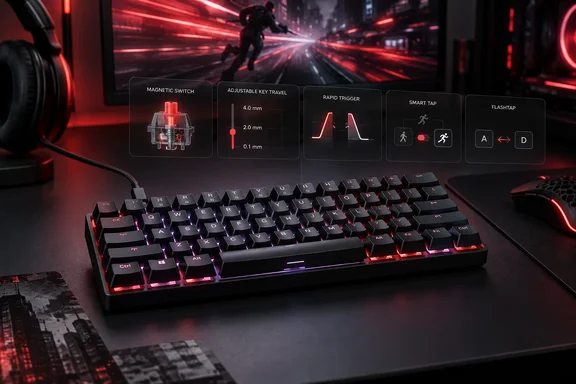
Corsair’s own comparison with the K65 RGB MINI confirms the magnetic switches and expanded input controls. It also provides an important buying distinction: both keyboards support 8,000 Hz polling, so the CLIPPER’s clearest upgrade is how its keys can behave, rather than a higher maximum polling rate.
The hands-on observations below come from Wccftech reviewer Sarfraz Khan. There is no second independent hands-on evaluation in the available reporting; Corsair’s documentation corroborates features, not the reviewer’s performance impressions.
What Hall Effect changes in practice
Corsair identifies the CLIPPER’s switches as MGX HYPERDRIVE CORE Hall Effect magnetic switches. Instead of relying on mechanical contacts to register a press, magnetic sensing lets the keyboard track switch position and use that information for configurable input behavior.
According to Wccftech, actuation can be set individually for each key between 0.2 mm and 3.8 mm, in 0.1 mm increments. That gives users a choice between registering a press near the top of the stroke and requiring a more deliberate depression.
The useful consequence is selective sensitivity. As Wccftech explains, frequently used gaming keys can have shallow actuation, while keys prone to accidental presses can require deeper travel. There is little reason to treat the shallowest setting as a universal optimum: the customization exists precisely because different keys and tasks benefit from different thresholds.
Rapid Trigger addresses a separate part of the movement. Wccftech describes it as responding to upward key travel rather than waiting for a fixed reset point, allowing repeated inputs with less movement. Adjustable actuation determines when an initial press registers; Rapid Trigger changes the reset and repeat behavior.
Neither feature establishes a measured competitive advantage by itself. Wccftech describes the keyboard as fast and responsive, but its review does not publish instrumented latency measurements or controlled gaming comparisons. Its “blazing fast” verdict should be read as a reviewer’s impression, not a benchmark result.
The meaningful comparison with the K65 RGB MINI
Corsair’s published comparison makes the differences between its two compact keyboards easier to assess:
| Capability | CLIPPER PRO MINI 60 | K65 RGB MINI |
|---|---|---|
| Layout and connection | 60%, wired USB-C | 60%, wired USB-C |
| Switch technology | MGX HYPERDRIVE CORE Hall Effect | Cherry MX mechanical switches |
| Maximum polling rate | 8,000 Hz | 8,000 Hz |
| Advanced input controls | Multi-Action, Tap Lock, Smart Tap and Rapid Trigger | Not listed as supported |
| FlashTap SOCD | Supported | Not supported |
| Configuration software | Corsair Web Hub | Corsair iCUE |
This is particularly useful for an existing K65 RGB MINI owner. Moving to the CLIPPER preserves the compact, wired arrangement and the same headline polling ceiling. The purchase therefore needs to make sense on magnetic input controls, configuration preferences or other physical differences.
According to Wccftech, Corsair specifies 1,000 Hz operation in standard mode and 8,000 Hz with Game Mode enabled. Corsair’s comparison independently confirms the 8,000 Hz capability and identifies Fn+G as the Game Mode shortcut, although it does not detail the standard-mode rate.
The mode qualification matters: “up to 8,000 Hz” should not be read as a promise that every operating mode uses that rate. Nor does the polling specification alone describe the time from a finger movement to a visible response in a game.
More functions from fewer physical keys
Corsair documents several controls that go beyond choosing an actuation point. Their value depends on whether the user wants to learn more elaborate key behavior.
- Multi-Action assigns four actions to one key’s movement: half-press, full-press, half-release and full-release.
- Smart Tap assigns one action to a short tap and another to a hold.
- Tap Lock turns a held action into a toggle, allowing a press to stand in for keeping the key depressed.
- FlashTap SOCD controls how conflicting directional inputs are resolved.
Smart Tap has a particularly direct connection to the 60% layout. Corsair gives the example of using Shift or another modifier as an arrow key when tapped, while retaining its modifier function when held. That provides another way to recover navigation functions without adding physical keys.
It also introduces a different interaction to learn. A dedicated arrow key has one immediate purpose; a tap-versus-hold assignment asks the user to distinguish two actions on the same key. For someone who spends much of the day editing text or code, that trade-off may matter more than the keyboard’s polling rate.
FlashTap similarly changes input interpretation, rather than simply making the keyboard more sensitive. Wccftech describes configurable priority between conflicting inputs. Its usefulness should therefore be considered separately from Rapid Trigger: one resolves simultaneous directions, while the other changes activation and reset behavior.
Web Hub changes the configuration workflow
Corsair lists Web Hub as the CLIPPER’s configuration software, rather than the iCUE software used by the K65 RGB MINI. According to Wccftech, the browser-based utility handles firmware updates, key programming, macros, RGB lighting and Hall Effect settings without requiring a conventional desktop application for online configuration.
Wccftech also reports 8 MB of onboard storage with room for up to five profiles. That makes saved configurations relevant to users moving the keyboard between systems, rather than requiring every adjustment to begin again on another PC.
Basic typing is described as plug-and-play by Wccftech. The advanced controls are a separate reason to open Web Hub; someone who only connects the keyboard and types will not necessarily be using the features that distinguish it from a conventional compact model.
For a managed work PC, the browser-based approach should not be taken as confirmation that configuration will be permitted. The reviewed material does not establish supported browser versions or behavior under enterprise device-access policies. Buyers relying on workplace configuration should resolve that compatibility question before making Web Hub central to their purchase.
The physical compromises are harder to configure away
According to Wccftech, the CLIPPER removes the dedicated function row, navigation cluster and arrow keys, placing those functions on an Fn layer. This frees desk space for mouse movement, but frequent navigation becomes a combination-key task unless the user adopts remapping or features such as Smart Tap.
Wccftech reports that secondary functions are printed on the keycaps, making the layer easier to learn. Khan nevertheless found the main legends difficult to see without RGB lighting and the unlit secondary legends difficult to read in darkness. That is a practical limitation for anyone who prefers lighting disabled or still needs to look up Fn combinations.
The reviewer describes the plastic chassis as lightweight rather than substantial, with two levels of height adjustment. His typing impressions are positive: smooth, linear switches with relatively quiet and consistent acoustics. Those are subjective observations, not sound-level measurements.
Hardware customization is more restricted. Wccftech reports that the switches are not hot-swappable, so extensive software tuning should not be confused with the ability to readily replace the switches for a different feel. Corsair also specifies wired connectivity; buyers needing Bluetooth or a wireless receiver should look elsewhere.
Who should consider it?
Wccftech lists a $99 product price, while the same review displays an $89 affiliate purchase offer. Those are different price references, not an established universal selling price. Check the actual checkout price rather than assuming either figure applies everywhere.
At the review’s sub-$100 price positioning, the CLIPPER deserves consideration from gamers who already want a 60% wired keyboard and will use per-key sensitivity, Rapid Trigger or more elaborate mappings. Corsair’s documented comparison makes those controls a stronger justification than 8,000 Hz polling alone.
For a mixed gaming-and-work setup, start with the layout decision. If dedicated arrow and navigation keys are essential to your daily workflow, the CLIPPER’s extensive customization still leaves you learning substitutes. If the compact layout already suits you, its magnetic input controls offer the more compelling reason to buy.
References
- Corsair CLIPPER PRO MINI 60 Review: Small But Blazing Fast Wccftech · Sun, 20 Sep 2026 18:05:44
- Documentation - CLIPPER PRO MINI 60 Hall Effect Gaming Keyboard | CORSAIR corsair.com
- CORSAIR CLIPPER PRO MINI 60 vs CORSAIR K65 RGB MINI: 차이점은 무엇일까요? | CORSAIR corsair.com