

What CPUID shipped
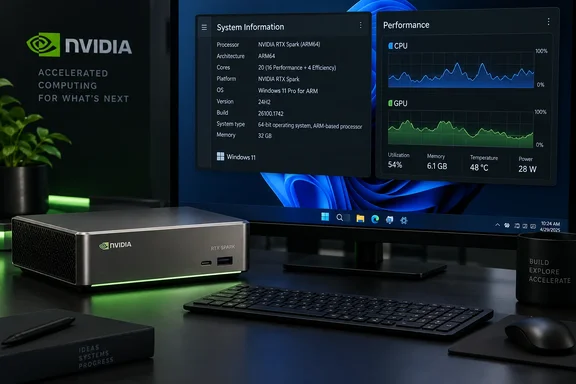
CPUID says CPU-Z 1.06 for ARM64 improves detection of the new chip, while HWMonitor 1.06 adds complete telemetry for the CPU and the GPU. The two tools do different jobs. CPU-Z identifies the hardware. HWMonitor reads its live sensors.
The version histories on CPUID's download pages show what else is in the release.
CPU-Z ARM64 1.06 (October 6, 2026):
- Improved support of NVIDIA RTX Spark.
- Added Qualcomm Snapdragon C and Snapdragon X2 Elite Extreme "EG".
- Fixed core-set maximum frequencies and improved logo rendering.
HWMonitor ARM64 1.06 (October 6, 2026):
- NVIDIA RTX Spark telemetry covering System, CPU and GPU.
- The same two Qualcomm additions: Snapdragon C and Snapdragon X2 Elite Extreme "EG".
- New HDD metrics (IOPS and average latency), new themes, and the app now remembers the state of device and sensor-type nodes.
If you run Snapdragon hardware rather than RTX Spark, the release still matters to you.
This isn't the first RTX Spark support
It would be wrong to call 1.06 the first RTX Spark support in either tool. CPU-Z ARM64 1.05, dated June 4, 2026, already listed "NVIDIA RTX Spark (N1x & N1)". HWMonitor ARM64 1.05, dated August 19, 2026, listed "NVIDIA RTX Spark (N1X & N1)" too. The 1.06 notes describe improved detection and added telemetry. They don't introduce the platform from scratch.
The changelogs don't say how older builds behaved on RTX Spark hardware. They don't say whether older builds showed incomplete readings, and they don't say whether any of them failed to run. Don't treat those outcomes as established.
What CPUID says about the hardware
CPUID's news post describes RTX Spark as a superchip with a 20-core MediaTek ARM SoC codenamed "Grace" and a 6144-core RTX GPU codenamed "Backwell", running Windows 11 on ARM64. Those codenames and that spelling come from CPUID's own post. They aren't confirmed retail branding.
Other outlets describe the hardware slightly differently:
- VideoCardz, citing NVIDIA, says RTX Spark combines a 20-core ARM processor with an NVIDIA Blackwell GPU featuring 6,144 CUDA cores.
- TweakTown, relaying VideoCardz, says the author used remote access to an ASUS P16 laptop because RTX Spark laptops hadn't been released yet.
The core counts agree across sources. The naming does not, so I'm keeping CPUID's wording attributed to CPUID.
How the software was developed
VideoCardz reports that CPU-Z and HWMonitor author Franck Delattre said he remotely accessed an ASUS P16 system during development. That detail comes from the developer via VideoCardz, not from CPUID's release notes. It doesn't tell us how extensive the testing was.
CPUID also published screenshots showing the software running on an RTX Spark system. That is useful evidence the tools work on real hardware. It isn't a sensor-by-sensor validation.
What isn't established
- Sensor list: TweakTown's coverage notes that the specific sensor readings HWMonitor shows on RTX Spark aren't listed. HWMonitor's general product page lists CPU utilization, per-core clocks, temperatures and power, plus GPU and NPU telemetry. That is a general description of the tool. It doesn't guarantee that every metric is exposed on RTX Spark hardware.
- Launch timing: TweakTown reported that the SoCs were debuting "tomorrow", meaning October 7. That is one outlet's reported timing. CPUID's pages don't confirm retail availability or an OEM lineup.
- Competitors: I found nothing in this reporting on whether AIDA64, HWiNFO or other tools have matching ARM64 support.
What to do if you're inspecting an RTX Spark system
- Use the ARM64 editions. CPUID lists Windows ARM64 builds separately from the x86/x64 builds. Tech-Insider notes the ARM64 packages are distinct from the standard x86 Windows releases. Don't assume an x64 build is equivalent.
- Check the version. Confirm that CPU-Z ARM64 and HWMonitor ARM64 show 1.06.
- Install HWMonitor per CPUID's instructions. The ZIP should be checksum-verified, then unzipped, and the executable run. Removal means deleting the executable and the files it generated in that folder. CPU-Z's ARM64 page describes a setup version with a different uninstall path, so don't apply the HWMonitor steps to it.
- Report bugs. CPUID's HWMonitor page asks users to use its contact page for sensor bugs or undefined values.
- Treat early readings as provisional. The release notes don't publish accuracy figures. Cross-check thermal and power readings before drawing conclusions, especially in review work.
Why it matters
ARM64 builds are maintained separately from the x86 ones, as VideoCardz notes. A new platform therefore needs deliberate tool support before diagnostics are trustworthy. Detection and telemetry are separate problems, and 1.06 advances both for this chip.
The practical takeaway is modest. Anyone testing RTX Spark hardware should use the 1.06 ARM64 builds. Other claims, such as market-signal theories or "complete" validation, go beyond what CPUID's own notes support.
References
- CPU-Z, HWMonitor Add RTX Spark Support (2026) - shattered.io shattered.io · 2026-10-07T21:12:18+00:00
- CPU-Z and HWMonitor now support NVIDIA RTX Spark ahead of launch - VideoCardz.com videocardz.com
- CPU-Z and HWMonitor add RTX Spark monitoring support ahead of release tweaktown.com