

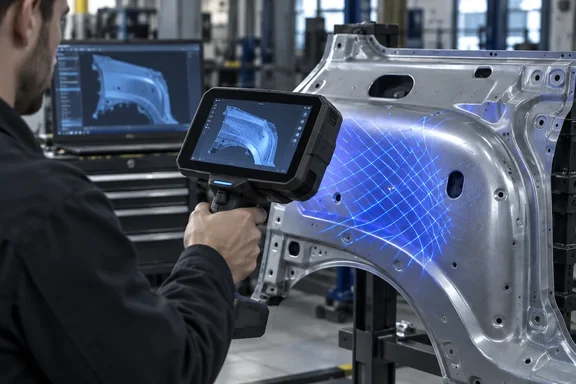
Creality Sermoon P1S keeps the all-in-one design and costs less
The P1S launch was announced in a Creality press release distributed through PR Newswire, and Notebookcheck reported it the next day. The release calls the Sermoon P1S a professional all-in-one blue-laser 3D scanner designed for reverse engineering, automotive applications, field digitization, and advanced scan-to-model workflows. Tech site CGMagazine also covered the launch and confirmed the date: available worldwide beginning Sept. 22, the P1S shifts much of the typical scan-to-model process directly onto the device.
What defines the Sermoon line is that most of the work happens on the scanner itself. Creality says the P1S's PC-free standalone workflow, supported by onboard computing, local storage, and a 6-inch touchscreen, allows users to capture an object, review scan coverage, and perform common processing tasks without moving back and forth between the scanner and a separate computer. In a hands-on review of the original P1, Hackster.io described the concept simply: It is like a Raptor Pro (or, more accurately, a Sermoon S1) attached to an Android tablet.
The P1S makes that same pitch at a lower price. According to the launch release, inside is an eight-core Qualcomm CPU running at up to 3.36 GHz, an Adreno 740 GPU and an FPGA, with 16 GB of LPDDR5X memory and 256 GB of UFS 4.0 storage. You can use it in three ways: standalone, connected wirelessly to a PC over Wi-Fi 7, or connected by cable over USB 3.0. It runs on two replaceable 3,300 mAh batteries and supports PD 3.0 fast charging.
What changed between Sermoon P1 and P1S
Notebookcheck compared the two models side by side. Creality's own documents confirm most of the P1S figures, and the P1 figures come from Creality's P1 product page and retail listings.
| Specification | Sermoon P1 | Sermoon P1S |
|---|---|---|
| Cross laser lines | 22 | 34 |
| Parallel / single blue lines | 7 / 1 | 7 / 1 |
| Volumetric accuracy | 0.02 mm + 0.06 mm/m | 0.02 mm + 0.08 mm/m |
| LPDDR5X RAM | 24 GB | 16 GB |
| Storage | 256 GB | 256 GB |
| Weight | 830 g | 807 g (with battery) |
| CPU / GPU | Eight-core Qualcomm, Adreno 740 | Same |
| Display | 6-inch | 6-inch |
| Batteries | Two 3,300 mAh | Two 3,300 mAh |
Creality's store listing for the original P1 confirms the baseline: 22+7+1 Blue Laser Lines + Dual NIR VCSEL and 0.02mm + 0.06mm/m volumetric accuracy. For the new model, Creality's release says that for blue-laser scanning, the Sermoon P1S is specified at up to 0.02 mm accuracy, with volumetric accuracy of 0.02 mm + 0.08 mm/m.
It helps to know how a volumetric-accuracy figure works. The first term is a fixed error. The second term grows with the size of the object. Both models are rated at 0.02 mm fixed error. The P1 adds 0.06 mm for every metre of object length, and the P1S adds 0.08 mm. On a small bracket the difference is negligible. Across a two-metre body panel, the P1S's rated worst case is 0.18 mm against the P1's 0.14 mm. That's our own arithmetic from Creality's lab figures, not a measured result. Creality itself notes that accuracy figures come from laboratory testing and that real results depend on vibration, temperature and operating conditions.
The laser lines are where the P1S gains. Creality says the 34 cross laser lines favour coverage and scanning speed on larger surfaces, the 7 parallel lines handle finer surface detail, and the single blue line is meant for narrow grooves and deep holes. More cross lines mean each frame covers more surface, which helps most on the large, fairly flat objects Creality is targeting in automotive work.
Sermoon P1S frame rates don't match Notebookcheck's figure
Frame rate is the one specification where the reports disagree, and it affects how fast you can work. Notebookcheck says that in standalone mode, NIR scanning on the P1S is capped at 20 FPS rather than 60 FPS. NIR here means near-infrared structured light, a mode that projects a pattern instead of laser lines.
Creality's release gives the P1S frame rates this way: blue-laser scanning reaches up to 60 fps standalone and 100 fps with a PC connected, and NIR scanning reaches up to 20 fps standalone and 30 fps with a PC connected. So the 20 FPS standalone NIR figure matches Creality's spec sheet. The "60 FPS" it's being compared against is the P1S's own standalone blue-laser rate, and we couldn't find a published P1 NIR frame rate to confirm that the P1 ran NIR at 60 FPS. The P1's Amazon listing advertises 100FPS Blue Laser Scanning with WiFi 7, which is the same peak blue-laser rate Creality now quotes for the P1S when it's connected to a PC.
In practice, anyone who plans to use NIR mode away from a computer should expect 20 fps and 30 fps when connected. Don't assume the P1S lost 40 frames per second compared with the P1 until Creality publishes a matching P1 figure.
Notebookcheck also says Creality improved the scanning rate in both standalone and wired mode and enlarged the single-capture range, but it gives no numbers for either claim. The same outlet reports that Creality claims marker-free scanning in blue-laser mode when the scanner is wired to a PC. That claim covers one mode only. Creality's release describes the four capture methods together as enabling fast marker-free scanning without requiring a separate scanner for each type of task. On the older P1, Tom's Hardware found that the NIR (near-infrared) mode can capture geometry with no markers in a variety of lighting conditions. If you're hoping to skip tracking markers entirely, expect that to work only in certain modes.
Creality's pricing puts the P1S next to the Sermoon S1
Creality's launch terms are a regular price of $2,299 and an early-bird price of $2,099 from September 22 through October 12, 2026. Launch-period buyers also get one AESUB blue scanning spray, which Creality describes as self-vanishing, so you don't have to clean the part after scanning. Notebookcheck describes the P1S as "up for pre-orders" through the official store. Creality's release says worldwide availability started on September 22, so check the shipping date at checkout.
Creality's Sermoon series store page lists the P1S at $2,099 with $2,299 struck through, the Sermoon P1 at $3,299, the Sermoon S1 at $2,299 marked down from $2,699, and the Sermoon X1 at $5,999. Retail prices for the P1 have varied. Tom's Hardware's review quoted a $3,129 price tag while also listing the P1 at Best Buy for $3,299.
These prices make the purchase decision clearer. At $2,099, the P1S costs less than the S1's sale price. Based on Hackster.io's description of the P1 as essentially an S1 with a tablet attached, the P1S gives you the built-in-computer design for about the price of Creality's scanner that needs a PC. We don't have a verified S1 spec sheet to compare them feature by feature, so that's a positioning observation, not a performance ranking.
The P1S isn't the entry-level option either. Notebookcheck notes that Creality's lower-end Pika came after the P1 as a budget scanner but is less capable than the rest of the range. The P1S sits between the Pika and the P1.
Where the Sermoon P1S fits in a Windows PC workflow
The onboard computer is the headline, but most serious scan-to-CAD work still ends up on a desktop. Creality says its CrealityScan software handles scanning, optimization and basic model processing, and it exports STL, OBJ and PLY files, the common mesh formats that CAD, modeling and slicer software accept. The software also offers AI-assisted hole filling to patch missing surfaces. Creality is clear that this is a software feature, not a hardware change, and says it will keep updating features and scanning algorithms through over-the-air (OTA) updates.
On the P1, Tom's Hardware found that for users who want more control, the CrealityScan app allows for precision editing on a Windows or macOS machine. Creality's P1 product page recommends a demanding PC for that software: Windows 10 or 11 64-bit, a 13th-generation Intel Core i7 or newer, an NVIDIA RTX 4060 or better with 8 GB of VRAM, and at least 64 GB of system RAM. On a Mac, it recommends macOS 14 or newer with an Apple M3, M4 or M5 chip and at least 32 GB of RAM. Those are P1 recommendations. Creality hasn't published separate PC requirements for the P1S. Since the P1S uses the same processor and software, the P1 requirements are a reasonable planning baseline, but that's our inference, not a published P1S spec.
The frame-rate figures show why the PC link matters. Creality's quoted blue-laser rate goes from 60 fps standalone to 100 fps with a PC, and NIR goes from 20 to 30. The marker-free blue-laser claim Notebookcheck reports also applies only to wired PC mode. A Windows workstation that meets the P1 recommendations gets the most out of this scanner. A modest laptop gets you the standalone experience plus file transfer.
Creality also lists some environmental limits worth knowing. According to CGMagazine's report of Creality's figures, blue-laser scanning can operate in light levels of up to 110,000 lux, while NIR scanning supports up to 80,000 lux with the included filter. Creality says the P1S is designed to rely less on scanning spray for suitable dark and metallic surfaces, and it avoids claiming that for every material.
The P1 review record is the best proxy for now
No independent outlet has published hands-on results for the P1S yet. Everything above comes from Creality's specifications and Notebookcheck's comparison. The nearest real-world evidence is what reviewers found with the P1, which shares the P1S's processor, display, software and battery setup.
Tom's Hardware reported that the P1 excelled at creating detailed 3D models during testing and performed impressively when scanning indoors, outdoors, both with and without tracking markers. Its verdict also had a caveat that the P1S price cut doesn't fix: the P1 stands out with a portable, computer-free workflow and strong geometry capture capabilities, but the disappointing color textures and a $3,129 price tag make it better suited to professionals than hobbyists. The P1S addresses the price. Creality hasn't said anything about color texture capture on the new model.
On handling, Notebookcheck's own P1 review found it comfortable with two hands but a bit heavy with one. The P1S is 23 grams lighter, which is small enough that we wouldn't expect it to change that verdict.
What this means for you
Reverse engineers and automotive users who want to scan in the field but can't justify $3,299 now have a real option at $2,099. Buyers who need the tightest accuracy on large objects, or who want the most on-device memory for big scan projects, should look closely at the P1. Everyone else can wait for independent P1S reviews without missing much, apart from the early-bird deadline.
- The Sermoon P1S is $2,099 until October 12, 2026, and $2,299 after that. The P1 is listed at $3,299 on Creality's store.
- The P1S has 34 cross laser lines instead of 22, but its rated volumetric accuracy is 0.02 mm + 0.08 mm/m against the P1's 0.06 mm/m, and it has 16 GB of RAM against the P1's 24 GB.
- Creality quotes NIR scanning at 20 fps standalone and 30 fps with a PC, and blue-laser scanning at 60 fps standalone and 100 fps with a PC. Plan around those figures, not the 60-to-20 NIR drop described in one report.
- Marker-free blue-laser scanning is claimed for wired PC mode, so budget for tracking markers if you plan to scan standalone in that mode.
- Creality's recommended Windows setup for the P1 is Windows 10/11 64-bit, a 13th-gen Core i7, an RTX 4060 with 8 GB VRAM and 64 GB RAM. Use it as a guide until Creality publishes P1S-specific requirements.
- If color texture capture matters for your work, wait for P1S reviews, because reviewers found the P1's textures disappointing.
The Sermoon P1S makes Creality's handheld scanner with a built-in computer affordable for more buyers, and it does so with specific, published trade-offs rather than a stripped-down redesign. Whether the extra laser lines outweigh the loss in memory and large-object accuracy will become clear once independent reviews appear. Until then, the October 12 early-bird cutoff is the only deadline, and if your PC already meets the P1's recommended specs, the P1S slots into that workstation setup without extra hardware.
References
- Sermoon P1S: Creality launches cheaper version of its all-in-one 3D scanner Notebookcheck · 2026-09-23T17:50:00+00:00
- Creality Launches Sermoon P1S, an All-in-One Blue-Laser 3D Scanner with Built-In Computing prnewswire.com