

For Windows PC builders, the practical rule is simpler than the marketing: buy the capacity you need in two DIMMs where possible, treat XMP and EXPO as configuration targets rather than guaranteed defaults, and do not assume a long first boot means Windows or the SSD is at fault. The memory controller, BIOS revision, motherboard trace layout, DIMM rank, and slot population decide whether a particular frequency will actually work.
Four DIMMs turn fast DDR5 into a platform problem
A 64GB DDR5-7200 kit can be an excellent two-stick setup in a compatible motherboard, but installing four modules is electrically different from using two. Each CPU memory channel must drive more physical devices, more traces, and more signal loading. The eventual result may be a lower stable frequency, looser timings, extended training, or a fallback to conservative settings.
Intel’s own memory specifications make the limitation explicit. On 13th- and 14th-generation Core desktop platforms, Intel lists DDR5 support at up to 5600 MT/s with one single-rank DIMM per channel, while two DIMMs per channel are rated much lower: 4000 MT/s for two single-rank modules and 3600 MT/s for two dual-rank modules. Those are official non-overclocked limits, not a prediction that every four-stick installation will be restricted to those numbers; a good motherboard and CPU sample can exceed them. But they explain why a four-DIMM DDR5-6400 or DDR5-7200 configuration is an overclocking exercise even when every stick carries the same label.
AMD’s AM5 desktop guidance shows the same pattern. Kingston’s population tables, which compile CPU makers’ published rules, list Ryzen 7000 and 8000 systems at DDR5-5200 with one DIMM per channel and DDR5-3600 with two DIMMs per channel on typical six-layer AM5 motherboards. Ryzen 9000’s listed two-DIMM-per-channel figure is likewise far below its one-DIMM-per-channel rating.
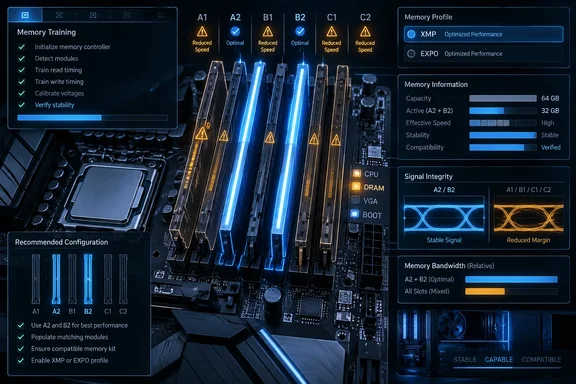
That is the caveat missing from many RAM shopping pages: a motherboard may have four sockets, but the fastest advertised kit speed is usually validated with one module in each channel, using the preferred A2 and B2 slots. Four physical slots give consumers a capacity expansion path; they do not promise that a 4×16GB or 4×32GB configuration will hit the same settings as a 2×16GB kit.
The issue is also not confined to a single CPU vendor or motherboard brand. It follows the limits of a dual-channel consumer memory interface. Users planning 64GB should normally favor a validated 2×32GB kit; users planning 96GB or 128GB should start with 2×48GB or 2×64GB kits if their board’s qualified-vendor list supports them. That removes the second DIMM from each channel and gives the memory controller an easier job.
XMP and EXPO are profiles, not the baseline specification
The most important distinction in DDR5 buying is between JEDEC operation and performance profiles. JEDEC defines the industry-standard memory settings that allow a system to boot safely at defaults. XMP on Intel-oriented kits and EXPO on AMD-oriented kits store higher frequencies, timings, and voltages that the user enables in UEFI.
That does not make XMP or EXPO reckless; mainstream boards are built to use them. But it means the advertised number on a DDR5-6000, DDR5-6400, or DDR5-7200 box should not be read as an unconditional system guarantee. Kingston says plainly that aggressive memory profiles will not run on every system and advises buyers to check motherboard QVL lists and processor support before enabling them. The vendor’s own troubleshooting guidance also notes that some configurations may need a less aggressive secondary profile or a return to automatic settings.
XDA Developers is right to warn that a buyer can install a high-speed kit and fail to achieve its labeled transfer rate. The stronger conclusion is that this is primarily a compatibility and configuration expectation problem, rather than evidence that DDR5 itself is defective. CPU memory-controller quality varies chip to chip; BIOS updates can materially improve training and compatibility; and a memory kit validated as a pair should not be casually expanded with a second retail pair, even if the part numbers match.
The sensible escalation path after failed boots, blue screens, game crashes, or WHEA hardware errors is also less dramatic than manually increasing several voltages. First update the motherboard UEFI, load optimized defaults, install the DIMMs in the board manual’s recommended slots, and test at default JEDEC settings. Then enable the intended XMP or EXPO profile and run a serious memory-stability test before tuning anything further. If instability returns, reduce frequency or select a less aggressive profile before treating higher voltage as the automatic answer.
Memory training can delay startup, but it should not punish every boot
The XDA article’s weakest assertion is that DDR5 systems “inevitably” take longer to load Windows because voltage settings must be checked on every boot. DDR5 memory training is real, and it can make a machine appear frozen during POST with a black screen and a lit DRAM diagnostic LED. But training happens most prominently after the first boot, a hardware change, a BIOS update, a cleared CMOS state, or failed prior training—not necessarily as a minute-long ritual before every trip to the desktop.
Kingston’s support documentation says DDR5 systems can spend several minutes training after those events, especially with large memory capacities, and that subsequent boots should be significantly shorter. MSI offers a more direct mitigation for certain AM5 boards: its Memory Context Restore setting lets the firmware reuse completed memory checks to reduce startup time after a configuration is known to be stable.
That setting deserves a careful approach. Memory Context Restore and similarly named “Memory Fast Boot” options trade some retraining for faster POST. They are quality-of-life features after stability has been established, not a cure for an unstable overclock. If a system only behaves with training bypassed, the underlying memory profile may still be marginal; a failed resumed setting can lead to unpredictable boots rather than a clean, repeatable failure.
The Windows-specific consequence is easy to misdiagnose. The extra time occurs before the operating system starts, so changing startup apps, disabling Windows services, or replacing an NVMe drive will not resolve a long DDR5 training cycle. Watch the motherboard’s POST codes or debug LEDs, time the interval from pressing the power button to the vendor logo, and separate firmware startup from the interval after the Windows loading screen appears.
Gaming gains depend on the bottleneck, not the transfer-rate label
The performance section needs more nuance, too. XDA Developers cites an approximate 15% to 20% jump in a 1080p example, then argues that a move from 150 fps to 170 fps may be difficult to notice. That can be a fair buying judgment for a GPU-limited system, but it is not a general measure of DDR5’s value.
Recent testing from Tom’s Hardware on Intel’s LGA 1700 platform found that DDR4 configurations trailed DDR5 by roughly 9% to 14% on average across tested 12th-, 13th-, and 14th-generation Core processors at 1080p with an RTX 5090, with game-specific differences reaching higher. TechSpot’s separate testing also found some heavily CPU- or memory-sensitive games producing much larger gaps between DDR4-3600 and DDR5-6000. Those test conditions are intentionally designed to expose CPU and memory differences, so they should not be mistaken for every player’s real-world result.
At 1440p or 4K with a midrange GPU, the graphics card often becomes the limiting component and narrows the gap. But the word often carries the weight here. Simulation games, strategy titles, competitive games pursuing very high refresh rates, and CPU-heavy scenes can still respond to memory bandwidth and latency. Faster DDR5 may also improve frame-time consistency and one-percent lows, which are not captured by comparing only average frame rates.
A DDR4 owner should therefore avoid both extremes: do not rebuild a functioning PC merely to chase a transfer-rate figure, and do not conclude that DDR5 has no practical benefit because one GPU-bound benchmark was flat. A platform change should be judged as a package—CPU, motherboard, memory capacity, upgrade path, and the workloads that actually run on it.
The buying advice is capacity first, validated speed second
DDR5 has matured into the normal choice for new consumer platforms, particularly AMD AM5 systems where DDR4 is not an option. Its less glamorous realities are signal margins at high frequencies, firmware-dependent training behavior, and confusing retail specifications that conceal the difference between stock operation and an enabled overclock profile.
For a new Windows gaming or productivity machine, the safer recipe is a two-DIMM kit from the motherboard QVL, enough capacity for the workload, a moderate platform-appropriate XMP or EXPO speed, and current UEFI firmware. A 2×32GB DDR5-6000 kit that trains consistently and survives long stability testing is more valuable than four modules advertised for DDR5-7200 that force repeated retraining, lower clocks, or intermittent application crashes.
The hidden downside of DDR5 is not a reason to retreat to DDR4. It is a reason to stop buying memory as though its headline speed exists independently of the CPU, board, BIOS, and number of sticks installed.