

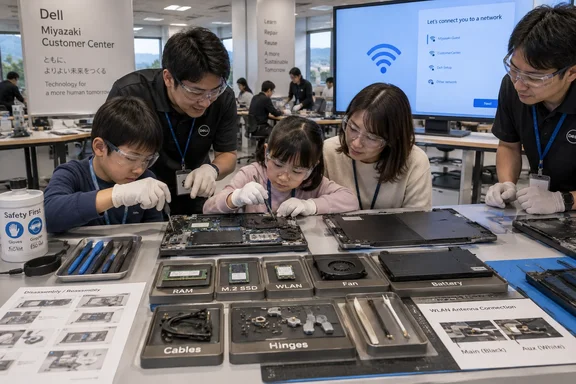
At Dell’s Miyazaki Customer Center on September 12, six family groups with 14 people assembled Dell 14 DC14250 laptops equipped with an Intel Core 5 120U processor, 16GB of memory and a 512GB SSD. The completed systems, which include one year of Basic Onsite Service, were taken home by participants after booting to the Wi-Fi connection screen. The attendance and component details were reported by Japan’s PC Watch, while Dell’s own support documentation confirms that the DC14250 has separately identified memory, SSD, wireless card, fan, battery, display, I/O board and system-board assemblies.
The event was Dell’s 14th such class, aimed at children from third grade through junior high school. It also included an office tour, an Intel presentation on PC hardware and AI use, and a dance appearance by Hii-kun, one of Miyazaki Prefecture’s dog mascots. That is the human-interest portion. For PC owners and repair administrators, the more consequential part was that Dell used a current, mainstream Windows 11 notebook and exposed students to several jobs that resemble actual field replacement work.
The class did not turn children into laptop manufacturers. Dell supplied a palm-rest assembly with the keyboard and motherboard already installed, then guided participants through fitting the remaining modules, routing cables, fastening hinges, connecting the display, inserting storage and memory, installing the battery and closing the chassis. That distinction is not a criticism; it is the reason the workshop could safely succeed in an afternoon. It is also a clearer picture of what a practical laptop repair normally looks like.
The 23-screw build was a controlled service exercise
PC Watch’s detailed account shows that participants installed memory first, then connected touchpad, keyboard and speaker cables, installed the fan, attached the display assembly, routed Wi-Fi antenna leads, fitted the wireless card and SSD, secured the battery, and finally fastened the bottom cover. The job ended with 23 screws: two for the fan, five for the battery, eight for the base cover and the remainder spread across the internal work.
The biggest hurdle reportedly was the wireless card’s antenna connection. That is unsurprising. Tiny coaxial antenna snaps are among the most delicate operations in a notebook teardown; a connector that appears aligned can still fail to seat, while excess force can damage the card or cable. Dell technicians were positioned alongside the children, and PC Watch reported that trainers stepped in when several participants struggled with the connection.
This is important because the workshop’s design does not merely present a tray of cosmetic modules. It includes parts that determine whether a notebook can boot, charge, cool itself, retain data and connect to a network. Participants installed a removable M.2 SSD and memory module, attached a fan, and seated a WLAN card. Those are genuine maintenance skills, even if the system board and keyboard arrived preinstalled.
For IT departments, the sequence is also a reminder that a device can be serviceable without being simple. Swapping an SSD or DIMM may take minutes. Replacing a display or tracing a wireless antenna around hinges is a different class of work, with higher risk of cable damage and reassembly errors. Dell’s event wisely separated the screws by task, an approach enterprise technicians should recognize: it reduces both missed fasteners and the common mistake of reinstalling a wrong-length screw into a motherboard or display area.
Dell’s manual supports the repairability claim—within limits
Dell’s support material for the Dell 14 DC14250 describes the system as a machine with replaceable internal assemblies. Its documentation lays out removal and installation steps for the base cover, battery, memory, 2230 SSD, WLAN module, fan, speakers, power-adapter port, I/O board, touchpad, system board and palm-rest assembly. That is meaningful documentation for an entry-level 14-inch Windows laptop, particularly compared with devices where memory is soldered, storage is inaccessible or port damage requires motherboard replacement.
The children’s build maps closely to that service hierarchy. Memory, the SSD, WLAN card, fan and battery are all explicitly treated as discrete parts in Dell’s service instructions. In practical terms, a future owner with the appropriate replacement component and the correct procedure should not need to discard the machine for a failed fan, degrading battery, dead wireless card or full storage drive.
But replaceable is not the same as user-serviceable without consequence. Dell’s support procedure for replacing the palm-rest assembly requires progressively removing much of the machine, including the battery, memory, SSD, WLAN card, fan, speakers, power-adapter port, I/O board, power button, touchpad and system board. The unit’s repairability is therefore modular, but the depth of disassembly changes sharply once a fault reaches the keyboard, touchpad, I/O hardware or motherboard.
Dell also demonstrated replacement of USB-C connector modules on an unspecified XPS laptop for members of the press before the class. According to PC Watch, Dell identifies components such as system boards, I/O boards, cooling assemblies, wireless antennas and USB-C modules as field-replaceable units, or FRUs. That is potentially good news for organizations trying to extend fleet life beyond the warranty term: a damaged USB-C port need not automatically mean replacing an entire system board.
The qualification matters. Dell said the XPS work was intended for certified service technicians and that damage arising from repairs involving unapproved FRUs is not covered by warranty. The company is presenting a repair path, but it has not turned that path into a blanket invitation for every owner to perform a teardown. Buyers should read the service manual for their exact model and understand the warranty terms before treating a component diagram as permission to experiment.
The lesson comes with a much higher admission price
This year’s workshop charged 113,275 yen, including the PC and one year of onsite support. That is about 86 percent higher than the 60,989-yen price Dell charged for its 2025 workshop, according to PC Watch’s coverage of both events.
The comparison needs care: the 2025 session used an Inspiron 14 5440 with a 13th-generation Core i5-1334U, while the 2026 event used the newer Dell 14 DC14250 with a Core 5 120U. The event configuration, production costs and program economics may also differ. Still, the increase is too large to ignore, and Dell has not publicly explained the change in the reports reviewed.
That price is not simply tuition. Participants receive the notebook and standard service coverage, so Dell is effectively packaging a PC sale, a supervised assembly experience, technical support labor and event operations. For the families selected, the value proposition is less about getting the cheapest Dell 14 and more about buying an unusually hands-on introduction to computer hardware. It is, however, a narrow program: only six family groups attended this year, despite eligibility extending nationally across Japan.
The 2025 revival also puts the 2026 event in perspective. Dell’s prior class was its 13th and its first after a six-year gap. The company appears to be treating the Miyazaki program as more than a one-off public-relations exercise, using its customer-center staff and university interns to run a repeatable event. That makes it a noteworthy model, even if its scale remains tiny compared with Dell’s consumer and commercial PC business.
What Windows users can take from a children’s workshop
The most practical takeaway is not that owners should immediately open their laptops. It is that the conventional “sealed laptop” assumption does not fully apply to the Dell 14 DC14250. Its RAM, SSD, battery, WLAN card and fan are physically distinct components, and Dell provides official disassembly instructions for them. Before ordering a replacement part, owners should check their precise service tag and original configuration, because Dell says component availability and part numbers depend on the system that was purchased and its warranty coverage.
For organizations, the same fact can shape purchasing policy. An endpoint standard with replaceable storage, memory, cooling hardware and battery can reduce downtime when paired with a documented spare-parts strategy and trained technicians. A notebook that technically permits repair but requires a nearly full teardown for common faults still needs labor planning, ESD controls and a clear decision about where self-maintenance ends and authorized service begins.
Dell’s Miyazaki class made that divide visible. Seven children successfully reached a Wi-Fi-ready Windows 11 system because the most sensitive factory integration had already been done, the remaining work was organized, and trained support staff were on hand. The completed notebooks can now be used normally; if one later needs a new SSD, fan or battery, the workshop has at least given its young owners a more accurate answer than “it can’t be fixed.”
References
- A dancing dog mascot, 23 screws, 9 parts: Inside Dell's attempt to show Japanese kids how computers work and how to assemble one TechRadar · 2026-09-15T23:05:00+00:00