

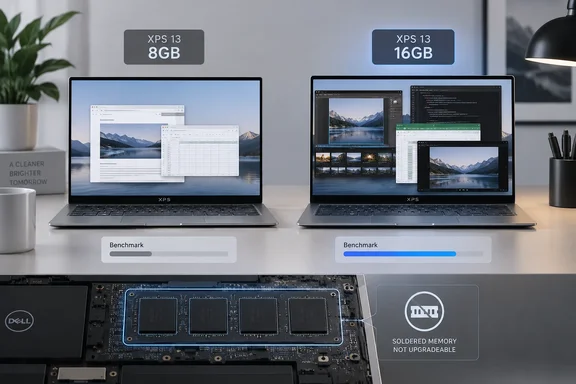
What the extra 8GB changed
The 16GB XPS 13 scored 6,904 in PCMark 10, versus 5,319 for the 8GB version: roughly a 30% difference. Engadget also reported 17 hours, 40 minutes in PCMark 10’s Modern Office battery test for the 16GB machine, compared with 15 hours, 56 minutes for the base model. In a handful of games, including Teamfight Tactics, the reviewer observed average frame rates generally 5–10% higher or more on the 16GB system. Engadget did not publish enough repeated-run data or power measurements to establish that memory alone caused every difference.
There is an important wrinkle in the review’s memory snapshot. On first boot, Task Manager showed 56% memory use on the 16GB unit; a Windows Update was pending. After the update and a restart, Engadget reported about 40%. That is evidence about this machine at those moments, not a measurement of what Windows 11 always consumes. Nor can the percentage on a 16GB PC be simply transferred to an 8GB PC: Windows and applications can adjust how they use available memory.
Microsoft’s memory documentation makes the distinction worth watching: available memory includes both free RAM and standby memory that can be reused when applications need it. A percentage alone therefore does not show how often a PC had to retrieve data from storage. Engadget suggests that heavier paging may help explain the base model’s performance and battery results, but its reported tests do not measure page-file activity or establish that battery-life mechanism.
The upgrade decision happens before checkout
Dell’s specifications for the XPS 13 DX13260 list both 8GB and 16GB LPDDR5X configurations for the Core 5 model, operating at 7,467 MT/s. More consequentially, Dell says the memory is integrated into the system board and cannot be upgraded. Choosing 8GB is not a plan to add an inexpensive RAM stick later.
Engadget reported a $200 step up to 16GB when its article was published. Treat that as the reviewer’s quoted configuration difference, not a guaranteed checkout price: compare the actual listings, including storage and display, before deciding whether the extra memory is worth the cost. The review’s comparison units both had 512GB SSDs; other Dell configurations may differ.
Does 8GB make a Windows 11 PC unusable? No. Microsoft lists 4GB as Windows 11’s minimum requirement, and its consumer memory guidance describes 8GB as a reasonable longer-term recommendation while suggesting 16GB or more for demanding projects. Minimum eligibility and a comfortable workload are different questions. Someone keeping to a modest number of browser tabs and documents may find an 8GB PC adequate; someone routinely combining browser tabs, calls, office apps and games has a clearer reason to buy headroom.
The practical takeaway: Engadget’s results favor the 16GB XPS 13 for buyers who can accommodate its price, particularly because this model’s memory cannot be expanded later. The base version still has a place for a constrained budget, but its lower sticker price should be weighed against what the laptop must comfortably run for years—not just what it can run on day one.
References
- The Midrange Dell XPS 13 Is The One You Actually Want - Engadget Engadget · 2026-09-29T13:00:00+00:00
- Dell XPS 13 Inch – Lightweight Touchscreen Laptop | Dell USA dell.com
- Computers, Monitors & Technology Solutions | Dell Store India dell.com