

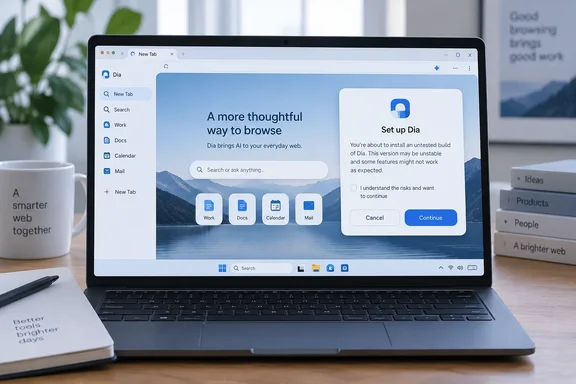
What actually shipped
The path to this launch was public. Dia confirmed in July that the Windows version would launch in fall 2026, and promised weekly progress updates. Josh Miller, the CEO of The Browser Company, said Windows was in active beta testing. The beta already had hundreds of testers.
Until now Dia was a Mac product. It became available on macOS without an invitation on October 9, 2025. As of March 2026 it was still macOS-only, with only a Windows signup page published. Arc, the company's earlier browser, also reached Windows long after its Mac debut, so the gap is a familiar one for this team.
Attribution matters here. Atlassian owns The Browser Company as a subsidiary, but the browser comes from The Browser Company. The Dia site now uses Atlassian's identity system for sign-in, which explains why the Windows onboarding leans toward Atlassian accounts.
The installer warning that needs an explanation
PiunikaWeb ran the Windows installer and reported what it saw. The setup screen asked for a work email address. A disclaimer called it an early, untested build that is not yet security-tested and not recommended for daily web use. PiunikaWeb found this odd because it had downloaded the build from the official site, and the download page said nothing about a test build.
That is one publication's observation. The official Windows page and changelog confirm a download and a v1.0 release. They don't mention the warning, explain it, or say whether it applies to the public installer. So three explanations are possible:
- The warning is leftover text from the beta installer.
- It is a real status note for this particular build.
- It is a packaging error.
PiunikaWeb suggested the company may have rushed the release. That is speculation. The evidence doesn't support calling Dia unsafe, and it doesn't support dismissing the warning either.
Practical guidance for cautious users:
- Install it on a secondary machine or a test profile first, not on the PC that holds your production logins.
- Keep your existing browser as the default until the vendor clarifies the warning.
- If you manage Windows fleets, hold off on broad deployment until the vendor addresses the warning in writing.
Setup flow, as PiunikaWeb described it
These steps come from PiunikaWeb's test. The official release notes are too brief to confirm them, so treat them as one hands-on account.
- Work email prompt. The setup begins with a request for a work email.
- Import. The migration tool brings over open tabs, passwords, bookmarks and extensions from browsers such as Chrome or Edge.
- Account linking. Dia asks you to connect Slack, Google Workspace and Atlassian accounts. The pitch is that these links let it assemble presentations, pull bug summaries and produce formatted reports from your work.
- Interface choices. You pick an accent color. You also choose between traditional horizontal tabs and an Arc-style vertical sidebar.
Dia's own security page says the browser can import from Chrome. Its changelog also shows work-tool connections growing over time. On the Mac side, version 1.48.0 added Outlook, SharePoint and Teams to the connected tools. That is relevant to Microsoft 365 shops, but the sources I reviewed don't confirm that every connector is available on Windows.
Why the workplace focus makes sense
Atlassian's acquisition announcement set out the product direction. Dia was meant to be more practical and centered on AI in the earlier beta era. By September 2025, Atlassian described a "browser for doing, not just browsing". It also described Dia as a browser for knowledge workers, with work context and AI skills connecting tabs and tools. The announcement said security, compliance and admin controls would be built in.
That framing explains why onboarding asks for workplace accounts before you reach a first web page. It also explains why PiunikaWeb described Dia as a "doer".
Pricing: read the fine print
PiunikaWeb mentioned expensive plans reaching $100 a month. The official plans page confirms that top figure, but it is inconsistent elsewhere:
| Plan | What it offers | Price shown |
|---|---|---|
| Better Browser | Free browser with no AI features | Free |
| Better Answers | Chat across your tools, tabs and docs | $10/month in the plan display, $20/month in the FAQ |
| Better Days | Six times the usage, daily briefing, reports, decks, meeting prep | $100/month |
The page is clear on several points:
- Every new user gets a 14-day trial of Better Days, with no credit card required.
- After the trial, AI features pause unless you pick a plan, and Dia continues as a free browser.
- Usage is measured in "Tasks". Extra usage comes in $20 blocks.
- Paid plans began rolling out to most new Mac users on August 17.
- On Windows, the page says Dia "stays as it is for now" and promises notice before anything changes.
So the Mac pricing should not be read as the current Windows terms. Given the $10 versus $20 mismatch, check the live page before you budget for Better Answers.
Security and privacy: what the vendor says
None of this validates the Windows v1.0 installer. It is the vendor's description of the product.
Engine and patching. Dia is built on Chromium. The company says it ships weekly, every Thursday, with the latest stable Chromium. For critical vulnerabilities it promises production fixes within 48 hours. The changelog shows Chromium engine upgrades on the Mac side. It doesn't establish which Chromium version the Windows build ships.
Data handling. The security page says conversations, history, bookmarks and files are stored locally and encrypted by default. Requests sent to AI features pass through Dia's servers to model partners. The page names Anthropic, OpenAI, Gemini, Azure and AWS, and says they are contractually restricted from retaining the data or training on it. Some content data is used to improve Dia unless you switch it off in Settings.
Compliance limits. The company says it completed a SOC 2 Type II examination covering calendar year 2025. It also says plainly that Dia is not HIPAA-compliant and that it offers no Business Associate Agreement. Regulated work involving protected health information is therefore out.
Admin controls. Dia says it supports standard Chromium enterprise policies and Chrome Cloud Management. It also offers Dia-specific MDM policies that disable AI features on chosen sites. It supports SAML single sign-on with providers including Microsoft Entra ID. Whether these controls work identically on the Windows build isn't established by the sources I reviewed.
Prompt injection. This is the main risk for any AI browser. The company says it assumes prompt injection can happen and relies on layered containment. Examples it lists:
- It won't follow AI-generated URLs.
- Chat starts with no write access.
- It asks for approval before inserting data into third-party sites.
- It hides password fields and irreversible buttons from the agent.
The company also admits no defense is perfect. A Dia security bulletin describes how it pulled one web-fetch feature and later rebuilt it with URL-provenance limits.
How it stacks up
PiunikaWeb's own take is that Dia faces an uphill fight. Copilot is deeply integrated into Windows, Chrome has added auto browse, and nearly every browser now has an AI sidebar. PiunikaWeb also noted that Dia's full agentic experience isn't here yet. This is editorial opinion, not a verified comparison. My own read, based on general industry knowledge:
- Dia's edge is focus. Cross-tool context for workers living in SaaS apps is a narrower bet than a general chatbot sidebar.
- Its weakness is trust and cost. A free tier with no AI, and a paid tier aimed at expense accounts, leaves casual users little reason to switch.
- For Microsoft-centric shops, the unknowns are Microsoft 365 connector availability on Windows and how Dia fits alongside Edge-based management policies.
Bottom line
Dia on Windows is real, and the official changelog dates the Windows v1.0 release to October 6. The one hands-on report we have raises an unresolved question about an "untested build" warning that the vendor's own pages don't explain. That is reason to try it cautiously, not to panic. Windows pricing is, per the vendor, unchanged for now. For admins, the questions to put to the vendor are the build's security status, how the Windows policy controls work, and which Microsoft connectors Windows supports.
References
- Dia, the AI-powered browser from the makers of Arc, is now available on Windows - PiunikaWeb PiunikaWeb · 2026-10-07T11:19:43+00:00
- Dia for Windows is slated to officially launch in the fall of 2026 piunikaweb.com
- Welcoming The Browser Company to Atlassian - Inside Atlassian atlassian.com