

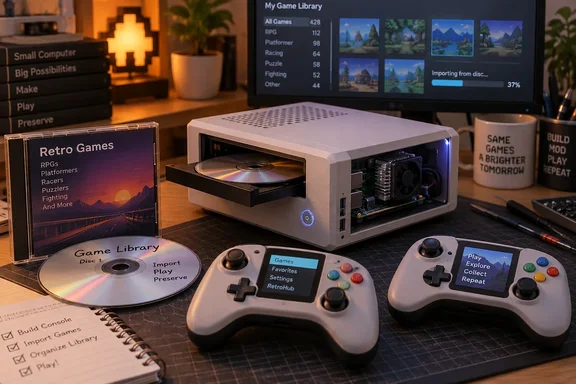
A PC foundation, with a console-shaped finish
According to TechEBlog, the system uses a ZimaBoard 2 with an Intel N150 processor and 32GB of onboard storage. A USB optical drive reads the CDs, while a 500GB SSD—removed from a USB enclosure—connects directly through SATA. Batocera supplies the retro-gaming interface.
Zima’s official specifications independently confirm the board family’s N150 processor, two powered SATA 3.0 ports, two USB 3.1 ports and Mini-DisplayPort 1.4 output supporting 4K at 60Hz. They also distinguish two configurations: the 832 has 8GB of RAM and 32GB of eMMC storage; the 1664 has 16GB and 64GB respectively. Emmet’s exact model and memory configuration are not established by the reporting.
That display specification deserves careful reading. A supported 4K/60Hz output mode is not a benchmark showing every emulated game running at 60 frames per second. Neither report provides game-by-game performance measurements, so this remains a retro-console project rather than a demonstrated performance rival to current consoles.
The CDs import games rather than prove direct-disc playback
Hackaday’s account describes ordinary recordable CDs holding game data alongside a placement script. That makes the physical medium meaningful: it carries the file, rather than acting only as a decorative token.
However, the reported copy operation suggests an import workflow, not continuous gameplay streamed from the optical drive. The distinction matters for anyone thinking of reproducing the idea: Batocera still needs the game in its organized library. The reporting does not establish exactly how Emmet starts the script, whether disc insertion triggers anything automatically, or how duplicate imports are handled. Hackaday’s suggestion that it might have chosen autorun is commentary, not documentation of Emmet’s implementation.
TechEBlog describes 700MB CD-Rs and gives a Game Boy Advance example it calls a Pokémon Emerald clone. That description does not establish the file’s provenance or licensing.
The takeaway: the disc is genuine storage, but “plays games off CDs” should not be mistaken for verified direct-disc execution.
Custom controllers complete the build
TechEBlog reports that Emmet also built ESP32-S3-based wireless controllers, with asymmetrical sticks, ABXY buttons, a D-pad, shoulder controls and a small screen. Their boards were designed in KiCad and manufactured by JLCPCB, with breadboard prototypes preceding the printed housings. The report’s reference to communicating with a phone does not establish the console-pairing arrangement or controller firmware.
Packaging required practical compromises too: a right-angle USB adapter and 90-degree SATA cable helped fit the hardware into the printed enclosure. Matching disc labels and jewel-case artwork finish the presentation. The project reportedly took months of preparation and revisions—rather more work than simply hiding a PC behind the television.
What Windows users can borrow from the idea
Batocera’s official documentation provides a useful way to test the underlying library workflow before attempting custom discs. These are general documented steps, not instructions for Emmet’s unpublished script; his Batocera version is unspecified.
With Batocera running and reachable from a Windows PC:
- Open File Explorer and enter
\\BATOCERA\share. - Open
romsand the appropriate system folder. Check its_info.txtfor accepted file formats. - Copy a game file you are entitled to use into that folder.
- On Batocera, press START, then select GAME SETTINGS → UPDATE GAMELISTS. A compatible file in the correct directory should appear.
If the hostname fails, substitute Batocera’s IP address in the share path; find it under MAIN MENU → NETWORK SETTINGS → IP ADDRESS. If a game remains absent, check its format and destination. If it appears but fails to launch, check the selected emulator’s requirements, including any necessary BIOS files. Creating an extra folder does not install an unavailable emulator.
Emmet’s build is compelling because it gives familiar PC components a deliberately physical interface. The useful lesson is not that CDs outperform modern storage. It is that a small computer, a documented game-library workflow and thoughtful industrial design can become something that feels purpose-built—right down to the jewel case.
References
- Emmet Built a From Scratch Game Console That Plays Retro Games Off Custom CDs - TechEBlog - TechEBlog - · 2026-10-01T20:47:20+00:00
- DIY Game Console Does It With Optical Discs | Hackaday hackaday.com
- add_games_bios (Batocera.linux - Wiki) wiki.batocera.org