

What was tested
Biswas used a community tool, which he calls DLSS Swapper and credits to rakanki911, to push DLSS 5 into older PC games. He tested six titles: three Prince of Persia games (the first title's name is cut off in the source text), Max Payne, Max Payne 2 and Need for Speed Undercover.
His results were mixed:
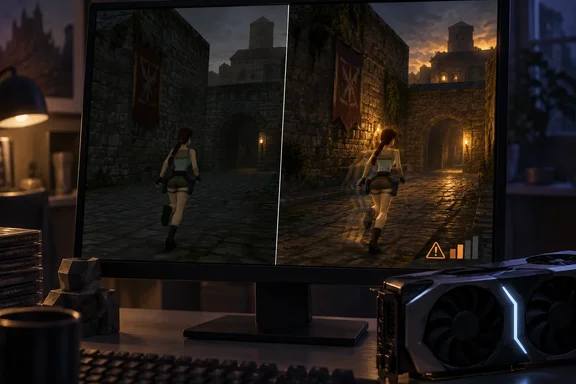
- Clear changes: He reports a substantial visual overhaul in the other games, mainly in lighting. This was Prince of Persia: Warrior Within, The Two Thrones and the first Prince of Persia, plus Max Payne.
- No noticeable effect: Need for Speed Undercover and Max Payne 2 looked unchanged on his setup.
- What improved: He describes better global illumination, ambient occlusion (including in games that lacked it) and "more pleasant" lighting. He says this was done without overriding each game's art style.
These are one writer's subjective impressions. The report gives no GPU model, driver version, resolution, frame rates or benchmark method. It also doesn't say which build of the tool was used. Treat it as an anecdote, not a benchmark.
The downsides he reported
- Shadow glitches: In Warrior Within, dynamic shadows glitched, especially in the "present day" sections. He guesses the tool conflicts with the game's files but doesn't establish a cause.
- Motion blur and ghosting: All the games looked blurry in motion, even with motion blur disabled. Camera movement briefly created artifacts around character models. Still frames showed no ghosting.
- A partial fix: Force-disabling camera motion blur helped a lot in his earlier DOOM test. He doesn't document how he did it or whether it worked consistently here.
- Performance cost: He calls the hit "steep" but gives no numbers, so I can't quantify it.
His guess is that DLSS 5's neural rendering is being forced onto code that wasn't built for it. That is plausible, but he labels it a suspicion, not a diagnosis.
Why a forced mod isn't the official DLSS 5
NVIDIA announced DLSS 5 on March 16, 2026. It unveiled DLSS 5 with real-time neural rendering. The company says the model takes a game's color and motion vectors for each frame as input. Developers also get controls for intensity, color grading and masking, and integration goes through NVIDIA's Streamline framework. NVIDIA's research page says DLSS 5 runs locally on GeForce RTX 50 Series GPUs and is meant to complement conventional rendering and artistic authorship, not replace them.
That is the key gap. Official integration relies on engine data and developer-tuned controls. A mod injected into a decades-old game has to supply that data in other ways. Artifacts and uneven results are therefore unsurprising. They shouldn't be read as proof that official DLSS 5 will behave the same way.
For official support, NVIDIA's September FAQ, as relayed in the research notes, said DLSS 5 would debut in NBA 2K27 on RTX 50 Series and GeForce NOW. It also said NVIDIA planned to work on expanding official support to RTX 40 Series after more optimization. None of that covers the older games tested here.
Tool, version and install caveats
Several details of this setup are easy to get wrong.
- Two different projects share a name. The long-standing DLSS Swapper project swaps the DLSS, FSR and XeSS DLL versions a game already ships with. According to the DLSS 5 Swapper site, DLSS 5 Swapper (by Rakan Alkhaldi) is a separate project that installs DLSS 5 neural rendering, including into games without native DLSS.
- The route for non-DLSS games is different from the article's wording. The project's GitHub page lists several routes. These include DLSS5-Feeder for games without DLSS, RenoDX, OptiScaler and multipass. TechPowerUp describes Feeder as a community mod that emulates the DLSS calls required to trigger Neural Rendering, paired with ReShade. So "just drop in a DLL" oversimplifies it.
- The overlay key may differ. The article says to press Home to open the in-game menu. The project's current README says to press F8 to open the overlay. Builds and routes differ, so check the documentation for the version you actually install. Don't assume either key.
- Hardware claims vary by route. The project's compatibility notes list RTX 20/30/40/50 for the ReShade/Feeder route, with older-series support attributed to the bundled runtime's author. For the OptiScaler route, the bundled neural model runs on RTX 50 (Blackwell) cards. Older cards need a modded
nvngx_dlssnr.dllthat the user supplies. - API coverage: DirectX 9 and DirectX 11 games and DirectX 12 games are supported through Feeder. DX10 isn't directly supported, and DX8 titles go through dgVoodoo2 and are 32-bit only.
- Emulators: The README lists PCSX2 and DuckStation among supported emulators, with compatibility varying by renderer and game. That matters if you want the genuine PS2 experience rather than the PC ports Biswas tested.
Safety and practical guidance
This is unofficial software with no tie to NVIDIA. One compatibility guide describes it as open-source third-party software, not an NVIDIA tool. TechPowerUp advises verifying the download source before installing anything.
Biswas says installation triggers Windows SmartScreen because the code comes from an unverified source. A SmartScreen warning is not evidence the tool is malicious. It is also not a reason to click through without checking where the file came from.
A sensible approach, drawn from the project's own documentation:
- Download only from the project's official GitHub releases page. The README says the installer and portable builds ship with a checksums file, so compare the SHA-256 hash.
- Close the game and any mod manager writing to its folder first.
- Let the tool back up original files. The README describes automatic backups and a "restore originals" option.
- Avoid multiplayer and anti-cheat games. The README warns that injection can cause crashes or account bans.
- Remember the README's own caution that compatibility isn't guaranteed and existing mods may conflict.
Remaster or filter?
Biswas's conclusion is the most defensible part of his piece. A lighting and appearance pass isn't a remaster. A true remaster can include rebuilt assets, interface and compatibility work, and quality-of-life changes. DLSS 5 touches none of that. He likens it to a ReShade-style graphical filter, closer to NVIDIA's RTX Remix than to a developer-made re-release. He says it is worth trying if you have enough VRAM.
My read is that the results are promising for tinkerers but not for anyone who wants stable, predictable output. The title-by-title variation, the motion artifacts and the performance cost are exactly what you'd expect from a forced, unofficial pipeline on a still-unreleased technology. Official integrations with developer controls could look quite different, and we won't know until they ship.
Bottom line
- Results vary by game: four of six titles showed changes, mostly in lighting, and two showed none.
- Motion ghosting, a shadow glitch and a steep performance cost were all reported.
- The tool is community-made and unofficial. Verify downloads, keep backups and check current documentation, because controls such as Home versus F8 depend on the build.
- This is an enhancement filter, not a remaster, and none of it is NVIDIA-supported for these games.
References
- I used DLSS 5 to remaster old PS2 games, and the results surprised me MakeUseOf · 2026-10-04T15:00:15+00:00
- DLSS 5 Swapper github.com
- New DLSS 5 Swapper Tool Brings Neural Rendering to Games NVIDIA Never Supported techpowerup.com