

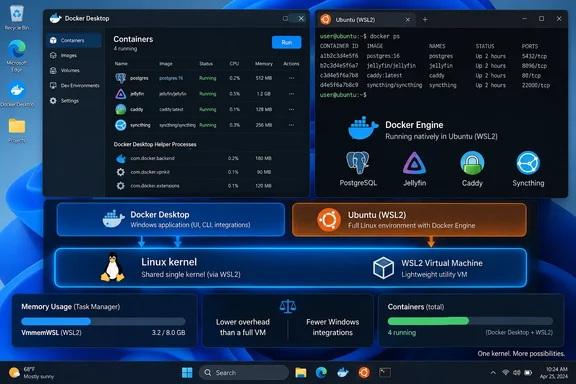
Docker Desktop’s WSL2 backend does not create a second virtual machine inside WSL’s virtual machine. Docker’s own documentation says WSL2 distributions share one Linux VM and one kernel; Docker Desktop runs its engine in a separate docker-desktop distribution within that shared WSL environment. Microsoft likewise describes WSL2 as a managed VM that hosts the Linux distributions. Replacing Docker Desktop with Docker Engine inside Ubuntu can reduce processes, services and retained memory, but it does not remove a layer of nested virtualization that was never present in the WSL2 configuration.
That correction does not make the XDA result meaningless. It changes what the result actually proves: the author measured the cost of Docker Desktop’s management layer on one machine, not the cost of an extra VM. For Windows users operating containers continuously on a desktop, home server or small lab machine, that is still useful information — provided they compare the two setups properly.
Docker Desktop and Ubuntu WSL share the same WSL2 VM
The visual clue that misled the XDA test is familiar to many Windows users: running wsl -l -v can show Ubuntu next to Docker-created distributions. Older Docker Desktop installations commonly exposed both docker-desktop and docker-desktop-data. Those names look like separate virtual machines, but they are WSL distributions, not independently booted Hyper-V guests.
Docker’s current WSL2 documentation is explicit that distributions run side by side on a shared kernel. Its Resource Saver documentation makes the point even more clearly: in WSL mode, Docker Desktop cannot stop “its” Linux VM when idle because the WSL VM is shared by all installed distributions. Instead, it pauses Docker Engine inside the docker-desktop distribution.
The docker-desktop-data detail is also dated. Docker began changing its storage layout with Docker Desktop 4.30, replacing the dedicated data distribution for fresh installations with a managed VHDX storage arrangement. Systems upgraded from older releases may still retain docker-desktop-data, so the XDA author’s observation can be accurate for that PC without describing how every current Docker Desktop installation is laid out.
This is more than architecture trivia. If Task Manager shows a large VmmemWSL memory figure, that number belongs to WSL’s shared VM — potentially including Ubuntu, Docker Desktop’s distribution, Linux page cache, development tools, databases and containers. It is not a clean Docker Desktop meter. A before-and-after screenshot of Task Manager cannot establish which portion came from Desktop’s own services unless the test controls the rest of the WSL workload.
The reported memory reduction needs a controlled comparison
XDA Developers reports that Docker Desktop used more than 1 GB before it started a container, while the direct Docker Engine setup added only a few hundred megabytes above idle WSL. That is a plausible result. Docker Desktop supplies a Windows application, background helpers, credential integration, networking components, an API endpoint, update machinery, a dashboard and an isolated Docker environment. Installing dockerd in an existing Ubuntu distribution avoids much of that product layer.
The article does not, however, supply the measurements needed to support “cut my resource usage in half” as a generally repeatable conclusion. It does not identify the Windows 11 build, WSL version, Docker Desktop version, memory-reclaim settings, Docker Engine version, Resource Saver timeout, image-cache state, or the exact Task Manager processes and memory columns used. It also does not show whether WSL was fully shut down between tests.
Those omissions are material because WSL allocates memory dynamically and can retain Linux filesystem cache after image downloads or builds. Docker specifically recommends WSL’s autoMemoryReclaim setting to return unused cache memory to Windows. Microsoft documents this setting in the user’s .wslconfig file, where it applies globally to WSL2 distributions rather than to Docker alone.
A fair test needs to start with a clean state. Shut down WSL completely with wsl --shutdown, launch only the environment being tested, wait for services to settle, and compare the same Compose project using the same images, volumes, resource limits and workload. Measure at least:
- The idle Windows-side Docker Desktop processes and the shared
VmmemWSLprocess separately. - The memory reported inside Linux with tools such as
free,ps,docker statsandsystemd-cgtop. - CPU use over time rather than a single Task Manager snapshot.
- The post-build and post-pull state, when cached filesystem pages can make WSL memory appear higher than the active workload requires.
Without those controls, a large difference may reflect Docker Desktop overhead, but it may also partly reflect the timing of the observation. An idle PostgreSQL container and a recently exercised database are not comparable merely because they use the same Compose file.
Resource Saver does less on WSL than many users expect
XDA is right to focus on idle consumption rather than container startup time. A development workstation that runs containers all day will notice a persistent 1 GB allocation more than a two-second difference in docker compose up. The catch is that Docker Desktop’s most obvious idle-saving setting behaves differently on WSL2 than it does with Docker Desktop’s Hyper-V backend.
On macOS, Linux and Windows Hyper-V configurations, Docker says Resource Saver can stop Docker Desktop’s Linux VM after containers have been idle for a set period. In WSL2 mode, it cannot stop the shared WSL VM, so it pauses the Docker Engine instead. Docker says this reduces CPU utilization but does not reduce Docker memory utilization on WSL.
That is a stronger explanation for the XDA observation than the claimed “two virtualization layers.” A user who has Ubuntu, a terminal session or another Linux service active keeps the shared WSL VM alive regardless of whether Docker Desktop is in Resource Saver mode. The engine may be paused, but memory retained by WSL, the Docker distribution or page cache can remain visible to Windows.
For systems short on RAM, WSL’s own configuration deserves attention before a wholesale migration. Microsoft’s .wslconfig supports autoMemoryReclaim values including gradual and dropCache; Docker recommends enabling it after container image builds to prevent the Linux page cache from holding memory that other Windows applications need. That option is marked experimental in Microsoft’s documentation, so administrators should test it against their build and database workflows rather than imposing it fleet-wide.
Direct Docker Engine is lighter, but it shifts operations to the user
Installing Docker Engine directly in Ubuntu WSL2 is a valid and often clean arrangement for people who work primarily in Linux terminals. Docker’s Ubuntu installation guidance provides supported packages for the engine, CLI, container runtime, Buildx and Compose plugin. With systemd enabled in WSL, the service can start in the normal Linux manner; without it, users need to arrange service startup themselves.
The operational boundary becomes important when switching away from Docker Desktop. Docker explicitly advises users not to leave a separately installed Docker Engine or Docker CLI in a WSL distribution when enabling Docker Desktop’s WSL integration, because the two can conflict. They may point docker commands at different daemons, maintain separate images and volumes, or make a container seem to disappear after the active Docker context changes.
The direct approach also does not automatically inherit Docker Desktop’s conveniences:
- Docker commands run naturally in the Linux distribution that hosts the daemon, but Windows PowerShell and Command Prompt no longer receive Docker Desktop’s automatic integration.
- A direct daemon needs its own decisions about service startup, non-root access, package updates, backups and recovery of volumes.
- Windows-to-Linux bind mounts still work, but performance and permissions are usually better when source code and bind-mounted data live in the Linux filesystem rather than under
/mnt/c. - Docker Desktop provides a supported dashboard, extensions, integrated controls and Windows container support that a plain Linux Docker Engine installation does not replace.
For a personal media server stack that rarely changes, those trade-offs can be sensible. For a developer juggling multiple repositories, contexts, test containers and Windows terminals, the time saved by the dashboard and integration can easily be worth the idle memory cost.
The practical choice depends on where Docker runs all day
The useful conclusion from XDA’s experiment is narrower and more actionable than its headline: Docker Desktop’s WSL2 backend carries management overhead that direct Docker Engine inside a WSL distribution may avoid. The size of that saving will vary by Desktop release, WSL settings, active Linux distributions and the workload itself. There is no evidence in the test that every Windows 11 user can halve memory consumption.
Users should also avoid a false choice between “Docker Desktop” and “two virtual machines.” With the WSL2 backend, the shared WSL VM remains in either design. The decision is whether the convenience, integration and support features of Docker Desktop justify its processes and retained resources on that PC.
For machines hosting long-lived containers and doing little else, a dedicated Ubuntu WSL2 distribution running Docker Engine is a reasonable lean setup. For Windows-first development, Docker Desktop remains the less fragile option — and the first fix for excessive idle memory may be WSL memory reclamation and a properly configured Resource Saver timeout, not an uninstall.