

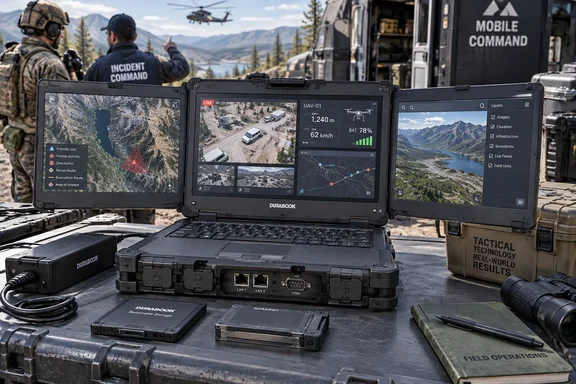
Durabook’s product specifications and reporting by Tom’s Hardware describe a machine aimed at military, emergency-response, engineering and industrial work. The interesting part is how its displays, legacy interfaces, removable storage and optional graphics fit together. For an IT team evaluating it, the useful question is whether that integration solves a field workflow well enough to justify the size—and which advertised options can actually coexist.
The Z14I-DX3 makes three displays part of the equipment package
The central computer follows a clamshell layout, with two expansion screens attached at the sides. Both fold inward and stay connected when the workstation moves between locations. Durabook says the integrated connections eliminate separate display cables, reducing the number of loose components needed to set up the three-screen workspace.
All three screens are 14-inch, 1920 × 1080 capacitive touch displays, with Durabook’s DynaVue sunlight-readable technology and brightness specified at up to 1,200 nits. Each can show a separate application or data source. That gives the system a straightforward operational purpose: keeping a map, video feed and telemetry or communications application visible together instead of repeatedly switching between windows.
Those examples come from Durabook’s intended workflows, not a field evaluation. Still, they explain the design more convincingly than the novelty of a triple-screen laptop alone. A team that needs several information sources visible simultaneously gets its display arrangement as part of the computer, with no separate monitor connection to rebuild at each stop.
The expansion displays have their own on-screen controls for independently adjusting brightness and contrast. That is useful when different content calls for different viewing levels: Durabook specifically describes thermal imagery, tactical maps and live video. The touch system also offers selectable finger/water, glove and stylus modes. These are documented operating choices, although the specifications cannot tell a buyer how well a particular glove or application will work in practice.
The physical cost is considerable. Durabook lists the closed system at 15.39 inches wide, 11.73 inches deep and 5.41 inches high, with a weight of 21.61 pounds—approximately 9.8 kilograms. Its specification footnote associates the dimensions and weight with configuration-dependent options. Tom’s Hardware contrasts that with a 3.6-kilogram single-screen model, but the published information does not isolate how much of the difference comes from the screens versus other workstation hardware.
For planning purposes, transportable workstation is the useful category. The folded dimensions help with storage and transport planning; they do not describe the working space required with both side screens open. A vehicle installation or temporary command desk therefore needs an open-system fit assessment as well as enough room to carry the closed computer.
Core Ultra and RTX options make configuration more important than the badge
Durabook specifies Windows 11 Pro 64-bit and four Intel processor choices: Core Ultra 5 125U and 135U, plus Core Ultra 7 155U and 165U. All four are listed with 12 cores, 14 threads and an Intel AI Boost neural processing unit, or NPU, for supported AI tasks. Memory starts at 16GB and reaches 64GB of DDR5-5600 across two slots.
That establishes the computing platform, but the more consequential purchasing decision may be graphics. Alongside integrated Intel graphics, Durabook lists an optional NVIDIA RTX A500, RTX 3500 Ada with 12GB of GDDR6 memory, or RTX 5000 Ada with 16GB. The company positions the higher-end graphics option for compatible image recognition, video analysis, geographic information systems and 3D visualization workloads.
The word compatible carries real weight here. Durabook describes separate CPU, integrated graphics, NPU and optional NVIDIA resources; an application’s ability to use them determines their value. For procurement, that makes the intended software workload a better starting point than selecting the highest graphics option simply because the machine is marketed for edge AI—processing data at the operating location.
Tom’s Hardware reports an advertised ceiling of 682 TOPS, meaning trillions of operations per second, for AI performance. That figure should stay attached to the advertised capability, not become a performance expectation for every Z14I-DX3 configuration. The available reporting provides no application benchmark demonstrating how quickly a particular model processes a video stream, analyzes imagery or completes a field task.
Durabook also recommends at least 32GB of system memory and a 512GB SSD for optimal performance with the optional graphics configurations. That is a useful qualification beside the base specification, which lists 16GB of memory and a 256GB NVMe PCIe SSD. A quotation for a graphics-equipped machine should make those supporting components explicit.
The Z14I-DX3 expansion box contains alternatives, not a cumulative feature list
The expansion box can accommodate two PCI Express 3.0 slots, discrete graphics, or a storage expansion supporting RAID 0, 1, 5 or 10. Durabook marks these expansion choices as mutually exclusive. A buyer therefore should not assume that the advertised graphics, extra interface slots and RAID storage all arrive in the same system.
The media bay creates another clear choice:
| Media-bay option | What the selection adds |
|---|---|
| A second battery | Additional battery capacity. |
| A SATA SSD | A third internal storage option. |
| A DVD Super Multi drive | An optical drive. |
Durabook explicitly permits only one media-bay option. Selecting extra battery capacity consequently uses the bay that could otherwise hold additional storage or the optical drive.
These constraints are central to the product’s value. The Z14I-DX3 can be configured for different field roles, but the complete configuration needs to be validated as a whole. A specification sheet assembled from every maximum and optional feature would describe a combination Durabook does not promise to build.
The Z14I-DX3 keeps field interfaces that thin laptops leave behind
The port selection helps explain the system’s intended customers. Durabook lists Thunderbolt 4, three USB-A connections spanning USB 3.2 Gen 2, USB 3.2 Gen 1 and USB 2.0, dual Gigabit Ethernet, HDMI, VGA and two serial ports. It also includes microSD, ExpressCard 54, a smart-card reader and a 41-pin docking connector.
The official specification identifies the serial interfaces as RS-232/RS-422/RS-485, providing more detail than a generic “dual serial” description. For an organization connecting specialized equipment, the practical task is to match the required interface to the supplied configuration. A connector inventory is useful, but it does not by itself establish compatibility with a particular instrument or control system.
Likewise, the two Ethernet sockets are specified at 10/100/1000 speeds. Their value is having two wired interfaces available in the machine; the documented specification is not a promise of multi-gigabit networking. These details matter when the workstation must fit an existing deployment rather than introduce a new collection of adapters.
Wireless hardware includes Intel’s Wi-Fi 7 BE200 and Bluetooth 5.4. Dedicated GPS, 4G LTE and 5G are optional, as is RF antenna pass-through for positioning and wireless connections. Nano SIM and eSIM support should therefore not be read as confirmation that every ordered unit includes cellular broadband hardware.
Durabook also offers custom integration of joysticks, switches and other control interfaces for unmanned-system ground-control applications. That is an integration route, not a statement that the standard computer includes drone controls or works with every unmanned platform. A procurement specification would need to identify the required controls alongside the application and communication interfaces.
Removable SSDs and authentication hardware need an operational plan
The product lists two quick-release storage positions, but the standard configuration contains one 256GB NVMe PCIe SSD; a second NVMe drive is optional. Larger PCIe SSD capacities and an OPAL 2.0 SSD option are also available. This is an important distinction between the chassis’s storage capability and the drives included in a particular order.
Tom’s Hardware reports that the quick-release drives can be removed without tools, consistent with Durabook’s emphasis on easily removable storage. That could make it easier to separate a computer from its data-bearing drives during handling or maintenance. It does not define a data-custody process: an organization still needs to decide who can remove drives, how they are protected and how replacements are tracked.
Security-related hardware includes TPM 2.0 and a smart-card/CAC reader. Optional choices include a Windows Hello-compatible infrared camera, fingerprint scanner and RFID/NFC reader. Those provide authentication options; the list alone does not establish that every machine ships with all of them or that a particular multifactor sign-in policy is already configured.
Rugged certification and battery capacity answer different deployment questions
Durabook lists MIL-STD-810H and MIL-STD-461G certification, a magnesium-alloy chassis and protective port covers. Its stated operating temperature range is −29°C to 63°C. The company associates the former standard with environmental testing including shock, vibration and temperature exposure, and the latter with emissions and susceptibility testing.
These are manufacturer-published qualifications for the system. They give field buyers concrete environmental information to evaluate, but they should remain separate from assumptions about application performance or operating endurance under those conditions. The available reporting is an announcement and specification record, not an independent field test.
Power deserves its own examination because the computer and additional displays have separately listed batteries:
| Battery | Published rating | Approximate nominal energy |
|---|---|---|
| Main system battery | 10.8V, 6,900mAh | 74.5Wh |
| Optional second system battery | 10.8V, 4,700mAh | 50.8Wh |
| Additional screen battery | 14.4V, 6,700mAh | 96.5Wh |
The watt-hour values above are calculated from Durabook’s voltage and capacity ratings. They illustrate why comparing the milliamp-hour figures alone is misleading: the screen battery operates at a different voltage. They also are energy ratings, not runtime measurements, and should not be added together to imply a guaranteed duration for the whole workstation.
Durabook specifies a 210W AC adapter accepting 100–240V input and says one adapter powers the integrated system. That is useful for planning the equipment package, but the adapter’s rating is not a measurement of continuous system consumption. The published material provides no universal runtime figure for a three-screen configuration with a selected NVIDIA GPU.
A field team planning extended operation away from mains power therefore needs a configuration-specific endurance assessment. That decision also loops back to the media bay: choosing the optional second system battery means giving up the bay’s optical-drive or SATA-storage alternative.
Buying the Z14I-DX3 starts with the field workflow
Organizations should shortlist the Z14I-DX3 when they have a concrete need to move a multi-screen Windows workspace between operating locations. Its strongest documented benefit is consolidation: attached displays, integrated interfaces and one AC power connection. For users who mostly need an ordinary mobile computer, the listed mass and closed thickness make that consolidation a substantial burden.
Durabook offers the system through a quotation process, without a public standard price in the available material. The September 22 announcement establishes the product, but the evidence does not specify a shipping date. Cost, delivery and the exact feature combination belong in the purchasing decision before any judgment about value.
The most useful checks are specific:
- Require an itemized configuration showing which graphics, expansion-box and media-bay options can coexist.
- Plan for the listed 9.8-kilogram transport weight and establish the space needed with all three screens open.
- Match applications to the selected CPU, graphics hardware, memory and storage instead of treating the advertised AI ceiling as a benchmark.
- Confirm cellular, GPS, biometric and additional-storage options explicitly, because their presence in the product range does not make them standard equipment.
- Assess endurance using the intended display settings and workload, while accounting for the media-bay trade-off if a second system battery is required.
- Match serial interfaces, docking requirements and removable-drive handling to the organization’s existing equipment and security procedures.
The Z14I-DX3 makes a clear engineering bargain: it accepts considerable bulk to keep a rugged, three-screen Windows workstation together during transport and deployment. For field teams whose work already requires that much screen space and specialized connectivity, the next purchasing step is a validated configuration and a deployment-specific evaluation. Its usefulness will come from fitting that job—not from making three screens look portable.