

What Panasonic launched
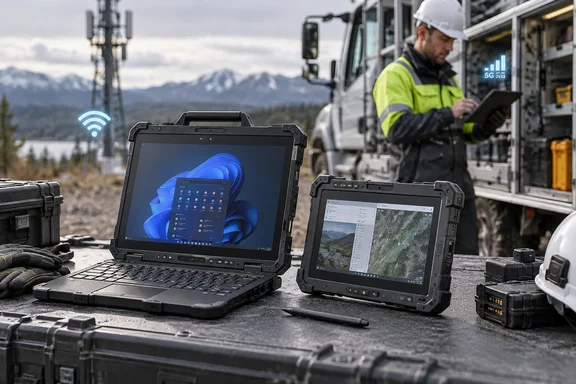
The TOUGHBOOK 34 is the larger model. It has a 12.4-inch display, and Windows Central's hands-on identifies it as the successor to the TOUGHBOOK 33. The G3 has a 10.1-inch display. It replaces the G2, according to the same hands-on and to ITdaily.
Panasonic's specification table lists the following for both models:
- Processors: Intel Core Ultra 5 335H or Core Ultra X7 368H, from the Core Ultra Series 3 generation.
- Memory and storage: Up to 64GB of RAM and up to 2TB on a user-replaceable quick-release SSD.
- Displays: The 34 has a 12.4-inch FHD+ panel and the G3 a 10.1-inch WUXGA panel. Both are rated at 1,000 nits with Gorilla Glass 3.
- Operating system: Windows 11 Pro or Windows IoT.
- Connectivity: Wi-Fi 7 and Bluetooth 5.4. 5G Sub-6, including eSIM, is optional. Panasonic lists optional multi-constellation GPS.
- Security: OPAL SSD, TPM, optional smart card and fingerprint authentication, and TAA compliance.
Panasonic also says both ship with a three-year factory warranty. It names TOUGHBOOK Total Defense as a security and services option. The announcement doesn't say that option comes with every configuration.
Where the numbers disagree
Panasonic's own material has a few inconsistencies, so some of the figures in the press coverage need care.
- Ingress rating. Panasonic's specification table lists IP66 for both models. A field-use passage in the same release says IP65. ITdaily reports the G3 is designed for IP66 but is currently certified to IP65, with IP66 results expected in the fourth quarter of 2026. ChannelPro says the new models are rated IP66, up from IP65 on their predecessors. If your customers' specifications require IP66, ask Panasonic for the certification status of your exact model before you quote.
- G3 weight. ChannelE2E gives 2.7 pounds. Panasonic's product pages list the G3 at about 2.36 pounds as a tablet, and the 34 at 2.9 pounds. Weight rises with the keyboard and accessories, so confirm which configuration a quoted figure describes.
- G3 battery life. Panasonic's North America table says up to 23 hours with the 99Wh battery. Panasonic's UK release gives 8.5, 17 and 24 hours for the three battery options. The North American table lists 35Wh, 70Wh and 99Wh options. The 34's figures are 9 hours with its 40Wh battery and 18 hours with an optional second battery. Panasonic says it measured these with MobileMark 30. They are manufacturer ratings, not guarantees for a full shift.
Hardware details that matter to IT
- Modularity. Panasonic says the 34 has four expansion areas, two of them user-replaceable xPAK areas. It also offers an optional dual hot-swappable battery setup. The G3 has two expansion areas with configurable I/O. XDA-Developers reports that Panasonic calls the 34 the world's most modular rugged tablet. That is Panasonic's own claim.
- Fixed ports on the G3. ITdaily lists two Thunderbolt 4 ports, one USB 3.2 Type-A port and a Gigabit LAN port. It says Panasonic kept its proprietary DC charging connector because it doesn't consider USB-C robust enough.
- Cellular. Panasonic lists Verizon, AT&T, FirstNet, T-Mobile and ANTERIX options. It also cites support for CBRS and B106 private cellular networks. Treat all of this as configuration-dependent.
- Linux. The TOUGHBOOK 34 is certified for Red Hat Device Edge, and G3 certification is still in progress. That matters if you run mixed Windows and RHEL fleets.
- Docks and accessories. Panasonic says the G3 is backward-compatible with many G2 docks and accessories. It describes the 34 as compatible with many prior-generation accessories. Test each dock and peripheral before assuming a fleet-wide fit.
AI claims
All coverage agrees on the NPU. Windows Central notes the third-generation Core Ultra chips have built-in NPUs for local AI processing. Panasonic's UK release says the G3 has Copilot+ capabilities and can analyze mission-critical data at the edge without a continuous cloud connection. Windows Central also describes Panasonic's Command Intelligence features, which let IT teams and fleet managers query systems using natural-language questions.
The NPU is hardware support. Panasonic's North America specification table doesn't list any validated AI workloads, so test your own applications before you promise AI features to a customer. The "Copilot+" label comes from the UK G3 release, and I couldn't confirm that it applies to every North American configuration.
What this means for MSPs and integrators
ChannelE2E's argument is that the refresh offers more than a one-time hardware sale. Configurable ports, private cellular support and reusable accessories let partners tailor deployments to each industry. User-replaceable modules also let a device change as requirements change, without replacing the whole system. That logic holds up, but none of the sources put numbers on cost savings, uptime or upgrade economics, so treat those benefits as plausible rather than demonstrated.
A pre-quote checklist:
- Model and display. The 12.4-inch 34 suits information-heavy command and diagnostic work. The 10.1-inch G3 suits small vehicles and highly mobile staff.
- Battery. Pick the capacity, and plan hot-swap procedures. The G3 needs the optional bridge battery for hot swapping.
- Carrier and private network. Check carrier, eSIM and CBRS or B106 compatibility.
- Modules. Confirm availability for barcode, RFID, serial, Ethernet, USB and authentication readers on your exact model.
- Operating system. Decide between Windows 11 Pro, Windows IoT and RHEL, and prepare your image and management tooling.
- Compliance. Confirm the IP rating and any hazardous-location certification. Panasonic's product pages show hazardous-location certification only as an option.
- Docks and mounts. Test existing vehicle docks and peripherals before staging a fleet.
Bottom line
The 34 and G3 are a substantial refresh for Windows-based rugged fleets. They bring Core Ultra Series 3 silicon, Wi-Fi 7, optional 5G, longer battery options and a modular design. Pricing and ship dates haven't been announced. Before quoting a fleet, get the exact configuration, IP certification status and weight confirmed in writing from Panasonic, because the published sources don't agree on all three.
References
- MSPs consider new Panasonic TOUGHBOOK lineup for frontline workers - ChannelE2E ChannelE2E · 2026-10-07T12:55:00+00:00
- Panasonic unites new Toughbook G3 and Toughbook 34 into one family - ITdaily itdaily.com
- Panasonic Connect Launches TOUGHBOOK 34 and TOUGHBOOK G3 Rugged PCs | Panasonic North America - United States na.panasonic.com