

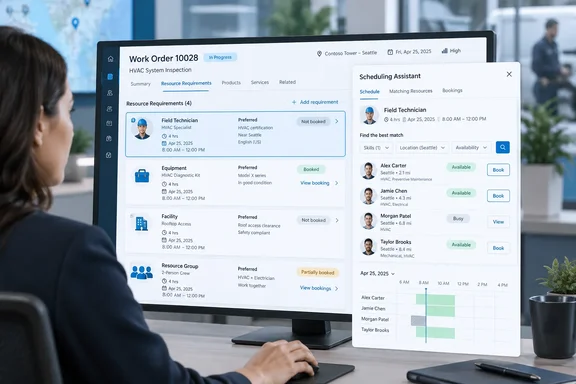
The change is modest in interface terms but addresses a real dispatch problem: a Field Service work order is a parent record, while the details that determine who can perform a job—duration, service window, territory, skills, resource type, and preferences—live on related resource requirements. A single work order can therefore represent several distinct scheduling needs. Until the picker arrives, the generic Book action from a work order does not give the dispatcher the same explicit record-level choice promised in this roadmap entry.
Microsoft says the new Book experience will appear from both the work order form and the work-order list view. When several requirements exist, the dispatcher will select the particular requirement to schedule before Field Service continues to the environment’s configured Schedule Assistant or Quick Book flow. Work orders with one requirement will bypass the new selection screen and continue directly to the existing booking experience.
The picker solves selection, not multi-resource coordination
The important boundary is what Microsoft has actually announced. The November feature lets a dispatcher choose one requirement from a work order containing several requirements. It does not replace Field Service’s existing requirement-group scheduling, which is designed to find and book coordinated combinations of people, equipment, or facilities into the same appointment slot.
Microsoft Learn describes a standard work order as generating one related resource requirement by default. More complex jobs can acquire additional requirements through incident types, requirement-group templates, or manual configuration. Those requirements can differ substantially: a repair may need a certified technician, a piece of specialized equipment, and perhaps a facility or a second worker with a different qualification.
Requirement groups remain the feature for jobs that need all of those resources scheduled together. The Schedule Assistant searches for a combination that can satisfy the group at a common time, then creates multiple bookings when the dispatcher commits the result. The roadmap’s new picker is a more targeted workflow: it exposes the individual requirements attached to a work order so the dispatcher can decide which one to process.
That distinction matters operationally. A dispatcher booking an individual requirement can resolve one outstanding piece of work without implying that every related requirement has been fulfilled. Organizations that use multiple requirements as a substitute for tightly coordinated crew work should not assume the forthcoming picker will enforce a same-time arrival or prevent partial booking. Those are requirement-group design and process questions, not capabilities Microsoft has assigned to Roadmap ID 570863.
Why the information shown in the picker is consequential
Microsoft says the selector will display requirement duration, time windows, resource preferences, booking status, and links to active bookings. Each field is already central to the resource-matching process, but putting them together before a scheduling tool opens is meant to reduce the context switching inherent in multi-requirement work orders.
Duration and promised time windows determine whether a booking is feasible. The Schedule Assistant can use availability, location, work hours, territories, characteristics, and other constraints to recommend matching resources. Microsoft also warns in its current Field Service documentation that bookings created outside the assistant’s recommended slots may not have constraints such as capacity, work hours, and time windows verified or enforced.
Resource preference is also more than a descriptive field. A requirement can favor a particular technician, crew, pool, facility, or equipment resource, depending on how the organization has modeled the work. Showing that preference at the requirement-selection stage gives dispatchers a chance to recognize the difference between, for example, a task that requires a qualified technician and a related task intended for a specific machine or facility.
The links to active bookings are perhaps the most practical detail in the announcement. Microsoft’s scheduling model allows a requirement to be booked more than once; that can be deliberate when the same job needs multiple resources or repeat visits. But Quick Book documentation warns that booking a single requirement again creates another booking rather than rebooking the existing one. A visible route to active bookings should make it easier to distinguish an unscheduled requirement from one that is already assigned, and reduce accidental duplicate assignments.
Microsoft has not said whether the picker will merely display an active booking, warn before creating another one, or offer a direct rebook action. Dispatch teams should not treat the presence of links as duplicate-booking protection until the released interface and its behavior are documented.
Existing Quick Book and Schedule Assistant settings still govern the next screen
The roadmap does not introduce a new matching engine. It changes the entry point for an existing scheduling decision.
For single requirements, Field Service will continue to open whichever experience the tenant has configured: Quick Book or the full Schedule Assistant. Quick Book provides a streamlined pane with available time slots and limited filtering; an administrator enables it per scheduling-enabled entity through booking setup metadata. The full Schedule Assistant offers a broader search and filtering experience, including characteristics, territories, resource types, work location, and date range.
That makes pre-release testing less about deploying a separate feature and more about reviewing whether the current booking configuration matches dispatcher intent. A tenant that has Quick Book enabled for work orders will still be handing the selected requirement to Quick Book. A tenant using the Schedule Assistant will still depend on its existing requirement data and availability-search limits.
The quality of the new picker’s decision support will be no better than the requirement records behind it. Microsoft’s documentation notes that the primary requirement associated with a work order is synchronized with scheduling-relevant work-order fields, while manually created additional requirements do not automatically remain synchronized in the same way. If an organization creates secondary requirements manually and later changes the work order’s location, duration, or service details, dispatchers may be looking at diverging records.
Administrators should therefore audit a few real multi-requirement scenarios before November:
- Confirm that each requirement has an accurate duration, date range or promise window, work location, territory, resource type, and required characteristics.
- Identify whether related requirements are independent tasks or should instead be modeled as a requirement group that must be fulfilled together.
- Test repeated bookings and rebooking behavior, particularly where dispatchers use Quick Book, because a second booking can create an additional booking record.
- Review security roles and command-bar access from both the work order form and the list view, since the new entry points do not guarantee every custom role or customized app surface will expose them identically.
- Check custom plug-ins, Power Automate flows, and integrations that assume a Book command always operates on the work order’s primary requirement.
Accessibility is stated; customization behavior is not
Microsoft says the requirement picker will be responsive, localized, keyboard-accessible, and support right-to-left languages. Those are welcome commitments for organizations with dispatch operations spread across devices and regions, especially because list-view scheduling can be useful for teams triaging many unassigned work orders rather than opening each record individually.
But the roadmap entry leaves several implementation details unanswered. It does not identify a Field Service application version, a feature-toggle name, supported browser or mobile scenarios, or whether the selector will honor custom work-order commands and custom columns. It also does not say whether partners who have replaced or extended the standard booking command with JavaScript, ribbon customizations, or embedded workflows will receive the picker automatically.
No separate public technical documentation or independent reporting has yet described those mechanics. The roadmap is a planning notice, not a release note, and its “in development” status means Microsoft can still alter the feature’s scope or delivery timing before the stated November 2026 target.
For now, the practical conclusion is narrower than the announcement’s polished language: Dynamics 365 Field Service is adding a missing decision point for dispatchers handling work orders with several independently schedulable requirements. Teams that currently work around that ambiguity by opening related requirement records individually may gain a faster path from the work-order form or grid. Teams scheduling synchronized multi-resource jobs will still need to rely on requirement groups and the Schedule Assistant’s coordinated booking logic.