

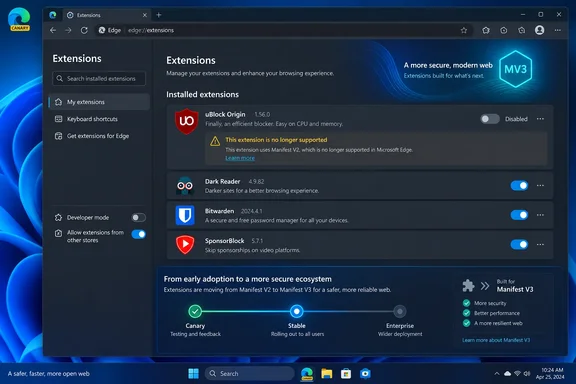
edge://extensions, but its enable switch was unavailable and Edge displayed a message saying it was no longer supported.The important point is that this is not an unexplained Canary regression. Microsoft announced on August 7 that it would begin its consumer transition away from Manifest V2, or MV2, in August 2026, first through notices and then by gradually turning extensions off by default. The company specifically said the staged rollout would begin in Canary, Dev, and Beta before reaching Stable over subsequent months.
Windows Report’s observation supplies the missing practical evidence: Canary has moved beyond warning banners for at least one cohort and is enforcing the disabled state. Microsoft’s public timeline allowed for that outcome, but did not identify a particular Canary build, rollout percentage, or the first extension versions affected. Those details still have not been published.
Canary Is Now the Early-Warning Channel
The screen Edge presents matters. A warning tells users an extension is on borrowed time; a disabled toggle says the browser has decided the extension may no longer run. Edge’s suggestion to search for similar extensions points users toward the Edge Add-ons store, which is consistent with Microsoft’s stated plan to direct people to MV3 replacements where available.
This also explains why experiences will differ across Canary installations. Microsoft characterized the consumer transition as gradual, and Windows Report correctly cautioned that the behavior may be limited to a subset of testers. A user running the same Canary version without the disabled toggle has not disproved the report; staged server-side and feature-flagged rollouts routinely create that split.
For Windows enthusiasts, the practical conclusion is simple: a working MV2 extension in Edge Canary is no longer evidence that it will survive the next browser update or configuration change. It is evidence only that the particular rollout has not reached that profile or device yet.
Microsoft has said managed devices will be exempt during the consumer rollout. That distinction is significant for organizations, but it should not be confused with a permanent exemption. The same transition is coming to enterprise-managed Edge after the consumer phase concludes.
uBlock Origin Is the High-Profile Casualty, but Not the Whole Story
uBlock Origin is likely to make this change visible to far more people than the underlying number of affected add-ons suggests. The full uBlock Origin extension uses Manifest V2 on Chromium-based browsers and gives advanced users controls that include dynamic filtering, per-site rules, a network request logger, and extensive custom filtering behavior.
Its MV3 counterpart, uBlock Origin Lite, is a separate extension rather than an in-place technical update. Raymond Hill, uBlock Origin’s developer, explicitly says uBO Lite is too different to be treated as an automatic replacement. It is designed around Manifest V3’s declarative model, which lets the browser apply precompiled rules without keeping a persistent filtering process running.
That design has real advantages: fewer continuously active extension processes and a more constrained permissions model are central parts of Microsoft’s security and performance case for MV3. But it also changes what a blocker can do. The uBO Lite project says its behavior and effectiveness depend on the sites visited and the rules selected; its documentation notes that some filters cannot be converted into Manifest V3 declarative rules, and that handling anti-blocker measures and site breakage can be less effective.
So the recommendation Edge offers — find a similar extension — is useful for ordinary users, but it glosses over a meaningful difference for power users. A similar listing is not necessarily functionally equivalent. Organizations with a narrowly configured internal extension face a more serious version of the same problem: there may be no replacement in the public store at all.
Microsoft says 95% of its top MV2 extensions have already moved to MV3 and that only 58 MV2 extensions on Edge Add-ons retain meaningful usage. Those figures suggest the total disruption should be limited, but they do not make the remaining extensions disposable. A low-install internal tool, legacy password workflow, compliance add-on, or custom content filter can be business-critical even if it barely registers in store-wide usage statistics.
The Enterprise Grace Period Has a Defined End
For Edge administrators, the consumer behavior appearing in Canary is a prompt to inventory extensions now rather than wait for the Stable rollout. Microsoft’s ExtensionManifestV2Availability policy can currently control whether MV2 extensions are available, disabled, enabled, or enabled only when force-installed. On Windows, the policy is available through the Microsoft Edge administrative template under Administrative Templates/Microsoft Edge/Extensions, and can also be set through the ExtensionManifestV2Availability registry value under SOFTWARE\Policies\Microsoft\Edge.
The policy should be viewed as a migration bridge, not a way to preserve MV2 indefinitely. Microsoft’s August Edge announcement says managed devices will not be affected during the consumer rollout but puts enterprise deprecation in early 2027. A Microsoft 365 Message Center notice, published September 4 and archived by the independent Merill archive, provides more detail: rollout is expected to begin in early January 2027 and finish by late April 2027, when MV2 extensions will cease functioning and the policy itself will be removed.
That makes the real administrative deadline earlier than the final removal date. Enterprises need time to discover legacy add-ons, identify their manifest version, obtain an MV3 replacement, test it against line-of-business sites, and update force-install or allow-list configurations. Waiting until Edge begins disabling extensions on managed endpoints would compress all of those tasks into a support incident.
Administrators should take four concrete steps:
- Review Edge extension inventories and identify every installed, allow-listed, or force-installed MV2 package, including internally developed extensions that never appear in the Edge Add-ons store.
- Contact each extension supplier for its MV3 release and deployment plan, rather than assuming an MV3 version will preserve required permissions, workflows, and configuration settings.
- Pilot replacement extensions on representative user groups and the web applications they depend on, especially where content blocking, authentication injection, download handling, or browser automation is involved.
- Remove dependence on
ExtensionManifestV2Availabilitybefore the enterprise cutoff, because Microsoft says the setting will no longer keep MV2 extensions active once enterprise deprecation takes effect.
There is an awkward documentation gap here. Microsoft’s policy reference, last updated May 22, still says the migration timeline “hasn’t been established.” That page predates Microsoft’s August 7 announcement, so it is stale on the single point administrators most need to know. The newer Edge blog and the September Message Center communication establish the operative schedule; admins should not treat the older policy page’s timeline language as a reprieve.
Edge Is Following Chromium, but Its Schedule Is Different
Microsoft’s move is related to Chromium’s underlying extension platform, yet Edge has not simply mirrored Chrome’s timing. Google disabled MV2 everywhere in Chrome 138 on July 24, 2025, according to Chrome’s official MV2 support timeline. Google then removed remaining MV2 extensions from the Chrome Web Store on August 31, 2026.
Edge kept the format alive longer, which gave extension developers and enterprise deployments additional time. That decision now makes the transition feel abrupt to users who moved to Edge precisely because an MV2 add-on, particularly the full uBlock Origin, still worked there after Chrome’s cutoff.
Microsoft’s rationale is the standard MV3 case: tighter extension permissions, no remotely hosted executable code, and a smaller attack surface. Those are legitimate security controls. MV2’s more permissive background model and powerful request-interception capabilities made it useful for extensions, but also broadened what a compromised or malicious extension could do.
The trade-off is that the most sophisticated extensions must redesign around a more restricted platform. For well-maintained mainstream add-ons, that work is largely complete. For abandoned projects and specialized internal extensions, Edge’s rollout will function as a hard compatibility deadline.
What Edge Users Should Expect Next
Consumer users should expect more MV2 extensions to show warnings and then become disabled by default as Microsoft expands the rollout from prerelease Edge channels toward Stable before the end of 2026. Microsoft has said users will be notified in advance and directed toward MV3 alternatives where those exist, but it has not published a build-by-build schedule or a final consumer cutoff date.
Anyone who depends on full uBlock Origin should test uBlock Origin Lite or another MV3 blocker before Edge disables the original extension, rather than discovering the differences after a browser update. Users with custom filters, advanced rules, strict blocking habits, or sites that aggressively resist content blockers have the strongest reason to test early.
For enterprise IT, the Canary change is the first visible operational milestone, not the final deadline. By the time Microsoft removes MV2 support and the supporting Edge policy in the January-to-April 2027 enterprise window described in its Message Center notice, an MV2 extension left in production will not be a warning banner or a helpdesk nuisance. It will simply stop working.
References
- Microsoft Edge Canary appears to be finally disabling Manifest V2 extensions Windows Report · 2026-09-17T12:13:29+00:00