

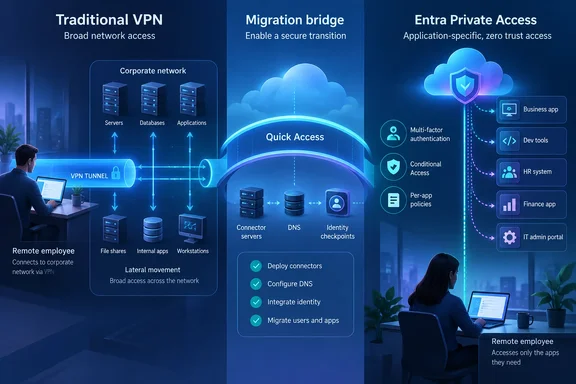
The guidance, published by Microsoft’s Entra team on September 16 and summarized by Neowin, argues that traditional VPNs conflict with a Zero Trust model because they establish network-level connectivity first and rely on controls layered around it. Microsoft Entra Private Access instead sends authorized traffic through the Global Secure Access service, using Entra identity, Conditional Access, and application assignments to decide who can reach a particular private resource.
For organizations already paying for Entra identity controls, the pitch will sound familiar: reduce lateral movement, require MFA or compliant devices before access, and stop giving a remote employee a route to an entire internal address range simply because they need one application. But Microsoft’s own deployment material makes clear that this is a migration project, not a VPN toggle. It requires client deployment, connector servers inside the private network, DNS planning, workload inventories, policy work, capacity testing, and a rollback plan before a VPN can be safely retired.
Microsoft’s VPN replacement starts with Quick Access
Entra Private Access is part of Microsoft Global Secure Access, its Secure Service Edge offering. The service uses a Global Secure Access client on end-user devices and private network connectors placed where they can reach the applications an organization wants to publish. The connector makes outbound connections to Microsoft’s service rather than requiring an inbound connection exposed to the internet.
Microsoft recommends starting with Quick Access for a VPN replacement. Quick Access can publish broader private network destinations—IP ranges, fully qualified domain names, and ports—so users retain access to the resources they previously reached through a VPN. It is designed to reduce the immediate compatibility shock of moving users away from a tunnel that may have accumulated years of undocumented dependencies.
That is pragmatic, but it is also the central limitation in Microsoft’s headline framing. Quick Access is a transition mechanism, not the finished Zero Trust state. Microsoft’s current documentation says the intended end state is per-app access, in which administrators create separate Global Secure Access enterprise applications containing narrowly defined segments: specific FQDNs, IP addresses, protocols, and ports. Each can then have separate user assignments and Conditional Access requirements.
A company that deploys Quick Access and stops there may have moved traffic away from its old VPN concentrators, but it has not necessarily achieved least-privilege connectivity. Microsoft acknowledges this in its operations guidance: a shared Quick Access application is simpler to administer, yet a policy change affects every segment associated with it. Per-app configurations provide finer control, but each one must be monitored and maintained independently.
The useful way to read Microsoft’s latest VPN message, then, is not “replace VPN with Entra in one project.” It is: use Entra Private Access to preserve remote access first, map what users actually touch, and remove broad routes piece by piece.
The discovery problem remains the hard part
The technology can enforce a narrow policy only after an organization knows what that policy needs to include. Microsoft’s proof-of-concept guidance admits that moving to per-app access can be difficult because many companies do not have a complete inventory of the IP addresses and FQDNs their workers use inside the private network.
That is not a minor documentation gap. Long-running internal applications often depend on hard-coded IP addresses, secondary services, unusual ports, legacy DNS arrangements, file shares, authentication endpoints, software-update servers, or database listeners that users never recognize as separate components. An administrator may publish the obvious web front end, only to discover that the client also needs a Kerberos dependency, a DNS suffix, a licensing server, or a back-end service on a different port.
Microsoft’s answer is Application Discovery, which observes traffic handled through Quick Access and helps administrators turn discovered destinations into individual application segments. It is a sensible sequence, but it means the initial deployment needs careful monitoring rather than blind confidence in a completed inventory.
Microsoft also warns that per-app segments overlapping with Quick Access take precedence. That design helps teams progressively carve an application out of the broader policy, but it creates a failure mode during rollout: a newly defined segment can capture traffic that formerly worked through Quick Access while the user or group has not been assigned to the associated enterprise application. Microsoft explicitly warns that incorrect assignments can disrupt access.
For support teams, that changes the operational question from “is the VPN connected?” to a more granular set of checks: did the client acquire the traffic, is the user assigned to the right app, does Conditional Access permit the session, can the connector resolve the destination, and is the defined IP/FQDN/port range complete? This can produce better auditability than a shared VPN tunnel, but it also distributes troubleshooting across identity, endpoint, DNS, network, and application ownership.
Broad segments can recreate the risk Microsoft is criticizing
Microsoft’s case against VPNs centers on excessive reachability: once users are connected, they may be able to scan or move laterally through resources they were never intended to use. Yet Microsoft’s own operational playbooks specifically flag overly broad Private Access segments as a risk.
The company warns administrators about application segments using a wildcard DNS suffix, an IPv4 default route of 0.0.0.0/0, or an IPv6 default route of ::/0. Such rules can pull unrelated traffic into the service, including traffic used by globally deployed endpoint agents. Its recommended correction is to narrow segments to concrete FQDNs or /24-or-smaller network ranges and to avoid overly broad port definitions.
That is the practical dividing line between a VPN migration and a ZTNA deployment. A broad Quick Access rule may be the right answer for a pilot or an emergency cutover because it keeps business systems working. It should not become permanent merely because it is operationally convenient.
Administrators should also resist the temptation to interpret per-app access as a way to avoid governance. It shifts the policy model from network groups and firewall rules toward Entra groups, enterprise application assignments, Conditional Access, and change control. Microsoft recommends monitoring denied connections and configuration changes in Microsoft Sentinel or Log Analytics, but it notes a limitation worth planning around: connector heartbeats are visible in the Entra admin center and through Microsoft Graph, rather than being automatically written to a Log Analytics table. Organizations that need KQL-based monitoring of connector-host availability must collect host heartbeat data through Azure Monitor Agent.
The replacement has requirements that a VPN budget may not cover
Entra Private Access is generally available as a standalone product or as part of the Microsoft Entra Suite, according to Microsoft’s licensing documentation. It also requires Microsoft Entra ID P1 or P2 as a prerequisite. That means an organization with Microsoft 365 E3, Business Premium, or another package that already includes Entra ID P1 still needs Private Access licensing unless it has purchased the Entra Suite or another package that includes the capability.
This is significant because “retire the VPN” does not automatically mean “remove a remote-access cost.” VPN appliances, support contracts, firewall capacity, and concentrator maintenance may decline, but the service introduces per-user licensing, endpoint client administration, connector hosts, monitoring, and potentially Sentinel ingestion. Guest access adds another wrinkle: Microsoft documents a monthly active-user billing model for guest users who sign in to Private Access through the Global Secure Access client.
The endpoint story is broader than Windows, but Windows administrators have the clearest deployment path. Microsoft supports the client on 64-bit Windows 10 LTSC 2021 or later, Windows 11, and Windows 11 on Arm using a separate Arm64 installer. Azure Virtual Desktop single-session and Windows 365 are supported; Azure Virtual Desktop multi-session is not. The Windows client can be installed through Intune or silently, but installation and upgrades require local administrator rights.
Microsoft also supports Global Secure Access clients for macOS, Android, and iOS. BYOD support is uneven, however. Microsoft says registered Windows devices can use Private Access traffic, while unmanaged macOS BYOD is not supported without MDM enrollment. Teams that use “contractor access” as their first test case should validate the device and identity path before presenting Entra Private Access as a universal replacement for every third-party laptop.
DirectAccess customers need a clean cutover, not coexistence
For organizations still using Microsoft DirectAccess, Microsoft has published more explicit migration warnings. DirectAccess and Entra Private Access cannot coexist actively on the same device, according to Microsoft’s migration guide. The DirectAccess device tunnel, Name Resolution Policy Table rules, and IP-HTTPS adapter can interfere with Private Access routing and DNS behavior.
Microsoft’s prescribed sequence is telling: deploy the Global Secure Access client without enabling traffic forwarding, remove DirectAccess from a pilot group, enable Private Access for that group, validate access, then move through controlled waves. It advises against decommissioning DirectAccess infrastructure until every affected user can reach required resources through Private Access.
That same discipline applies to conventional VPNs even where no formal protocol conflict exists. Keep the old path available during the pilot, document the fallback procedure, test applications from off-network locations, and verify that help desk staff can distinguish an identity-policy denial from a connector, DNS, or routing failure.
Microsoft is right that a legacy VPN is a poor long-term authorization model when users need only a handful of internal applications. But Entra Private Access earns its security value only after Quick Access gives way to well-maintained application segmentation. Organizations that treat the initial broad-access phase as the destination will replace one tunnel with another policy boundary that is easier to manage, but still wider than it needs to be.