

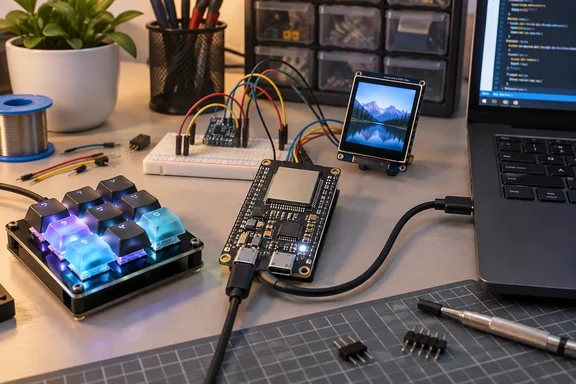
The pitch in brief
Pande says the classic ESP32 is the default beginner pick because it is cheap and easy to set up. He still prefers the S3 for most early projects. He puts its price at "barely" $10, which is a seller-dependent figure, not a fixed price. Prices vary by retailer and by flash and PSRAM configuration, so check the exact listing before you buy.
His main points:
- The S3 has native USB, so it can show up on a PC as a keyboard, mouse or similar device.
- It can drive parallel RGB, SPI and QSPI displays, and external PSRAM helps with frame buffers.
- It has vector instructions that suit simple edge-AI jobs such as keyword spotting.
- The ESP32-C6 is the better choice for smart-home work, because it adds Wi-Fi 6, Bluetooth LE 5.3 and an 802.15.4 radio.
Why the USB argument holds up
This is the strongest part of the case, and the documentation backs it. Espressif's USB device guide says the S3 can be programmed with any well-defined USB device function, such as a keyboard, mouse or camera. The guide lists multiple supported device classes (CDC, HID, MIDI, MSC…). The tusb_hid example implements a USB keyboard and mouse using the TinyUSB component.
For Windows users, that makes a macro pad a realistic first build:
- Press a button and the board sends a keystroke or key combination to your PC.
- Windows sees it as an ordinary HID device, so it needs no driver you would have to install.
- You can add a small display later, as Pande suggests.
The Arduino route is also well documented in community material. One tutorial says the Arduino ESP32 core includes USB HID support for S2/S3 variants. It tells you to pick "USB-OTG (TinyUSB)" under the USB Mode setting. A GitHub macro project lists the same setting, and it also sets USB CDC On Boot to Disabled.
Beginner traps the XDA piece doesn't cover
Before you buy, know these three things.
1. Not every USB port is the OTG port
Espressif says the S3 routes its USB D+ and D− signals to GPIOs 20 and 19, and a board has to wire those to a connector. Its note on dev boards with two ports says the port labeled "USB" is already connected to those pins. The other port is typically a UART bridge. Buy a board with both and identify which is which.
2. Serial debugging can collide with USB device mode
The S3 has two USB controllers, USB-OTG and USB-Serial-JTAG. According to Espressif, both share a single PHY, so only one can operate at a time. In practice, a first USB-HID project can lose the convenient serial console on the same port. The fixes are an external PHY chip or switching debugging to plain JTAG through eFuses. A board with a separate UART port avoids most of this, which is another reason to prefer two-port boards.
3. Memory specs vary by board
Pande cites 16 MB of flash and 8 MB of Octal PSRAM. Those match one common configuration, the "N16R8" boards. One GitHub macro-pad project lists exactly that as its ESP32-S3 N16R8 (16 MB Flash, 8 MB PSRAM). They are not a baseline for every S3. Espressif's overview confirms only 512 KB of internal SRAM on the chip itself. Always read the listing before you buy.
The display and AI claims, with caveats
The S3's LCD hardware does support parallel RGB. Pande's "most colored LCD and AMOLED panels with ease" is too sweeping, though. Whether a panel works depends on its interface, timing, resolution, driver support, board routing and memory. AMOLED describes the panel technology, not its interface.
The frame-buffer argument is sound in principle. PSRAM gives you room for larger buffers, but only on boards that have it, and only if it's configured correctly. Pande's double-buffer experience is his own and not a universal result.
On vector instructions, Espressif says they accelerate neural network and signal-processing workloads through its ESP-DSP and ESP-NN libraries. Whether keyword spotting runs well still depends on the model, the software and your memory budget.
How the S3 compares with the classic ESP32 and the C6
| Need | Better first pick | Why |
|---|---|---|
| PC macro pad, custom keyboard, mouse or controller | ESP32-S3 | Native USB device support with documented HID examples |
| Display-heavy UI | ESP32-S3 (with PSRAM) | Parallel RGB support and room for frame buffers |
| Simple Wi-Fi sensors, LEDs, basic projects | Either | The extra S3 features may go unused |
| Thread, Zigbee or Matter devices | ESP32-C6 | Has an 802.15.4 radio |
The classic module's current datasheet carries a "Not Recommended For New Designs" label. That is context for people designing products. It does not mean existing boards or hobby projects have stopped working.
The C6 datasheet lists Thread 1.3 and Zigbee 3.0 support, along with Bluetooth 5.3 certification. Pande's C6 caveat is correct. A finished smart-home device still needs the right firmware and ecosystem support.
A note on "payload execution"
Pande mentions that USB HID emulation could be used for remote payload execution. A programmable keyboard is exactly how many "BadUSB"-style attacks work. The same capability that makes a macro pad useful makes a convincing rogue device.
For readers on managed networks, two points apply:
- Only build and test these devices on machines you own or are authorised to test.
- Admins who use device-control policies should expect hobby boards to enumerate as ordinary keyboards.
Practical buying checklist
- Pick the project first. A macro pad, a USB gadget or a display points to the S3. Thread or Zigbee points to the C6.
- Choose a board with two USB ports, one of them labelled for native USB, so you keep a flashing and debugging route.
- Check the flash and PSRAM listing, such as N8R8 or N16R8, against what your project needs.
- Use a data-capable USB cable. Charge-only cables are a classic source of "my board isn't detected" problems.
- In Arduino, set USB Mode to USB-OTG (TinyUSB) for HID projects, and check the CDC-on-boot setting.
Verdict
The S3 is a better first board for anyone who wants to build things that talk to a PC. A macro pad is a better first project than a blinking LED if you want something you'll still use. For simple sensors, the classic ESP32 remains fine, and for smart-home protocols the C6 is the better fit. Treat Pande's piece as a good argument for choosing a board by its first project. It is not a rule that applies to every beginner.
References
- Your first ESP32 should be the S3, not the board everyone recommends XDA · 2026-10-04T15:00:17+00:00
- GitHub - locnh/esp-hid-kb: A virtual USB HID Keyboard built on ESP SoC · GitHub github.com
- USB Device Stack - ESP32-S3 - — ESP-USB Programming Guide latest documentation docs.espressif.com